
1.5. Using Sentinal Technique
Use this technique to input values for array elements without knowing exactly how many elements will be entered (not knowing the number n).
Example 4: Write a program to input a series of positive numbers and print the sum of those positive numbers.
Sketch of solution: The program requires input of positive numbers without knowing in advance how many elements to input, so to terminate input when satisfied by entering negative numbers or zero.
Programme
Maybe you are interested!
-
 Basic Programming - Hanoi Industrial College - 8
 -
 Database Programming - Hanoi Industrial Vocational College - 22
 -
 Database Programming - Hanoi Industrial Vocational College - 1
 -
 Database Programming - Hanoi Industrial Vocational College - 14
 -
 Basic Programming with Python - 2
/* Enter integer number here, print out base and margin */
#include <stdio.h>
#include <conio.h>
#define MAX 50 void main(void)
{
float fa[MAX], fsum = 0; int i = 0;
by
{
printf("Enter the %d element: ", i + 1); scanf("%f", &fa[i]); //Enter the value for the i-th element
} while (fa[i++] > 0); //continue inputting when element value > 0 i--; //decrement i one last time and increase by 1 before exiting
//Total
for(int ij = 0; ij < i; ij++)
fsum += fa[ij]; //constant to toss elements into isum printf("Total : %5.2fn", fsum);
getch();
}
Print results to screen
Enter the 1st fraction: 1.2 Enter the 2nd fraction: 3 Enter the 3rd fraction: 4.6 Enter the 4th fraction: -9 Total: 8.80
_
* What will happen to the above program if you enter more than 50 elements while you only declare the fa array to have a maximum of MAX = 50 elements. You use the break command to exit the do…while loop before moving to the second element.
51. Add the following code before line 11:
if(i >= MAX) //check element step to 51
{
printf("Wearing heavy clothes!n"); //announce "Wearing heavy clothes" i++; //increment i by 1 line 14 decrease i by 1 break; //exit the loop…while
}
1.6. Array initialization
Example 5: There are 4 types of money: 1, 5, 10, 25 and 50 dong. Write a program to input the amount of money and then show how many types of money the amount consists of and how many bills of each type. Sketch the solution: The amount of money is 246 dong, including 4 bills of 50 dong, 1 bill of 25 dong, 2 bills of 10 dong, 0 bills of 5 dong and 1 bill of 1 dong. That means you have to consider the larger type of money first, and if you run out of money, consider the next type.
Programme
/* Enter the amount and convert it to 50, 25, 10, 5, 1 */
#include <stdio.h>
#include <conio.h>
#define MAX 5
void main(void)
{
int itien[MAX] = {50, 25, 10, 5, 1}; //Declare and initialize an array with 5 elements
practice
int i , isotien, ito; printf("Enter the amount: ");
scanf("%d", &isotien); //Enter the amount for (i = 0; i < MAX; i++)
{
ito = isotien/itien[i]; //Find the size of the currency printf("%4d to %2d dongn", ito, itien[i]);
isotien = isotien%itien[i]; //The remaining amount after eliminating the existing types of money
}
getch();
}
Print results to screen
Enter the amount: 246 4 50 dong notes
1 25 dong note
2 10 dong notes
0 5 dong notes
1 note 1 coin
_
* What happens if the number of array elements is greater than the number of items, the extra uninitialized elements will be filled with 0. If the number of elements is less than the number of initialized items, the compiler will report an error.
Example 6:
int itien[5] = {50, 25}, element itien[0] will have value 50, itien[1] will have value 25,
itien[2], itien[3], itien[4] have value 0.
int itien[3] = {50, 25, 10, 5, 1} → compiler reports error
1.7. Array initialization without size
In the above example, suppose we declare int itien[] = {50, 25, 10, 5, 1}. Then the compiler will count the number of items in the initialization list and use that number as the array size.
1.8. Multidimensional array
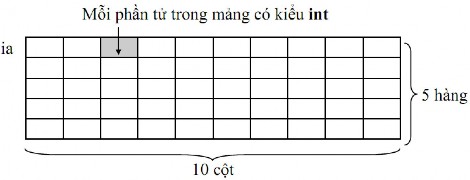
Example 7: declare 2-dimensional array int ia[5][10]; with int being the array type, ia being the array name,
The number of array elements is 5 x 10.
Meaning: Declare a 2-dimensional array of integers with 50 elements, each element is of type int.
1.9. Reference to each element of a 2-dimensional array
Once declared, each element in a 2D array has 2 indices to reference, the row index and the column index. The row index starts from 0 to the row number - 1 and the column index starts from 0 to the column number - 1. Referring to an element in a 2D array ia: ia[row index][column index]
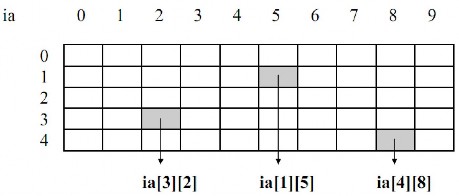
ia[3][2] is the element at row 3 column 2 in a 2-dimensional array considered as a variable of type int.
1.10. Enter data for 2-dimensional array
for (i = 0; i < 5; i++) //for loop with value i running from 0 to 4 for row
for (ij = 0; ij < 10; ij++) //for loop with ij value running from 0 to 9 for column
{
printf("Enter element ia[%d][%d]: ", i + 1, ij + 1); scanf("%d", &ia[i][ij]);
}
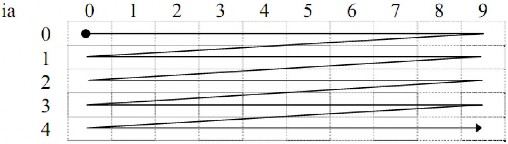
* Order of data entry into 2-dimensional array
2. Chain
A string is considered as a 1-dimensional array of elements of type char such as letters, numbers and any special characters such as +, -, *, /, $, #…
By convention, a string is terminated by the null character ('' : empty character).
For example, the string "Infoworld" is stored as follows:

2.1. How to declare a string
Example 8 : char cname[30];
Meaning: Declare a cname string of 30 characters. Since the string ends with a null character, when you declare a string of 30 characters, it can only contain 29 characters.
Example 9: Enter and print name
Programme
/* Program to input and print name*/
#include <stdio.h>
#include <conio.h> void main(void)
{
char cname[30];
printf("Please give me your name: "); scanf("%s", cname); printf("Hello %sn", cname); getch();
}
Print results to screen
Tell me your name: Minh Hello Minh
Note: there is no need to use the address operator & in cname in the scanf("%s", fname) command, because fname itself is an address.
Using the scanf function to input a string has the following limitation: When you try the above program again with the input data Mai Lan, but when printing out you only get Mai. Because the scanf function receives data until it encounters a space and then ends.
2.2. Input (gets), output (puts) functions
Using the gets and puts functions requires declaring #include <stdio.h>
- The gets function is used to enter a string of characters from the keyboard via stdin.
Function form: char * gets(char *s);
Work:
The function receives a string of characters from stdin until it encounters the character 'n' (so if stdin already contains the character 'n', the gets function will not wait for the user to enter data, we say the gets function has been washed). The character 'n' will be removed from stdin but not placed in the string. The received string will automatically add the character '' to mark the end of the string and then be placed in the memory area pointed to by the pointer s. The function returns the address of the received string.
For example, to enter a string of characters from the keyboard and save it to the HoTen variable, we write as follows:
Char Name[25]; gets(Name);
- The puts function is used to output a string of characters to the screen via stdout.
Function form: int puts(const char *s); Operation:
The function will output the string managed by the s pointer and a character 'n' to stdout. If successful, the function will return the last character output (which is the character 'n'), otherwise the function will return EOF.
For example, the command puts(“Hello”);, will display the text “Hello” on the screen and then go to the next line. Similarly, the command printf(“Hellon”);
Example 10
Programme
/* Program to input and print name*/
#include <stdio.h>
#include <conio.h> void main(void)
{
char cname[30];
puts("Please give me your name: "); gets(cname);
puts("Hello "); puts(cname); getch();
}
Print results to screen
Tell me your name: Mai Lan
Hello Mai Lan
_
Note: For the puts function, the null string terminator () is replaced with a newline (n). The gets and puts functions have only one argument and do not use formatting in input or output.
2.3. String initialization
Example 11
Programme
/* Program to input and print name*/
#include <stdio.h>
#include <conio.h> void main(void)
{
char cname[30];
char hello[] ="Hello"; printf("Please give your name: "); gets(cname);