
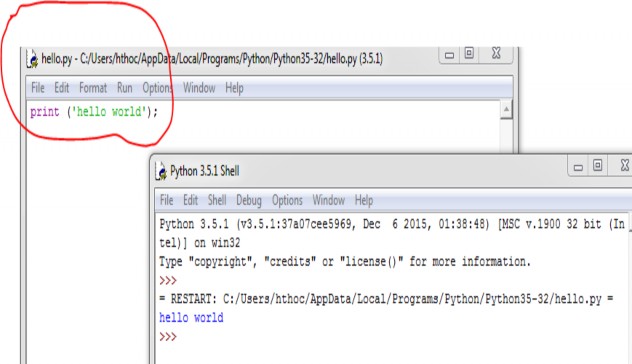
3. The print statement
Used to display data Syntax:
Syntax 1:
print ("display string")
Example 2:
print ("This line will be printed.")
Results displayed:
This line will be printed .
Syntax 2:
print ("display string", expression/value, parameters)
Example 3:
print ("2 + 2 is", 2 + 2)
print ("3 * 4 is", 3 * 4)
print ("100 - 1 is", 100 - 1)
print ("(33 + 2) / 5 + 11.5 is", (33 + 2) / 5 + 11.5)
Results displayed:
2 + 2 is 4
3 * 4 is 12
100 - 1 is 99
(33 + 2) / 5 + 11.5 is 18.5
Note: With Python version 2.7, the syntax is shown as follows:
print "display string"
4. Variables and data types
Variable: A variable is a name placed in computer memory, programmers can use variables to store data and to query data when needed.
Data type: A data type is a way of classifying data so that the compiler or interpreter can understand what the programmer wants to use the data for. Most languages support many different data types such as real numbers, integers, Booleans , strings, lists, etc. In this lesson, we will learn about number and string data types. In the following lessons, we will
Have the opportunity to learn and use Boolean, list and other data types.
Number type:
Python supports two basic number types: integer and floating point.
Example 4: Integer
myint = 7 print (myint)
In the above example, myint is a variable and 7 is the value assigned to the variable myint . So, when the programmer wants to use the value 7 , he can call it through the variable myint .
Example 5: Real numbers
myfloat = 7.0 print (myfloat)
myfloat = float (7) //coerce integer 7 to real number 7.0
print (myfloat)
String type:
A string is a set of consecutive “characters”, represented/described within single or double quotes.
mystring ='hello world' //single quote
print(mystring)
Result: hello world
mystring ="hello world" // double quotes
Example 6:
print(mystring)
Result: hello world
mystring ="Don't worry about apostrophes" print (mystring)
Result: Don't worry about apostrophes mystring ='Don't worry about apostrophes' print (mystring)
Result: Don't worry about apostrophes
* Note
1. To use special characters (single quotes, double quotes, ...), we use the special characters and marks. See the summary table below:
Symbol
Meaning | |
n | New line |
t | Tab key |
' | ' |
" | " |
Maybe you are interested!
-
 Basic Programming - Hanoi Industrial College - 8
 -
 Basic Programming - Hanoi Industrial College - 12
 -
 Basic electronic engineering - City College of Construction. HCM Part 1 - 1
 -
 Practice database programming with VB.net - 39
 -
 Basic Burn Rate Experimental Formulas
2. In case you want to delete a variable that is no longer used, you can use the del command as in the example below:
1. myfloat = 7.0
2. print (myfloat)
3. del myfloat
4. print (myfloat)
Result : 7.0
Traceback (most recent call last):
File "C:UsershohuynhAppDataLocalProgramsPythonPython37
test.py", line 4, print <module> print (myfloat)
Name
The command on line 4 will return an error “name 'myfloat' is not
defined”. The reason is that we deleted the variable myfloat in line number 3.
3. To see what data type a variable belongs to, we use the type function (variable) as follows:
Example:
>>> i = 42
>>> type(i)
<type 'int'>
>>> f = float(i)
>>> type(f)
<type 'float'>
4. Check the variable's value storage area: To better understand the data nature of the variable, for example real variables and integer variables, we can check the variable's value storage area based on the example below:
import sys
print(sys.int_info)
#Integer details
print(sys.float_info) #Detailed information of the float number
Result :
sys.int_info(bits_per_digit=30, sizeof_digit=4)
sys.float_info(max=1.7976931348623157e+308, max_exp=1024, max_10_exp=308, min=2.2250738585072014e- 308, min_exp=-1021, min_10_exp=-307, dig=15, mant_dig=53, epsilon=2.220446049250313e-16, radix=2, rounds=1)
5. Display string in format
Python uses the C standard string format (the C programming language standard) to display strings.
Display string: %s Display number: %d
Example 7:
name ="John"
print ("My name is, %s!" % name) age = 18
print ("I am %d years old" % age)
Example 8:
name ="John" age = 23
print ("%s is %d years old." % (name, age))
6. Math
a. Arithmetic operations
Math
Operator | Example (python3.x) | |
Power | ** | 5 ** 2 == 25 |
Core | * | 2 * 3 == 6 |
Divide | / | 14 / 3 == 4.6666666666667 |
Divide and conquer original | // | 14 // 3 == 4 |
Divide by remainder | % | 14 % 3 == 2 |
Add | + | 1 + 2 == 3 "hello" + " " + "world" = hello world |
Apart from | - | 4 - 3 == 1 |
b. Assignment
Operator
Meaning | Example (python3) | |
= | Assign value on left side right for left side | X = 5 |
+= | Addition and assignment | x+=5 (x = x + 5) |
-= | Subtract and assign | x-=5 (x = x – 5) |
*= | Multiplication and assignment | x*=5 (x = x * 5) |
/= | Divide and assign | x/=5 (x = x/5) |
//=
Divide and assign original | x//=5 (x = x // 5) | |
%= | Divide and assign remainder | X%=5 (x = x % 5) |
**= | Take the power and assign | X**=5 (x = x ** 5) |
7. Commands entered from the keyboard
Python 2.x:
raw_input (prompt)
Python 3.x:
input (prompt)
The raw_input() or input() function always returns string data. That means if you want to input a number (not a string) you have to call the corresponding integer or float conversion function.
Example 9:
name = input ("What's your name?") print ("Welcome, %s!" % name)
age = input ("How old are you?")
print ("Next year you are %d" % int(age) + 1)