
Example: BRING DW 100,72,48,54
Will create an array with 4 elements with initial values 100,72,48,54. The first word is assigned with the name MANG, the next word is assigned with MANG+2, then MANG+4 etc. If the array starts at 07F0h then the memory will be as follows:
Address | Content | |
CARRY | 07F0h | 100d |
CARRY +2 | 07F2h | 72d |
CARRY +4 | 07F4h | 48d |
CARRY +6 | 07F6h | 54d |
Maybe you are interested!
-
 Data Structure and Algorithm - Hanoi College of Industry - 14
 -
 Electrical safety textbook for industrial electricity at college level - Vietnam - Korea Vocational College, Hanoi city - 4
 -
 Bridge and road structure - Ho Chi Minh City College of Construction Part 2 - 9
 -
 Database - Hanoi Industrial College - 2
 -
 Natural, Economic and Social Characteristics of Hanoi and Organizational Structure of People's Court in Hanoi City
When we initialize the elements of an array with the same value we use the DUP operator in the .
c. Named constants
To create understandable Assembly code, people often use symbolic names to represent constants.
EQU (EQates: considered equal).
To assign a name to a constant, we can use the EQU pseudo operator. Syntax:
EQU constant name Example:
LF EQU OA h
will assign the name LF to o OAh. is the ASCII code for the newline character. The name LF can be used in place of OA h anywhere in the program. The compiler will translate the statements:
MOV DL,OAH
and:
MOV DL,LF
output the same machine instruction.
2. Program structure
Simple Segment declaration
.MODEL pride
.STACK size (in bytes)
.DATA
Variable declaration
.CODE
Label:
Mov AX,@DATA Mov DS,AX
Than the program
…
…
DOS return command
[ subprograms ] (if any)
END Label
3. Control commands
a. .STASK control command Syntax:
.STACK stack size
Function: Determine the stack size (in Bytes). With this command, DOS will set the top address of the stack and that value is written to the SS segment register.
b. .CODE command Syntax:
.COD E
Function: Marks the starting point of the memory area containing the instruction code.
c. Control command .DATA Syntax: .DAT A
The declaration and initial assignment of memory variables
Function: Marks the starting point of the memory area containing data.
d. .MODEL control command Syntax:
.MODEL memory type (Tiny ,Small,Medium,Compact,Large, Huge) Function: Defines the memory model for a Module Assembly using simple Segment control scripts.
•Tiny: Both the program's machine code (CODE) and data (DATA) are in a 64KB Segment. Both CODE and DATA are NEAR.
• Small: The machine code part of the program (CODE) can be larger than 64KB of the data part (DATA) and can be contained in a 64KB Segment. Both CODE and DATA are NEAR.
• Medium: The machine code part of the program (CODE) is in a 64 KB Segment. The data part (DATA) is also in a 64KB. CODE is FAR and DATA is NEAR.
•Compact: The machine code part of the program (CODE) is located in a 64KB Segment, the data part (DATA) is located in a memory area larger than 64KB
.CODE is NEAR and DATA is FAR.
•Large: The program's machine code (CODE) and data (DATA) are located in a memory area larger than 64KB. CODE and DATA are FAR. A data field cannot exceed 64KB.
•Huge: The program's machine code (CODE) and data (DATA) reside in a memory area larger than 64KB. CODE and DATA are FAR. Data fields exceeding 64KB are allowed.
For example:
Write a string of characters 'XI NCHAOCÁCBAN!' on the screen. Solution:
Use the function to display a string of characters ending with a $ sign on the screen. The 9th function of the DOS int2lh interrupt function allows us to display a string of characters ending with a $ on the screen if DS:DX contains the address SEG:OFFSE T of the string variable. Therefore, the program will be as follows:
.MODEL small
.STACK lOO h
.DATA
Operate db 'XI NCHAOCÁCBAN!$' ;Declare character string variable
.COD E
Program1:
Mov AX,@DATA ;Put the SEGMENT address part of the segment Mov DS,AX. ;data segment into the DS segment register Mov DX,OFFSET Tbao ;DX contains the OFFSET address part
Mov AH,9 ;Call function-display string
Int 21h ;Display the character string Tbao on the screen
Mov AH,4Ch ;End program return to DOS Int 21 h
END Program
4. Stack and procedures
Stack
STACK: is a one-way data structure. Elements are stored and retrieved in a LIFO (Last In First Out) manner. Each program must reserve a block of memory to make a stack by declaring STACK. For example: .STACK 100H; Please allocate 256 bytes as a stack.
As a part of memory, data is organized to store data according to the input mechanism.
Last in first out (LIFO).
In programming, sometimes we need to access elements in the STACK but cannot change the order of the STACK. To do this, we use the BP pointer register: point BP to the top of the Stack: MOV BP,SP change the value of BP to access elements in the Stack: [BP+2]
The element that is first put into the STACK is called the bottom of the STACK, the last element that is put into the STACK is called the top of the STACK.
When adding an element to the STACK, we add from the top. When taking an element out of the STACK, we also take from the top the address of the top memory cell of STCAK is always changed.
SS is used to store the segemnt address of the memory segment used as STACK SP is used to store the address of the top memory cell of STACK (pointing to the top of STACK)
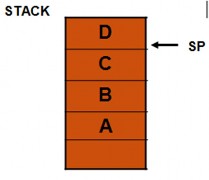
For example :
A, B, C are words
MOV
MOVBP,SP AX,[BP] | ;AX =D | |
MOV | AX,[BP+2] | ;AX= C |
MOV | AX,[BP+6] | ;AX=A |
To save an element to the Stack, we use the PUSH command. To take an element out of the Stack, we use the POP command. PUSH source: put the source at the top of the STACK.
PUSHF: store the flag register contents into the STACK POP and POPF: used to take an element out of the STACK.
Syntax: POP destination: put source on top of STACK
POPF : save the content at the top of the STACK to the bar
flag
Note: - Here the destination is a 16-bit register (except the IP register) or
a memory word. The PUSH, PUSHF, POP and POPF instructions do not affect the flags.
Procedure declaration
Syntax for declaring a procedure PROC name type
;...the commands in the RET procedure
ENDP Name
Name: is the name of the procedure defined by the writer type: Optional operands are:
- NEAR: The procedure call line is in the same section as the procedure.
- FAR: The procedure call line is in another section.
CALL- RET procedural instructions
The CALL command is used to call a procedure. The syntax is as follows:
CALL Name
WhereName is the name of the procedure given by the programmer.
To return from a procedure we use the RET command, every procedure except the main procedure must have a RET command at the end of the procedure.
Example of subroutine
Present a program to add 2 numbers consisting of 2 parts organized in the following way.
main program and subprogram. These two parts pass parameters to each other through the memory cell for variables (external registers).
TITLE CT : ADD2SO
.SMALL MODEL
.STACK l00h
.DATA
DB STATEMENT 'INPUT 2 INTEGERS $'
DB Comparison ? DB 2 Comparison 7
DB 7
.COD E
Program3:
MOV AX,@Data ;initialize DS MOV DS,AX
MOV AH,9 ;function displays message
LEA DX,TBAO ;load message content address into DX INT 21 h ;display message
MOV AH1 ; function to read character Soi INT 21 h ; read 1 character
MOV Sol,AL ;store the code of number 1 MOV DL', ' ;comma in between
MOV AH,2 ;function to display characters on screen INT 21 h ;display character Number 1 on screen MOV AH,1 ;function to read characters
INT 21 h ;read character number 2 MOV Number2,AL ;store code of Number 2
CALL CONG; call procedure to add 2 numbers
MOV AH,4Ch
INT 21 h ;return to DOS
CON G Proc ;subprogram to add two numbers MOV AL,Sol ;get code Number 1
ADD AL,So2 ;plus code Number 2
ADD Tong,AL ;Put the total value into the Tong variable RET ;return to the main program CONG Endp ;end subprogram END Program 3 ;end main program
REFERENCES
1. Computer Architecture – Vo Van Chin, Can Tho University, 1997.