
<lastName>Smith</lastName>
<address type="home">
<address1>200 Brattle Street</address1>
<city>Cambridge</city>
<state>MA</state>
Maybe you are interested!
-
 Advanced XML Web Programming - Dalat College of Technology - 10
 -
 Advanced XML Web Programming - Dalat College of Technology - 1
 -
 Advanced XML Web Programming - Dalat College of Technology - 5
 -
 Advanced XML Web Programming - Dalat College of Technology - 31
 -
 Java programming Web design profession - Dalat College of Technology - 8
<zip>02138</zip>
</address>
<hairColor>brown</hairColor>
<birthDate>11/30/1974</birthDate>
<favoriteColor>blue</favoriteColor>
</person>
Although the actual data is contained in both documents, the metadata in the XML version makes it easier to understand. We are correct in guessing his name and address and the meanings of “brown”, 11/30/1974”, and “blue”. The XML elements can also be ordered with no impact on interpretation. The elements in the document can be ordered alphabetically.
<person>
<address type="home">
<address1>200 Brattle Street</address1>
<city>Cambridge</city>
<state>MA</state>
<zip>02138</zip>
</address>
<birthDate>11/30/1974</birthDate>
<favoriteColor>blue</favoriteColor>
<firstName>John</firstName>
<hairColor>brown</hairColor>
<lastName>Smith</lastName>
</person>
Schemas and DTDs
XML documents can also include a type of metadata in the form of a schema or a DTD. Both models and DTDs serve the same purpose but use different syntaxes. They engrave an external language, or class, of XML documents that controls the types of elements and attributes that may appear in conformant documents. Models and DTDs can also impose a rigid or loose structure on XML documents. For example, a <person> element has the first
<firstName> and <lastName> can also have a <favoriteColor> element. The following example is a schema that defines a personal XML document. Note that the coreXMLPerson document test does not need to include all element definitions in the schema.
PersonSchema.xml: This schema provides metadata that describes the structure of a coreXMLPerson XML document.
<?xml version="1.0"?>
<Schema name="coreXMLPerson" xmlns="urn:schemas-microsoft-com:xml-data" xmlns:dt="urn:schemas-microsoft-com:datatypes">
<ElementType name="firstName" content="textOnly" model="closed"/>
<ElementType name="lastName" content="textOnly" model="closed"/>
<ElementType name="birthDate" content="textOnly" model="closed"/>
<ElementType name="hairColor" content="textOnly" model="closed"/>
<ElementType name="favoriteColor" content="textOnly" model="closed"/>
<ElementType name="address.address1" content="textOnly" model="closed"/>
<ElementType name="address.address2" content="textOnly" model="closed"/>
<ElementType name="address.address3" content="textOnly" model="closed"/>
<ElementType name="address.city" content="textOnly" model="closed"/>
<ElementType name="address.state" content="textOnly" model="closed"/>
<ElementType name="address.zip" content="textOnly" model="closed"/>
<ElementType name="address.country" content="textOnly" model="closed"/>
<ElementType name="address" order="many" content="eltOnly" model="closed">
<AttributeType name="type" />
<element type="address.address1" minOccurs="0" maxOccurs="1"/>
<element type="address.address2" minOccurs="0" maxOccurs="1"/>
<element type="address.address3" minOccurs="0" maxOccurs="1"/>
<element type="address.city" minOccurs="0" maxOccurs="1"/>
<element type="address.state" minOccurs="0" maxOccurs="1"/>
<element type="address.zip" minOccurs="0" maxOccurs="1"/>
<element type="address.country" minOccurs="0" maxOccurs="1"/>
</ElementType>
<ElementType name="person" order="many" content="eltOnly" model="closed">
<element type="firstName" minOccurs="0" maxOccurs="1"/>
<element type="lastName" minOccurs="0" maxOccurs="1"/>
<element type="address" minOccurs="0" maxOccurs="*"/>
<element type="hairColor" minOccurs="0" maxOccurs="1"/>
<element type="favoriteColor" minOccurs="0" maxOccurs="1"/>
</ElementType>
</Schema>
Using XML for Metadata Definition
Software and hardware components use metadata to identify themselves when communicating. Historically this was done in a proprietary fashion where the sender and receiver first agreed on a mutual exchange format before they could exchange metadata. XML changes this.
Today, we can build applications that find and execute Web services without prior knowledge of their existence. We can also publish our own Web services without knowing who will use them, where they will come from, how to use them, or even what kind of client software will make the request. These services can now be rich, abstract data objects that are exchanged uncoupled.
XML has many advantages for creating ideas for carrying data and metadata on the Internet:
It can be read and written by humans. This is one of the reasons for HTML's success and it works equally well for XML. This makes the language more accessible to beginners and lowers the fear factor for people. You can see it, touch it, and use Notepad to create it. This is useful.
It is open. XML is defined by the W3C. No single company owns it. Microsoft has added to the W3C specification by implementing standards-compliant XML parsers and placing them in the willing hands of its developer community. However, the language is platform independent. UNIX clients can exchange XML data with .NET Web services.
It's everywhere. XML parsers are everywhere. It's easy to get our hands on an XML toolkit and use the technology right away.
It is flexible. The most attractive reason to use XML is that it has no prescribed usage. We decide how we want to use it in our application. We define its scope, which can range from creating small XML documents to passing data between applications or application layers to creating our own body of standards that govern the use of XML within an entire industry.
Describe an object
Consider an example using a C# class definition for a <Person> object person.cs:
using System;
namespace CSharpWebService
{
/// <summary>
/// A Simple Person Class Definition
/// </summary>
public class Person
{
public String firstName; public String lastName; public String birthDate; public String hairColor; public String favoriteColor; public Address address; public Person()
{
firstName =""; lastName =""; birthDate =""; hairColor =""; favoriteColor ="";
address = new Address();
}
public Person(String _firstName, String _lastName, String _birthDate, String
_hairColor, String _favoriteColor)
{
firstName = _firstName; lastName = _lastName; birthDate = _birthDate; hairColor = _hairColor; favoriteColor = _favoriteColor; address = new Address();
}
public void setFirstName(String _firstName)
{ firstName = _firstName; }
public void setLastName(String _lastName)
{ lastName = _lastName; }
public void setBirthDate(String _birthDate)
{ birthDate = _birthDate; }
public void setHairColor(String _hairColor)
{ hairColor = _hairColor; }
public void setFavoriteColor(String _favoriteColor)
{ favoriteColor = _favoriteColor; }
}
}
Our object definition declares properties for the fields, <firstName>, <lastName>, <birthDate>, <hairColor>, <favoriteColor>, and <address>. Now let's create an instance of this object in C#.
Person p = new Person("John", "Smith", "11/30/1974", "brown", "blue"); Object representing XML document
This call to initialize Person creates a Person instance in memory. If we want to save this object to a file or pass it to another program, we must first serialize it. How do we do this? The simplest solution would be to build an XML document representing the object that holds the state of the object in memory. This document looks surprisingly similar to a previous incarnation of this data.
<Person>
<address type="home">
<address1>200 Brattle Street</address1>
<city>Cambridge</city>
<state>MA</state>
<zip>02138</zip>
</address>
<firstName>John</firstName>
<lastName>Smith</lastName>
<hairColor>brown</hairColor>
<birthDate>11/30/1973</birthDate>
<favoriteColor>blue</favoriteColor>
</Person>
XML document defining the class
The other program, however, is not able to do so and therefore does not have much more information about the Person class definition. In this case we need another XML document describing the Person class definition. The following source code is an excerpt:
An excerpt from createPerson.wsdl, an XML Web service descriptor, describing the Person class definition.
<s:complexType name="Person">
<s:sequence>
<s:element minOccurs="1" maxOccurs="1" name="firstName" nillable="true" type="s:string" />
<s:element minOccurs="1" maxOccurs="1" name="lastName" nillable="true" type="s:string" />
<s:element minOccurs="1" maxOccurs="1" name="birthDate" nillable="true" type="s:string" />
<s:element minOccurs="1" maxOccurs="1" name="hairColor" nillable="true" type="s:string" />
<s:element minOccurs="1" maxOccurs="1" name="favoriteColor" nillable="true" type="s:string" />
<s:element minOccurs="1" maxOccurs="1" name="address" nillable="true" type="s0:Address" />
</s:sequence>
</s:complexType>
Notice that all of the attribute information in the original class definition appears in this XML document. The most important pieces of information are the attribute name and the data type. You may have also noticed that the address attribute is listed as type s0:Address. This is because the address attribute is a reference to another type of Address object named . This class requires its own XML descriptor, but it is omitted for the sake of brevity.
These two XML documents, the class document and the instance document, provide enough information for another program to generate a comparable class definition and create an instance of the class with the desired state. The process of generating these prototype classes and instantiating remote objects in .NET Developer Studio will be covered in more detail later in this section.
Describe a service
The future of distributed computing over the Internet has been hotly debated in recent years. Many object-oriented programmers believe that, one day, distributed applications will be built from objects located over the Internet. Computers will be able to participate in a global object community by publishing objects that can be run locally or whose code can be transmitted over the Internet. Unfortunately, firewalls, unreliable network connections, and competing technologies have hindered this movement and have led developers to seek a more practical way to build distributed applications.
Although these technologies differ in approach and implementation, they all share a common problem: how to describe remote methods and services so that they can be dynamically discovered and used. All distributed technologies use some kind of metadata to communicate the characteristics and semantics of the services. In the past the format of this metadata was often proprietary. Today XML is used as an ideal carrier for remote service metadata.
CORBA and IIOP
When CORBA (Common Object Request Broker Architecture) was introduced in the 1990s, its enthusiasm for fine-grained object distribution became widespread.
Applications will be able to locate and use business software components over a large network of Object Request Brokers (ORBs), and CORBA will allow objects implemented in C++, Java, and even COBOL to be implemented remotely. CORBA objects publish their behavior using Interface Definition Language (IDL) and register this information with an ORB implementation on the local network.
Client programs interact with these objects through subinterfaces that remotely execute one of the object's methods on the software server. The ORB sits in the middle and dispatches all intermachine communications. ORBs around the Internet can share information about the objects they manage. The Internet Inter-ORB Protocol (IIOP) was developed for this purpose. CORBA supports runtime object discovery and is a flexible architecture for coordinating the exchanges of fine-grained software components.
JAVA RMI
Like CORBA, Java's RMI subsystem allows objects to be distributed across a network. Unlike CORBA, Java RMI can transport entire classes, software and all, across application boundaries. This is possible because all Java applications must run on the Java Virtual Machine. This allows distributed Java applications to safely download compiled byte streams and execute them on the local machine. Java now allows shared objects to be shared by either RMI or the IIOP protocol.
Although the ability to share executable objects over the Internet opens up some exciting possibilities, Java RMI has its drawbacks. The only technology that works if the applications involved in the exchange are both written in Java. Programs written to use RMI also require a fair amount of preparation. Remote instance classes need to be generated statically or downloaded dynamically for remote methods to work properly. Finally, RMI uses a proprietary protocol to exchange information. Much software supports these facilities and firewalls.
Metadata reception
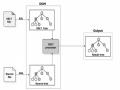
Metadata contained in WSDL documents is important information for any application that wants to use a distributed service. One problem: How do you find this information in the first place? The process of finding a service on the Internet and obtaining its WSDL description is a top-down search similar to how the Domain Name Service (DNS)6 works. The following figure illustrates the Web service discovery procedure:
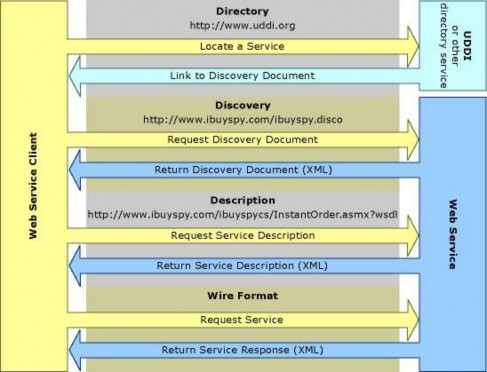
.NET provides Metadata and Web services
Microsoft designed the .NET developer studio to be friendly to Web service authors and consumers. It provides a rich set of tools, wizards, and utility classes to automate the discovery and implementation of Web services.
.NET Developer Studio allows service developers to quickly build locally deployable or remotely controlled Web services. .NET Developer Studio automates the creation of all WSDL discovery and contracts. It even generates simple Web documents that help you test and debug your code. All we need to do is write the code for the business logic! The Studio also includes a rich API that allows developers to make high-level calls to remote services. The utilities handle all the work of converting back and forth to SOAP messages.
Microsoft is not the only company touting the future of Web services. Sun is actively working on integrating the idea into Java 2 Enterprise Edition. This means that Microsoft and Sun Web services will one day be able to work together.
Web service createPerson( )
The createPerson() Web service will be implemented in the C# programming language. The Asp.net Web Service Project Wizard initializes most of the infrastructure needed to create a Web service. Among other things, it creates vsdisco. and WSDL files (the actual WSDL contract is dynamically generated by a call to the Web service asmx file) that hold all the metadata the client will need to locate and access the service. The .vsdisco file contains bindings to the WSDL contracts. The wizard also creates a .asmx template file that is the starting point from which coding the service's business logic begins.
Before they could start writing the service code, the team needed to add a few classes to the project. The first class defined a Person object and the second defined an Address object. The code behind the Person class was similar to the class definition shown earlier with the exception of the address information. The listing of the file was as follows:
person.cs: A C# source file containing the definition of the Person class using System;
namespace CSharpWebService
{
/// <summary>
/// A Simple Person Class Definition
/// </summary> public class Person
{
public String firstName; public String lastName; public String birthDate; public String hairColor; public String favoriteColor; public Address address; public Person()
{
firstName =""; lastName =""; birthDate =""; hairColor =""; favoriteColor ="";
address = new Address();
}
public Person(String _firstName, String _lastName, String _birthDate, String _hairColor, String _favoriteColor)
{
firstName = _firstName; lastName = _lastName; birthDate = _birthDate; hairColor = _hairColor;
favoriteColor = _favoriteColor; address = new Address();
}
public void setFirstName(String _firstName){ firstName = _firstName; } public void setLastName(String _lastName){ lastName = _lastName; } public void setBirthDate(String _birthDate) { birthDate = _birthDate; } public void setHairColor(String _hairColor) { hairColor = _hairColor; } public void setFavoriteColor(String _favoriteColor)
{ favoriteColor = _favoriteColor; }
public void setAddress(String address1, String address2, String city, String state, String postalCode, String country)
{
address.setAddress1(address1); address.setAddress2(address2); address.setCity(city); address.setState(state); address.setPostalCode(postalCode); address.setCountry(country);
}
}
}
The properties listed in the class definition above are employee information: the employee's name, hair color, date of birth, favorite color, and home address. The required properties will be marked public so they can be returned via a SOAP document. The class methods are simple accessors that manipulate class properties. The setAddress() method sets properties on the address dependency object.
The designers decided to create a helper class Address to provide a common API for storing classes. This class can be extended later to support handling directions or other properties. It contains a few properties and the associated accessor methods required to manipulate them.
address.cs: A C# source file containing the definition of the Address class using System;
namespace CSharpWebService
{
/// <summary>
/// A simple address object
/// </summary> public class Address
{
public String address1; public String address2; public String address3; public String city; public String state;
public String postalCode; public String country; public Address()
{
address1 =""; address2 =""; address3 =""; city ="";
state =""; postalCode =""; country ="";
}
public String getAddress1() { return address1; }
public String getAddress2() { return address2; } public String getAddress3() { return address3; } public String getCity() { return city; }
public String getState() { return state; }
public String getPostalCode() { return postalCode; } public String getCountry() { return country; }
public void setAddress1(String _address1){ address1 = _address1;} public void setAddress2(String _address2){ address2 = _address2;} public void setAddress3(String _address3){ address3 = _address3;} public void setCity(String _city){city = _city;}
public void setState(String _state){state = _state;}
public void setPostalCode(String _postalCode){postalCode = _postalCode;} public void setCountry(String _country){country = _country;}
}
}
Now that the objects have been built the development team can begin developing the We service logic. Most of the code in this file is generated by the .NET Web Service Wizard. The only code the programmer needs to worry about comes after the C# [WebMethod] declaration. Here is some sample code:
Service1.asmx.cs using System;
using System.Collections;
using System.ComponentModel; using System.Data;
using System.Diagnostics; using System.Web;
using System.Web.Services; namespace CSharpWebService
{
/// <summary>
/// Summary description for Service1.
/// </summary>
public class Service1 : System.Web.Services.WebService
{
public Service1()
{
//CODEGEN: This call is required by the ASP.NET Web Services Designer InitializeComponent();
}
#region Component Designer generated code
/// <summary>
/// Required method for Designer support - do not modify
/// the contents of this method with the code editor.
/// </summary>
private void InitializeComponent()
{
}
#endregion
/// <summary>
/// Clean up any resources being used.
/// </summary>
protected override void Dispose( bool disposing )
{
}
[WebMethod]
public Person CreatePerson(String firstName, String lastName,