
}
else
{
List li = (List) source;
String selected = li.getSelectedItem();
lab.setText(selected);
}
}
}
Program execution results:
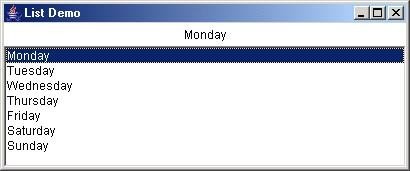
Figure 4.17 ListDemo
Exercise 5: Build a Dialog container class to display messages like the MessageBox function on Windows.
import java.awt.*; import java.awt.event.*; class DialogDemo
{
public static void main(String[] args)
{
createMenu();
}
private static void createMenu()
{
// Create Frame for application final Frame fr = new Frame(); fr.setLayout(new BorderLayout());
// Create menu bars
MenuBar menubar = new MenuBar(); Menu mTest = new Menu("Test");
MenuItem testDlg = new MenuItem("Test Dialog"); testDlg.addActionListener(
new ActionListener()
{
public void actionPerformed(ActionEvent e)
{
MessageBox msgBox = new MessageBox(fr, "Here it is", "Dialog");
msgBox.show();
}
}
);
mTest.add(testDlg); menubar.add(mTest); fr.setMenuBar(menubar); fr.setBounds(100, 100, 300, 200); fr.setVisible(true);
fr.addWindowListener(
new WindowAdapter()
{
public void windowClosing(WindowEvent e)
{
System.exit(0);
}
}
);
}// end of createmenu()
} // end of class
import java.awt.*; import java.awt.event.*; public class MessageBox
{
Dialog msgBox;
/* ------------------------------------------------ ---------------- //
Constructor of MessageBox class
// parentWindow: parent window
// title: Title of the Dialog
// msg: message string
-------------------------------------------------- ---------------*/ public
MessageBox(Frame parentWindow, String msg, String title)
{
if (parentWindow == null)
{
}
else
{
}
Frame emptyWin = new Frame();
// Create Modal Dialog (parameter 3: true) msgBox = new Dialog(emptyWin, title, true);
msgBox = new Dialog(parentWindow, title, true);
// Object used to represent the message Label Message = new Label(msg);
// Set the layout mode for the objects. msgBox.setLayout(new FlowLayout()); // Add the Label message to the Dialog frame msgBox.add(Message);
// Put the OK button in the Dialog box
Button okButton = new Button("OK"); msgBox.add(okButton);
// Declare the size of the message box msgBox.setSize(200, 100);
// Handle the situation when the user presses the OK button okButton.addActionListener(
new ActionListener()
{
public void actionPerformed(ActionEvent evt)
{
msgBox.setVisible(false);
}
}
);
}
public void show()
{
msgBox.show();
}
} // end of class MessageBox
Program execution results:
Figure 4.18 DialogDemo
Target:
CHAPTER 5: STREAMS AND FILES
Article code: 5
Students understand the concepts and uses of streams and files in Java programming;
Know how to classify and use byte streams, character streams,...;
Understand the concepts, functions, properties, and methods of the InputStream and OutputStream classes, and the RandomAccesFile class;
Write and execute programs to exchange data with various types of files using byte streams and character streams.
5.1. Introduction
Storing data in program variables, arrays is temporary in nature and the data will be lost when the variable goes out of its scope or when the program terminates. Files help programs to store large amounts of data, as well as to store data for a long time even after the program terminates. In this chapter we will learn how java programs can create, read, write and process sequential files and random access files through some illustrative examples.
File processing is a very basic and important issue that any programming language must support libraries and functions to handle some of the most basic operations on file data types.
File handling is part of the thread handling workflow, which enables a program to read and write data in memory, on files, and exchange data through network connections.
This chapter will give us some basic knowledge about streams and files:
Library of classes about streams in java: byte streams, character streams. Console input and output using byte streams, character streams.
Import and export files using character streams and byte streams.
Handling random access files uses the RandomAccessFile class. Handling files and directories uses the File class.
5.2.Streams
5.2.1.Stream concept
All data input/output operations (entering data from the keyboard, retrieving data from the network, writing data to disk, outputting data to the screen, printer, ...) are all classified into a concept called stream. Stream is a place where information can be "produced" and "consumed". Stream is usually attached to a physical device by the input/output system in java. All streams have the same operating principle even when they are attached to different physical devices. Therefore, the same class, input/output method can be used for different physical devices. For example, the same method can be used to write data to the console, and can also be used to write data to a file on disk. Java implements streams using a set of hierarchical classes in the java.io package.
Java defines two stream types: byte and character (the original version only defined byte streams, and then character streams were added in later versions).
Byte streams (or byte-based streams) support byte-based data input and output, commonly used when reading and writing binary data.
Character streams are designed to support Unicode input and output. In some cases, character streams are more efficient than byte streams, but at the system level, all input and output must be in bytes. Character streams are efficient only for character management and processing.
5.2.2.Byte Streams
Byte streams are defined using two hierarchical classes.
The top level are two abstract classes InputStream and OutputStream. InputStream defines the common characteristics for byte input streams. OutputStream describes the behavior of byte output streams.
Subclasses derived from two classes InputStream and
OutputStream will support details corresponding to reading and writing data on different devices. Don't be overwhelmed with a series of many different classes. Don't worry too much, once you master and use a certain byte stream, you can easily work with the remaining streams.
Byte stream class
Meaning | |
BufferedInputStream | Buffered input stream |
BufferedOutputStream | Buffered output stream |
ByteArrayInputStream | Input stream reads data from a byte array |
ByteArrayOutputStream | Output stream writes data to a byte array |
DataInputStream | Input streams have How to read standard data types in java |
DataOutputStream | Output streams have methods for writing data types. standard data in java |
FileInputStream | Input stream allows reading data from file |
FileOutputStream | Output stream allows writing data to file |
FilterInputStrem | Implement the abstract class InputStream |
FilterOutputStrem | Implements the abstract class OutputStream |
InputStream | Abstract class, is the parent class of all Byte input stream classes |
OutputStream | Abstract class, is the parent class of all import and export classes. Bytes |
Maybe you are interested!
-
 Java programming Web design profession - Dalat College of Technology - 8
 -
 Advanced XML Web Programming - Dalat College of Technology - 10
 -
 Advanced XML Web Programming - Dalat College of Technology - 1
 -
 Advanced XML Web Programming - Dalat College of Technology - 5
 -
 SQL server database management system course, web design profession, Dalat College of Technology - 14
A piped byte input stream must usually be associated with a piped output stream. | ||
PipedOutputStream | A piped byte input stream must typically be attached to another pipe input stream to form a piped data exchange connection. | |
PrintStream | The output stream contains the print() and println() methods. | |
PushbackInputStream | Is a Byte input stream that supports push back and unread operations. | |
RandomAccessFile | Supports read and write operations on random access files. | |
SequenceInputStream | An input stream is created by logically connecting other input streams. | |
PipedInputStream
5.2.3.Character Streams
Character streams are defined using two hierarchical classes.
The top level is the abstract class Reader and Writer. The Reader class is used for inputting stream data, and the Writer class is used for outputting stream data. The classes derived from Reader and Writer operate on Unicode character streams.
Character stream class
Meaning | ||
BufferedReader | The character input stream reads data into a buffer. | |
BufferedWriter | The character output stream writes data to a buffer. | |
CharArrayReader | The input stream reads data from a character array. | |
CharArrayWriter | The output stream writes data to a character array. | |
FileReader | Character input stream reads data from file |
FileWriter | Character output stream writes data to file |
FilterReader | Intermediate data reading class (abstract class) |
FilterWriter | Abstract intermediate export class |
InputStreamReader | Input stream converts bytes to characters |
LineNumberRead r | Input stream count line |
OutputStreamWrit er | The output stream converts characters into bytes. |
PipedReader | Pipeline data reading stream |
PipedWriter | Pipelining data streams |
PrintWriter | Stream that writes text to the output device (contains print() and println() methods) |
PushbackReader | Input streams allow reading and restoring data. |
Reader | Abstract data entry class |
StringReader | Input stream reads data from string |
StringWriter | Output stream writes data to string |
Writer | Abstract Data Recording Class |
5.2.4.The Predefined Streams
All programs written in Java automatically import the java.lang package. This package defines the System class, which includes some run-time features. It has three predefined stream variables in, out, and err, which are fields declared static in the System class.
System.out: standard output stream, default is console. System.out is an object of type PrintStream.
System.in: standard input stream, default is keyboard. System.in is an object of type InputStream.
System.err: standard error stream, default is also console. System.out is also a PrintStream object like System.out.
5.3.Using Byte Streams
As we know, the two classes InputStream and OutputStream are two superclasses for all byte input and output stream classes. The methods in the two superclasses
This class throws errors of type IOException. The methods defined in these two superclasses are available to their subclasses. Thus the set of methods is the minimal set of I/O functionality that byte I/O streams can use.
Methods defined in InputStream and OutputStream classes
Method | Meaning | ||
InputStream | |||
int available( ) | Returns the number of bytes that can be read from the input stream. | ||
void close( ) | Closes the input stream and releases system resources associated with the stream. Failure to do so will throw an error. IOException | ||
void mark(int numBytes) | Mark at current position in input stream | ||
boolean markSupported( ) | Check if the input stream is support mark() and reset() methods. | ||
int read( ) | Read next byte from stream enter | ||
int read(byte buffer[ ]) | Read buffer.length bytes and store them in buffer memory. The result returns the number of bytes actually read. | ||
int read(byte buffer[ ], int offset, int numBytes) | Read numBytes bytes starting from offset address and store into buffer memory. Return number bytes actually readable | ||
void reset( ) | Jump the pointer to the location specified by calling the mark() function last. | ||
long skip(long numBytes) | Jump over numBytes of data from the input stream | ||
OutputStream | |||
void close( ) | Closes the output stream and releases system resources associated with the stream. Failure to do so will throw an error. IOException | ||
void flush( ) | Force data from buffer to be written immediately to stream (if any) | ||
void write(int b) | Write specified data byte down stream | ||
void write(byte buffer[ ]) | Writes buffer.length bytes of data from the specified array to the stream. |
void write(byte buffer[ ], int offset, int numBytes) | Writes numBytes bytes of data from the specified buffer offset to the stream. |