
Dim objXML ' DOM for XML Dim objXSL ' DOM for XSL
Dim strResult 'Resultant document 'Load the XML document.
Set objXML = CreateObject("Microsoft.XMLDom") objXML.Async = False
objXML.Load "c:Order.xml" 'Load the XSL style sheet.
Set objXSL = CreateObject("Microsoft.XMLDom") objXSL.Async = False
Maybe you are interested!
-
 Advanced XML Web Programming - Dalat College of Technology - 10
 -
 Advanced XML Web Programming - Dalat College of Technology - 1
 -
 Advanced XML Web Programming - Dalat College of Technology - 31
 -
 Advanced XML Web Programming - Dalat College of Technology - 21
 -
 Java programming Web design profession - Dalat College of Technology - 8
objXSL.Load "c:Order.xsl" 'Apply the style sheet to XML
strResult = objXML.transformButton(objXSL)
After running the above code, strResult will contain the resulting record.
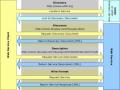
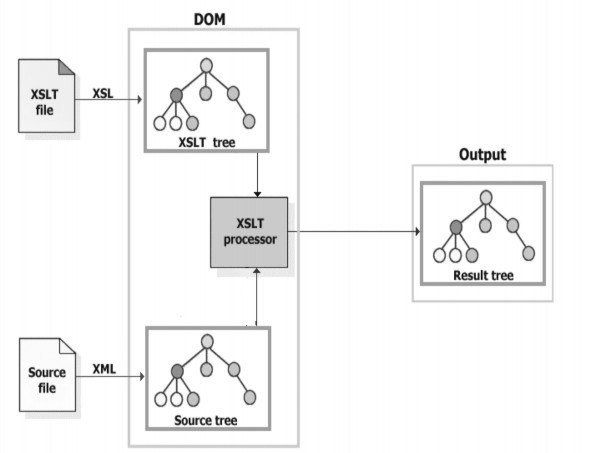
The figure below illustrates the role of the XSLT processor in transforming an XML document into an XSLT (from now on we can use the word XSLT instead of XSL) file:
We can also code in JavaScript to run in the Browser, instead of in the WebServer, as shown in the Web page below. It also gives the same result as using IE to display the XML directly.
<HTML>
<HEAD>
<TITLE>sample</TITLE>
<SCRIPT language="javascript"> function init()
{
var srcDOM = new ActiveXObject("Msxml2.DOMDocument.4.0"); srcDOM.async=false;
srcDOM.load("order.xml");
var xsltDOM= new ActiveXObject("Msxml2.DOMDOCUMENT.4.0");
xsltDOM.async = false; xsltDOM.load("order.xsl");
resDOM.innerHTML = srcDOM.transformButton(xsltDOM);
}
</SCRIPT>
</HEAD>
<BODY onload="init()">
<div id="resDOM"></div>
</BODY>
</HTML>
Perhaps we ask why we don't use XML directly as above to display the Web page. Note that we can use this technique to Transform an XML with XSL and then display it inside a DIV, which is a limited area inside the Web page, not occupying the whole Web page. Here, when the Web page starts loading (onload event), IE calls the init() function to transform the XML and then assigns the result to the innerHTML property of the resDOM DIV.
There is another method we can use instead of transformButton called transformButtonToObject. The main difference between these two methods is:
transformNode: The result of this method is a tree in the form of a text string, typically an HTML document. We can display it in a browser or save it to a file.
transformButtonToObject: The result of this method is put into another object, which can then be further processed.
When using either of the above methods, the source object does not actually need to be a complete document. It can be just a Node of an XML document. If it is just a Node, the XSLT processor treats the set of Nodes, and its descendant Nodes, as a complete document. Similarly, an XSL object can be a complete XSL file, or just a Node within an XSL file.
To parse XML documents in .NET environment, we use one of the following classes XmlTextReader, XmlDocument, XmlSerializer, DataSet and XpathDocument. We will consider some examples below:
family.xml document
<?xml version="1.0" encoding="UTF-8"?>
<family>
<name gender="Male">
<firstname>Tom</firstname>
<lastname>Smith</lastname>
</name>
<name gender="Female">
Dale
<lastname>Smith</lastname>
</name>
</family>
The following example uses XMLTextReader Imports System.IO
Imports System.Xml
Module ParsingUsingXmlTextReader Sub Main()
Dim m_xmlr As XmlTextReader 'Create the XML Reader
m_xmlr = New XmlTextReader("C:Personalfamily.xml")
'Disable whitespace so that you don't have to read over whitespaces m_xmlr.WhiteSpaceHandling = WhiteSpaceHandling.NONE
'read the xml declaration and advance to family tag m_xmlr.Read()
'read the family tag m_xmlr.Read()
'Load the Loop
While Not m_xmlr.EOF 'Go to the name tag m_xmlr.Read()
'if not start element exit while loop
If Not m_xmlr.IsStartElement() Then Exit While
End If
'Get the Gender Attribute Value
Dim genderAttribute = m_xmlr.GetAttribute("gender") 'Read elements firstname and lastname m_xmlr.Read()
'Get the firstName Element Value
Dim firstNameValue = m_xmlr.ReadElementString("firstname") 'Get the lastName Element Value
Dim lastNameValue = m_xmlr.ReadElementString("lastname") 'Write Result to the Console
Console.WriteLine("Gender: " & genderAttribute _
& " FirstName: " & firstNameValue & " LastName: " _ & lastNameValue)
Console.Write(vbCrLf)
End While 'close the reader m_xmlr.Close() End Sub
End Module
Parsing XML documents with XmlDocument Imports System.IO
Imports System.Xml
Module ParsingUsingXmlDocument Sub Main()
Try
Dim m_xmld As XmlDocument Dim m_nodelist As XmlNodeList Dim m_node As XmlNode 'Create the XML Document m_xmld = New XmlDocument() 'Load the Xml file
m_xmld.Load("C:CMSPersonalfamily.xml") 'Get the list of name nodes
m_nodelist = m_xmld.SelectNodes("/family/name") 'Loop through the nodes
For Each m_node In m_nodelist 'Get the Gender Attribute Value
Dim genderAttribute = m_node.Attributes.GetNamedItem("gender").Value 'Get the firstName Element Value
Dim firstNameValue = m_node.ChildNodes.Item(0).InnerText 'Get the lastName Element Value
Dim lastNameValue = m_node.ChildNodes.Item(1).InnerText 'Write Result to the Console
Console.Write("Gender: " & genderAttribute _
& " FirstName: " & firstNameValue & " LastName: " _ & lastNameValue)
Console.Write(vbCrLf) Next
Catch errorVariable As Exception 'Error trapping
Console.Write(errorVariable.ToString()) End Try
End Sub End Module
HOMEWORK
1. Parsing of an XML document?
2. Compare the two structures of HTML and XLM?
LESSON 2
Title : BUILDING WEB APPLICATIONS BASED ON XML
Article code: 02
Introduce :
In this article, we study methods of data integration and exchange using XML as well as methods of applying XML in Web applications.
Implementation objectives:
After completing this lesson, students will be able to:
- From the application problem on the Web, the main issues include:
- Database level integration, Web development, UI development, XML based Messaging techniques, Metadata creation, Server level and Client level application creation.
- Exploit the unique strengths of XML in building integrated applications on the Web.
Main content:
I. Database level integration
One of the strengths of computer applications is the ability to store, organize, and retrieve large amounts of data. An organized collection of data is referred to as a database, and the programs designed to manage the data are called Database Management Systems (DBMSs).
In this section, we will study and discuss how to use XML with databases.
- DBMS types:
A number of different types of DBMS have emerged over the years. The most distinguishing feature between them is the way they are used to store, manage, and query the database. We will briefly examine some of the popular DBMSs in terms of their design and their advantages and disadvantages.
+ Hierarchical DBMS (HDBMS)
Used in the mainframe era, an HDBMS links records, called nodes, together like a family tree, meaning each record type has only one parent. In the example below, an order has only one customer parent. The following figure illustrates:
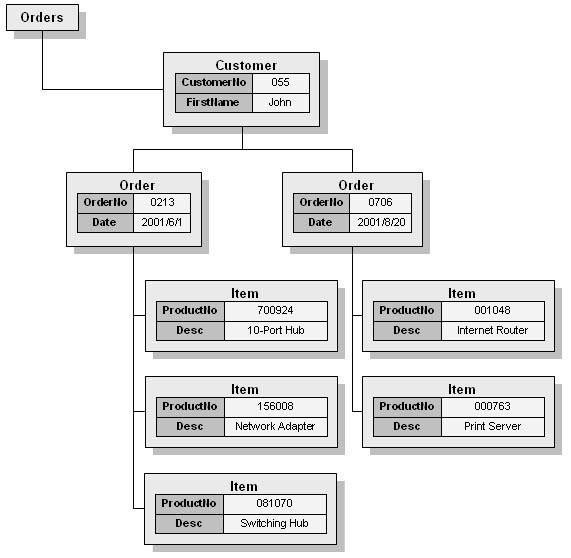
The nodes in the tree above are linked together by pointers, which the user must specify exactly. For example, Order (0706) is linked to Customer (055). All the nodes linked together are a representation of a tree structure.
The main disadvantage of HDBMS is that it is difficult to query. For example, a query to get the Item node with ProductName in the Orders database, we have to specify it explicitly as follows:
055/0706/000763
It is important to note that the above query specifies a path that specifies the nodes. (In this respect, it is similar to Xpath for navigating nodes in an XML document.) However, if we want to know all the Orders we must also use item, this is the only way to be able to judge that the search time will be very expensive when searching for each Order node.
+ Relational database management system (Relational DBMS – RDBMS)
Relational database was proposed by Dr. EFCodd of IBM and written in a journal titled "A Relational Model of Data for Large Shared Data Banks" in 1970. An RDBMS stores a collection of tables, each table is a fixed set of columns or fields. An unlimited number of rows or records can appear in each table. Compared to HDBMS, RDBMS is more complex. However, a relational model provides a more flexible platform for data access and data manipulation.
The following figure illustrates a relational database with three tables: Customer, Order, and Item.
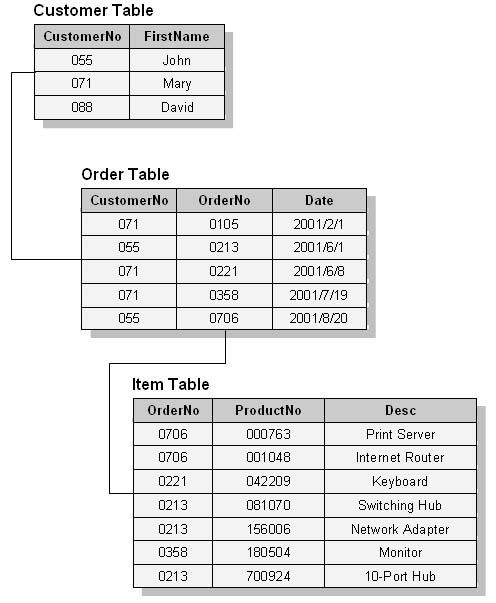
Unlike HDBMS, the relationships between tables in an RDBMS are created at runtime by linking the key column from one table to another. This database uses two types of keys, primary key and foreign key, which is a key whose primary key resides in another table. For example, in the following figure, CustomerNo is the primary key of the Customer table while OrderNo is the primary key of the Order table. The Order table also has a foreign key, Customer, which links to the CustomerNo column of the Customer table. Hence, in this case, the Customer table is called the parent table and Order is the child table.
When tables are linked together at runtime using a primary key, this is called a join. A key component in a relational database creates some constraints between the tables that are linked. This property allows the same database to be displayed and used in different ways.
Additionally, because a relational database can span multiple tables, the database can be designed with minimal data duplication. In a conventional sense, an actor can add, delete, and modify data in one table that will affect other tables based on the designed relationships.
Finally, RDMBS uses Structured Query Language (SQL) to query, retrieve and update data stored in the database and the data can be rejected if it violates the rules of the relationship. For example, to find all the Items purchased by customer Jonh, we can use the following SQL statement:
SELECT ProductNo, Desc FROM Customer, Order, Item