
end if
if error = false Then
xmlresult = source.transformNode(style)
end if Response.write(xmlresult)
%>
Maybe you are interested!
-
 Advanced XML Web Programming - Dalat College of Technology - 1
 -
 Advanced XML Web Programming - Dalat College of Technology - 5
 -
 Advanced XML Web Programming - Dalat College of Technology - 31
 -
 Advanced XML Web Programming - Dalat College of Technology - 21
 -
 Java programming Web design profession - Dalat College of Technology - 8
Separating page presentation from creation and formatting allows for parallel development and shorter development times. Content writers need to have a broad understanding of the intricacies of business logic and the use of information from start to finish in an application. Layout experts can point to the aesthetics of the interface, not worry about where the information will come from, but only care about how it appears.
The controller can be parameterized to decorate or filter XML content based on the user's browser or application rules. A new interface presentation, or transition can be changed into the environment without having to rewrite the page.
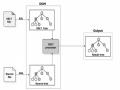
User interface diagram
Team members need to work together to create a complete project. In this case, the content developer and the layout designer can work together to choose a well-defined language that can use XML and XSLT to implement an interface. The schema language defines the documents that flow through the application. The schema acts as a blueprint for the content developer, as they begin to build pages as a presentation team specifies when creating their XSLT document. The schema is used to validate the documents in the application and it must address interface elements such as layout, navigation, input objects, user actions, and security. Once the schema is complete, the two teams can work independently.
Defining our interface is imperative to our team to abstract away what can be displayed in the application and how. The benefits are immediate. Presentation experts demystify XML interface documents.
Two schematic approaches
The goal of an interface schema is to define an XML document that models how the interface elements in an application can be translated into a single document. Naturally, this schema will vary from company to company. How large is our application? How many different business entities are involved? What type of clients will use the system? What will it take to support a wide range of browsers with different compatibility capabilities (such as an internet application) or a single browser (an intranet application)?
In layman's terms, our interface schema can fall into two main categories. The schema can be presentation-based, where each element associated with an interface function represents the type of data to be displayed. The XSLT schema can be business object-oriented. The underlying XML documents model business entities and illustrate the context for common forms. XSLT does the work required in this scenario, it is responsible for generating the entire interface.
+ Presentation-based interface
Presentation-based UI documents are the easiest for traditional HTML developers to understand. Presentation-based schemas define common document structures that all pages must follow. Note that the details of the HTML are given in the example of a presentation-based schema.
The advantages of using a presentation-based UI include:
Easier to learn. The approach is similar to HTML and easy for HTML developers to understand.
A small number of requests for transformation. This scheme requires one transformation pattern for each part of the content model. New transformations are not required even if the number of pages in the system increases.
Pages look more robust. Linking schema and transformations to the document structure promotes robustness between pages in our applications.
Disadvantages include:
The loss of metadata underlying the data on the page. This schema does not care what type of data is displayed as long as it has a proper document structure.
Difficulty in defining highly dynamic pages. Some pages in our application require client-side scripting to capture user interaction. This can be difficult to achieve without scripting code directly in the pages.
Therefore, use a presentation-based UI schema if the number of business entities or pages in our application is large. A presentation-based model is durable, scalable, and even split between content developers and layout designers.
To see how useful this schema is, the XML illustration that specifies a person can be viewed from the perspective of a representation-based schema.
<document>
<header>
<title>Person Detail</title>
<icon>person.gif</icon>
<section>
<header>
<title>William Jones</title>
</header>
<view>
<properties>
<property description="First Name">William</property>
<property description="Last Name">Jones</property>
<property description="Address">200 Irving Street</property>
<property description="City">Cambridge</property>
<property description="State">MA</property>
<property description="Zip Code">02138</property>
</properties>
</view>
</section>
</document>
This document looks like an HTML document, although XML has no hard-coded rules. Instead, the layout designer can use some clues when presenting this page. Still, there is not much metadata that naturally describes the data contained in the document.
+ Business object based user interface
The second part of the UI is a business-centric XML UI document. In this case the underlying XML documents represent business entities rather than document structures. Here the XML documents describe the type of data embodied (e.g., CD, Employee, or Car) on the page and the context of the page (e.g., detail, edit, or creation). The XSLT developer must create transformations that construct unique documents for every type and context combination allowed by the system.
Advantages of using this method:
Pages will be more specialized. If certain object contexts in our application require highly dynamic and customized pages, an object-based approach is probably the way to go.
Preserve metadata. XML documents that conform to an enterprise object-oriented schema provide information about the data rather than how it is presented. Metadata can be useful if our application is heavily customer-facing.
Disadvantages of using this method:
It does not scale well with the increase in the number of business entities or the number of contexts. Many transformation patterns covering a variety of contexts must be performed each time a new business entity is introduced.
Certainty in “look and touch” is difficult to achieve. Highly specialized sites may have hindered efforts to establish a universal “look and touch”.
Global changes are more difficult. Presentation rules may be scattered across a number of different object transformation patterns. These need to be localized if possible.
This approach places a heavy burden on the XSLT author's shoulders.
Counting the advantages and disadvantages, use an object-based UI schema when our application has several business entities with highly specialized UI requirements. This approach will help us isolate dynamic content into browser-specific XSLTs. Client-side scripts are generated by XSLT, which is created by the content developer.
The following code snippet details an XML document on a business object platform that might look like this:
<person context="detail">
<firstName>William</firstName>
<lastName>Jones</lastName>
<address>200 Irving Street</address>
<city>Cambridge</city>
<state>MA</state>
<zip>02138</zip>
</person>
This XML document is clearly different in structure from the document on the representation shown earlier. The XML elements only in this document place information around the type of data being viewed and the context in which it is used. The XSLT author is responsible for packaging this information into the UI elements. The XSLT may also need to request additional XML data (such as the person's company information) via a separate HTTP request.
Layout management
One of the best features of XML is that it enforces global consistency. This is easily accomplished through the use of the controller design pattern. In this section we will use XML to define a single presentation model to design a simple UI. The controller pattern specifies a single endpoint to all page requests in the application. The controller has two main jobs:
XML scraping generates the content of the requested page. Typically, this task is not directly handled by the controller. This makes the controller too complex. It is easier to delegate this responsibility to view helpers that are designed for each specific view.
Apply presentation rules to content by transforming XML content into a final document to be delivered to a client. The rendering engine is free to produce any type of document that satisfies a particular context. It might produce an HTML document intended for a browser, a Wireless Markup Language (WML) document for a wireless device, a PDF or Microsoft Exec document for reporting, an XML document to be processed later by another application, or plain text.
A simple detail view
To begin our look at the controller, let's look at a simple XML document that will serve as our document model. An excerpt from the application requires detailed information about a CD:
CDDetail1.xml: a generic document describing how a CD should appear.
<document>
<header>
<title>This is our first XML application page</title>
<icon>document.gif</icon>
</header>
<section>
<header>
<title>Hello World</title>
<icon>world.gif</icon>
</header>
<view>
<properties>
<property description="Property 1">Hello World</property>
</properties>
</view>
</section>
</document>
The <document> element specifies the beginning and end of the content in this document. Like the <html> element in HTML, the <document> element is a container for all the information that comes below it. The <document> element can contain a <header> element with a title and an icon.
The <section> element defines a content area on the screen. No, one or more <section> elements can appear inside a <document> element. The <section> element can also have a <header> element and one or more <view> elements below it.
In this example our document contains a <section> and a <view> and a small properties sheet. We transform this document into an HTML page suitable for representation in our application. We will create an XSLT stylesheet to perform this transformation. The first line of the stylesheet will be used for initialization. The <xsl:stylesheet> element marks the beginning of a transformation and the <xsl:output> element specifies that the output of this transformation will be an HTML document.
<xsl:stylesheet xmlns:xsl="http://www.w3.org/1999/XSL/ Transform" version="1.0">
<xsl:output method="html" />
First we will bind the root <document> node and start initializing our HTML document. After inserting the <html> element the transform will create a <head> element and provide a link to the CSS page that will contain the application's styles. The body of the transform affects the body of the document. Inside the <body> element, the transform creates a <div> element to contain the rest of the information on the page. Note that the <div> will inherit the style properties from the document class that appears in our CSS document. The final step will call the <xsl:apply-templates/> delegate to expedite the transforms to more precise rules.
<xsl:template match="document">
<html>
<head>
<link rel="stylesheet" type="text/css" href="css/style.css"/>
</head>
<body>
<div class="document">
<xsl:apply-templates/>
</div>
</body>
</html>
</xsl:template>
The document header contains information about the page. The header may contain a title and a link to an icon. This information will be displayed at the top of the screen. The document header pattern matches the Xpath expression “document/header” to distinguish the header of a <document> element from the header of a <section> element.
The first task of this transform template is to create a section for the header. The section links to the documentHeader class in our stylesheet. The next template checks for the existence of the <icon> element, converting it to an <img> element if it exists. Notice that the transform inserts an absolute path to the images directory before inserting the icon value. The next template takes the value of the <title> element and inserts it into the resulting document.
<xsl:template match="document/header">
<div class="documentHeader">
<xsl:if test="icon">
<img align="absmiddle" src="images/{icon}"/>
</xsl:if>
<xsl:value-of select="title"/>
</div>
</xsl:template>
The component template is like a document template. It creates a wrapping component with padding to separate it from other areas that might appear on the page. It then creates a new component, references the CSS class area, and makes a recursive call to <xsl:apply-templates>.
<xsl:template match="section">
<div align="center">
<div class="section">
<xsl:apply-templates/>
</div>
</div>
</xsl:template>
The area header template is similar to the document header template. It creates a new division and inserts the icon and title found in the XML document.
<xsl:template match="section/header">
<div class="sectionHeader">
<xsl:if test="icon">
<img align="absmiddle" src="images/{icon}"/>
</xsl:if>
<xsl:value-of select="title"/>
</div>
</xsl:template>
In this example the view patterns do not need to do anything other than look for the patterns later to apply. It will be expanded on in later examples.
<xsl:template match="view">
<xsl:apply-templates/>
</xsl:template>
We will convert the document's <properties> and <property> elements into a simple table of name/value pairs. The properties template sets the start of the <table> element. Properties can include hyperlinks that link to other documents. XSLT will check an href attribute and create a hyperlink if it exists.
<xsl:template match="properties">
<table cellpadding="5">
<xsl:apply-templates/>
</table>
</xsl:template>
<xsl:template match="property">
<tr>
<td bgcolor="a1a1a1">
<font class="text"><b><xsl:value-of select="@description"/></b></font>
</td>
<td><font class="text">
<xsl:choose>
<xsl:when test="@href"><a href="{@href}"><xsl:value-of select="."/></a></xsl:when>
<xsl:otherwise><xsl:value-of select="."/></xsl:otherwise>
</xsl:choose>
</font></td>
</tr>
</xsl:template>
</xsl:stylesheet>
Try using <xsl:apply-templates/> instead of <xsl:for-each/> whenever possible. This syntax will allow us to mix and match components more easily.
The CSS example below contains all the CSS rules for this document. Style.css: a CSS to provide smooth element styling body {
background-color: background;
}
.text {
font-family: Verdana; font-size:9pt;
color: black;
}
.document {
background-color: background; border:0px;
width: 100%;
}
.documentHeader { border:1px solid; width: 100%;
background-color:778899; border-bottom:1px solid; font-weight: bold; color:black;
font-family: Verdana; font-size:9pt;
}
.section { border:0px; width: 99%; text-align: left;
background-color:white; border: 3px;
border-style: offset; border-color: e0e0e0; color:black;
font-family: Verdana; font-size:9pt;
}
.sectionHeader {
background-color: activeCaption; color: captionText;
align: left; border:0px; width: 100%;
border-bottom:1px solid; font-family: Verdana; font-size:9pt;
}
Although XSLT is the language of choice for most XML transformations, CSS should still be used to isolate the formatting rules for our HTML documents.
The following figure illustrates the resulting XML document after applying XSL and CSS styling rules:
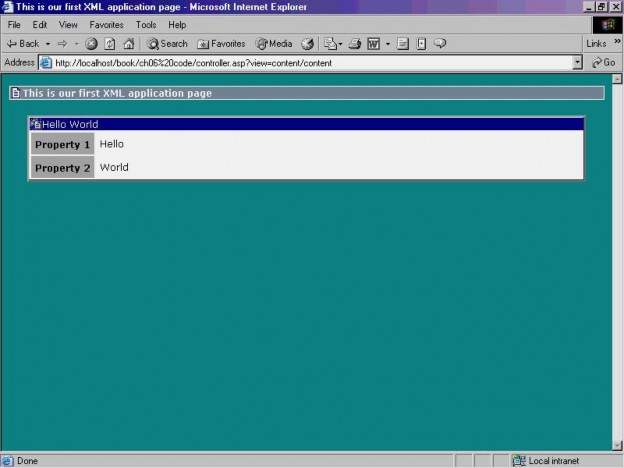
What have we accomplished here? To start, we've created a 30-line HTML document out of an 18-line XML document. Although the extra 12 rows doesn't sound like much, it amounts to a 60 percent increase. So we see that XML can do much of the "dirty work" of page generation for us. A layout expert needs to program XSLT only once, and the XML engine will generate and reproduce thousands of lines of well-formed HTML code. We don't have to worry about unclosed tags (XSLT requires that all style sheets be carefully formed, and this feature catches many HTML errors) or copy-and-paste formatting logic running rampant in our application. Furthermore, global style changes need to be applied only once to a single document to affect all pages.
A More Detailed View
Consider the Noverant CD online store. Noverant uses an application to maintain a database of albums and artists. This application allows Noverant staff to inventory, update the database, and easily link to more detailed information. Below is an example of an XML document containing information about one of the albums in the collection.
CDDetail2.asp: XML document containing a second item element to indicate that CD is a streak list
<document>
<header>
<title>The Beatles - Revolver</title>
<icon>document.gif</icon>
</header>
<section>
<header>
<title>General Information</title>
<icon>world.gif</icon>
</header>
<view>
<properties>
<property description="Artist">The Beatles</property>
<property description="Album">Revolver</property>
<property description="Label">EMI Records Ltd</property>
<property description="Year Released">1966</property>
<property description="Price">$13.99</property>
</properties>
</view>
</section>
<section>
<header>
<title>Track Listing</title>
<icon>world.gif</icon>
</header>
<view>
<properties>
<property description="Track 1">Taxman [2:39] (Harrison)</property>
<property description="Track 2">Eleanor Rigby [2:07] (Lennon/McCartney)</property>
<property description="Track 3">I'm Only Sleeping [3:01] (Lennon/McCartney)</property>
<property description="Track 4">Love You To [3:01] (Harrison)</property>
<property description="Track 5">Here, There, and Everywhere [2:25] (Lennon/McCartney)</property>
<property description="Track 6">Yellow Submarine [2:40] (Lennon/McCartney)</property>
<property description="Track 7">She Said She Said [2:37] (Lennon/McCartney)</property>
<property description="Track 8">Good Day Sunshine [2:09] (Lennon/McCartney)</property>
<property description="Track 9">And Your Bird Can Sing [2:01] (Lennon/McCartney)</property>
<property description="Track 10">For No One [2:01] (Lennon/McCartney)</property>
<property description="Track 11">Doctor Robert [2:15] (Lennon/McCartney)</property>
<property description="Track 12">I Want to Tell You [2:29] (Harrison)</property>
<property description="Track 13">Got to Get You Into My Life [2:30] (Lennon/McCartney)</property>
<property description="Track 14">Tomorrow Never Knows [2:57] (Lennon/McCartney)</property>
</properties>
</view>
</section>
</document>
This XML document, when transformed with the XSLT listed earlier, is an HTML products page with two content areas. The resulting HTML page is shown in the following figure: