
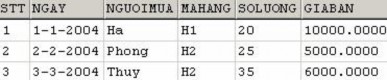
NHATKYBANHANG Table
We can see that the quantity of item with H2 code is 40 (reduced by 5) while it should be 35 (reduced by 10). So the above trigger is not working properly in this case.
To fix the above error, we redefine the trigger as follows:
CREATE TRIGGER trg_nhatkybanhang_update_soluong ON nhatkybanhang FOR UPDATE AS IF UPDATE(soluong) UPDATE mathang SET mathang.soluong = mathang.soluong - (SELECT SUM(inserted.soluong-deleted.soluong) FROM inserted INNER
Maybe you are interested!
-
 Introduction to database management system Part 1 - 2
 -
 Introduction to database management system Part 1 - 12
 -
 Introduction to database management system Part 1 - 1
 -
 SQL Database Administration - Hanoi University of Business and Technology - 14
 -
 Practice database programming with VB.net - 39
JOIN deleted ON inserted.stt=deleted.stt WHERE inserted.mahang = mathang.mahang) WHERE mathang.mahang
IN (SELECT mahang FROM inserted)
or:
CREATE TRIGGER trg_nhatkybanhang_update_soluong ON nhatkybanhang FOR UPDATE AS IF UPDATE(soluong) /* If the number of rows updated is 1 */ IF @@ROWCOUNT = 1 BEGIN
UPDATE mathang SET mathang.soluong = mathang.soluong – (inserted.soluong-deleted.soluong) FROM (deleted INNER JOIN inserted ON deleted.stt = inserted.stt) INNER
JOIN mathang ON mathang.mahang = deleted.mahang END ELSE BEGIN
UPDATE mathang SET mathang.soluong = mathang.soluong - (SELECT SUM(inserted.soluong-deleted.soluong) FROM
inserted INNER JOIN deleted ON inserted.stt=deleted.stt
WHERE inserted.mahang = mathang.mahang) WHERE mathang.mahang IN (SELECT mahang FROM inserted) END
Using pointer variables
Another way to fix the error that occurs as in Example 5.17 is to use a cursor to iterate through the data rows and check each row. However, using a cursor variable in a trigger is the solution that should be chosen only when absolutely necessary.
A cursor variable is used to iterate over rows of data in the results of a query and is declared using the following syntax:
DECLARE cursor_name CURSOR FOR SELECT_statement
In which the SELECT statement must have results in tabular form. That is, the statement does not use the COMPUTE and INTO clauses .
To open a pointer variable we use the command:
OPEN cursor_name
To use the cursor variable to iterate through the data rows of a query, we use the FETCH statement . The value of the status variable @@FETCH_STATUS is zero if all rows in the query result have not been browsed.
The FETCH statement has the following syntax:
FETCH [[NEXT|PRIOR|FIST|LAST] FROM] pointer_name [INTO
variable_list]
In which the variables in the variable list are used to contain the values of the fields corresponding to the data row that the cursor points to. The number of variables must be equal to the number of columns of the query result in the DECLARE CURSOR statement .
The set of statements in the example below illustrates how to use a cursor variable to iterate through the rows in the result of a SELECT statement.
DECLARE contro CURSOR FOR SELECT
name, quantity
FROM mathang OPEN contro DECLARE @mahang NVARCHAR(10) DECLARE @tenhang NVARCHAR(10) DECLARE @soluong INT
/*Start iterating through the rows in the query result*/ FETCH NEXT FROM contro INTO @order number,@order name,@quantity WHILE @@FETCH_STATUS=0 BEGIN PRINT 'Order number:'+@order number
PRINT 'Product name:'+@product name PRINT 'Quantity:'+STR(@quantity)
FETCH NEXT FROM contro INTO @mahang,@tenhang,@soluong
END
/*Close the cursor and free the memory*/ CLOSE contro
DEALLOCATE CONTRO
The trigger below is another solution to the above mentioned case.
CREATE TRIGGER trg_nhatkybanhang_update_soluong ON nhatkybanhang FOR UPDATE AS IF UPDATE(soluong)
BEGIN
DECLARE @mahang NVARCHAR(10) DECLARE @soluong INT DECLARE contro CURSOR FOR SELECT inserted.mahang, inserted.soluongdeleted.soluong AS soluong FROM inserted INNER JOIN deleted ON inserted.stt=deleted.stt OPEN contro FETCH NEXT FROM contro INTO @mahang, @soluong WHILE
@@FETCH_STATUS=0 BEGIN
UPDATE mathhang SET quantity=quantity@quantity WHERE quantity=@quantity
FETCH NEXT FROM contro INTO @mahang,@soluong END CLOSE contro DEALLOCATE contro END END
Chapter 5 exercises
Based on the database in exercise chapter 2, perform the following requirements:
5.1 Create a stored procedure through which a new record can be added to the MATHANG table (the procedure must check the validity of the data to be added).
supplement: no duplicate primary keys and ensure referential integrity)
5.2 Create a stored procedure that has the function of calculating the total quantity of goods sold of an item with any code (the item code to be counted is a parameter of the procedure).
5.3 Write a function that returns a table that shows the total number of units sold for each item. Use this function to count the total number of units (currently available and sold) of each item.
5.4 Write a trigger for the CHITIETDATHANG table according to the following requirements:
•When a new record is added to this table, decrease the existing row count if the existing row count is greater than or equal to the number of rows sold. Otherwise, cancel the addition operation.
•When updating the quantity of goods sold, check whether the updated quantity is appropriate or not (the quantity of goods sold must not exceed the existing quantity and must not be less than 1). If the data is valid, reduce (or increase) the existing quantity of goods in the company, otherwise cancel the update operation.
5.5 Write a trigger for the CHITIETDATHANG table so that it only accepts the sales price.
output must be less than or equal to original price (price of item in MATHANG table)
5.6 To manage newsletters in a Website, people use the following two tables: LOAIBANTIN table (newsletter type)
CREATE TABLE loibantin ( maphanloai INT NOT NULL PRIMARY KEY, name
NVARCHAR(100) NOT NULL , bantinmoinhat INT DEFAULT(0)
)
BANTIN board (newsletter)
CREATE TABLE bantin ( maso INT NOT NULLmPRIMARY KEY,
ngoduatin DATETIME NULL , tieude NVARCHAR(200) NULL , noidung NTEXT NULL , maphanloai INT NULL FOREIGN KEY REFERENCES loaibantin(maphanloai)
)
In the LOAIBANTIN table, the BANTINMOINHAT column value indicates the code number of the latest corresponding message type (last added).
Write triggers for the BANTIN table so that:
•When a new newsletter is added, update the BANTINMOINHAT column of the row corresponding to the type of newsletter just added.
•When a news item is deleted, update the value of the BANTINMOINHAT column in the LOAIBANTIN table of the row corresponding to the type of news item just deleted with the code number of the previous news item (based on the date of posting). If there is no more news item of the same type, the value of this column is 0.
•When updating the code of a newsletter and if it is the latest newsletter, update the value of the BANTINMOINHAT column to the new code.
5.1
CREATE PROCEDURE sp_insert_mathang( @mahang @tenhang NVARCHAR(50), @macongty NVARCHAR(10) = NULL,
@maloaihang
INT = NULL, @quantity INT = 0, @donvitinh NVARCHAR(20)
=
NULL, @giahang money = 0) AS IF NOT EXISTS(SELECT
giant
FROM mathang WHERE mahang=@mahang) IF (@macongty IS NULL
OR EXISTS(SELECT macongty FROM nhacungcap WHERE macongty=@macongty)) AND (@maloaihang IS NULL OR
EXISTS(SELECT maloaihang FROM loaihang WHERE maloaihang=@maloaihang)) INSERT INTO mathang
VALUES(@mahang,@tenhang, @macongty,@maloaihang,
@solution,@donvitinh,@giahang)
5.2
CREATE PROCEDURE sp_thongkebanhang(@mahang NVARCHAR(10))
AS SELECT mathang.mahang,namehang,
SUM(chitietdathang.soluong) AS totalsoluong FROM mathang
LEFT OUTER JOIN chitietdathang ON mathang.mahang=chitietdathang.mahang WHERE mathang.mahang=@mahang GROUP BY mathang.mahang,name
5.3 Function definition
CREATE FUNCTION func_banhang() RETURNS TABLE AS RETURN
(SELECT mathang.mahang,name, CASE WHEN sum(chitietdathang.soluong) IS NULL THEN 0 ELSE sum(chitietdathang.soluong) END AS tongsl FROM mathang
LEFT OUTER JOIN chitietdathang ON mathang.mahang = chitietdathang.mahang GROUP BY mathang.mahang,name)
Use defined function
SELECT a.mahang,a.tenhang,soluong+tongsl FROM mathang AS a
INNER JOIN dbo.func_banhang() AS b ON a.mahang=b.mahang
5.4 Function definition
CREATE TRIGGER trg_chitietdathang_insert ON chitietdathang
FOR INSERT AS BEGIN DECLARE @mahang NVARCHAR(100) DECLARE
@soluongban INT DECLARE @soluongcon INT SELECT
@mahang=mahang,@soluongban=soluong FROM inserted SELECT
@soluongcon=soluong FROM mathang WHERE mahang=@mahang
IF
@soluongcon>=@soluongban UPDATE mathang SET
quantity=quantity@quantityban WHERE quantity=@quantity ELSE ROLLBACK TRANSACTION END CREATE TRIGGER
trg_monthly_details_update_quantity ON monthly_details
FOR
UPDATE AS IF UPDATE(soluong) BEGIN IF EXISTS SELECT
sohoadon FROM inserted WHERE soluong 0 ROLLBACK
TRANSACTION ELSE BEGIN UPDATE mathang SET
quantity=quantity
(SELECT SUM(inserted.soluong ,deleted.soluong) FROM inserted INNER JOIN deleted ON
inserted.sohoadon=deleted.sohoadon AND inserted.mahang=deleted.mahang WHERE
inserted.mahang=mathang.mahang GROUP BY inserted.mahang) WHERE mahang IN (SELECT DISTINCT mahang FROM inserted) IF
EXISTS SELECT mahang FROM mathang WHERE soluong 0 ROLLBACK
TRANSACTION END END
5.5
CREATE TRIGGER trg_chitietdathang_giaban ON chitietdathang
FOR INSERT,UPDATE AS IF UPDATE(giaban) IF
EXISTS(SELECT inserted.mahang FROM mathang INNER JOIN inserted ON
mathang.mahang=inserted.mahang WHERE mathang.giahang>inserted.giaban) ROLLBACK TRANSACTION
Lesson 6. SQL Transactions
An important concept is the concept of transaction. The properties of a transaction must be ensured to ensure that a database system, built on the corresponding database system, will always provide a reliable database (data is always consistent) during its operation. Transaction management aims to ensure that every transaction in the system has the properties that a transaction must have. One thing to note is that among the properties of a transaction, the consistency property must first be ensured by the programmer - the person who writes the transaction.
1 Transactions and their properties
A transaction is one or a series of SQL statements that are combined together to form a body of work. The SQL statements that appear in a transaction are usually closely related to each other and perform independent operations. Combining statements together in a transaction ensures data integrity and data recovery. In a transaction, statements can be independent of each other, but all statements in a transaction require either complete execution or none of the statements are executed.
Databases use transaction logs to record changes made by transactions to the database and to recover data in the event of errors or system crashes .
A transaction requires the following four properties:
• Atomicity: Any changes to data must either be fully executed when the transaction is successfully executed or no changes to data occur if the transaction is not fully executed. In other words, the effect of the statements in a transaction must be as a single statement.
• Consistency: Consistency requires that after a transaction is completed, whether successful or failed, all data must be in a consistent state (i.e. data integrity must always be preserved).
• Isolation: Transaction isolation means that the effect of each transaction must be the same as if it were executed alone on that system. In other words, a transaction when executed concurrently with other transactions on the same system is not affected by any of those transactions.
• Durability: After a transaction has been successfully executed, any effects it has created must persist in the database, even if the system fails.
2 Transaction Models in SQL
SQL transactions are defined based on the following transaction processing statements:
• BEGIN TRANSACTION : Start a transaction
• SAVE TRANSACTION : Mark a position in the transaction (called a mark point)
sign).
• ROLLBACK TRANSACTION : Roll back to the beginning of the transaction or a point
marked earlier in the transaction.
• COMMIT TRANSACTION : Marks the end point of a transaction. When this statement is executed, it also means that the transaction has been successfully executed.
• ROLLBACK [WORK] : Roll back to the beginning of the transaction.
• COMMIT [WORK] : Mark the end of the transaction.
A transaction in SQL is initiated by the BEGIN TRANSACTION statement . This statement marks the beginning of a transaction and has the following syntax:
BEGIN TRANSACTION [transaction_name]
A transaction will end in the following cases:
• The COMMIT TRANSACTION (or COMMIT WORK ) statement is executed. This statement signals the successful completion of a transaction. After this statement, a new transaction is started.
• When the ROLLBACK TRANSACTION (or ROLLBACK WORK ) statement is executed to cancel a transaction and return the database to its pre-transaction state
transaction begins. A new transaction will begin after the ROLLBACK statement is executed.
• A transaction will also end if an error occurs during execution (such as a system error, a network connection being “broken”, etc.). In this case, the system will automatically restore the database state to the state before the transaction started (similar to when the ROLLBACK statement is executed to cancel a transaction).
However, in this case no new transaction will be initiated.
The transaction below ends due to the ROLLBACK TRANSACTION command and any data changes that the transaction made ( UPDATE ) are not effective.
BEGIN TRANSACTION communication1 UPDATE module SET sodvht=4 WHERE sodvht=3 UPDATE condition SET condition2=0 WHERE
diemlan2 IS NULL ROLLBACK TRANSACTION communicationtac1
The transaction below ends with the COMMIT command and successfully updates data on the MONHOC and DIEMTHI tables.
BEGIN TRANSACTION communication2 UPDATE module SET sodvht=4 WHERE sodvht=3 UPDATE diemthi SET diemlan2=0 WHERE
diemlan2 IS NULL COMMIT TRANSACTION Giaotac2
Command:
SAVE TRANSACTION marker_name
is used to mark a position in a transaction. When this statement is executed, the state of the database at that point in time is recorded in the transaction log.
During transaction execution it is possible to go back to a marker using the statement:
ROLLBACK TRANSACTION marker_name
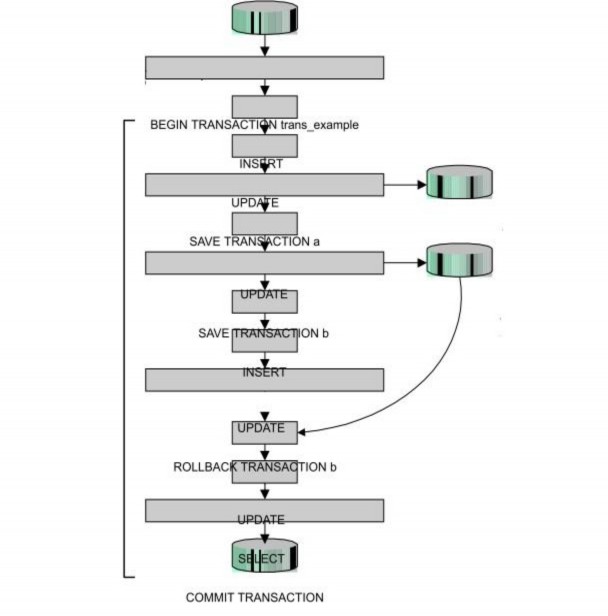
In this case, the data changes that the transaction made from the marker point until before the ROLLBACK statement was called are undone. The transaction continues with the database state that was at the marker point. The figure below shows the operation of a transaction using markers:
Activity of 1 transaction
After the ROLLBACK TRANSACTION statement is used to roll back a point in the transaction, the transaction continues with subsequent statements. But if this statement is used to roll back to the beginning of the transaction (i.e., abort the transaction), the transaction will end and therefore the COMMIT TRANSACTION statement in this case will fail.
The COMMIT TRANSACTION statement in the transaction below successfully terminates a transaction.
BEGIN TRANSACTION communication3 UPDATE diemthi SET diemlan2=0