
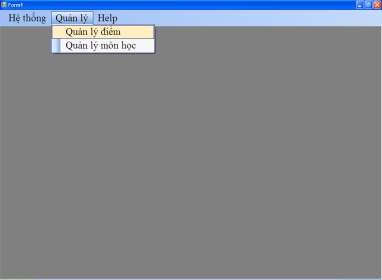
Figure 3. 44
Write a command so that when the user selects the menu Management Score Management, Subject Management, the system opens the corresponding Form frmDiem, frmMonHoc.
Job 3:
Using the data base in question 1 , create a form according to the template and perform the following requirements:
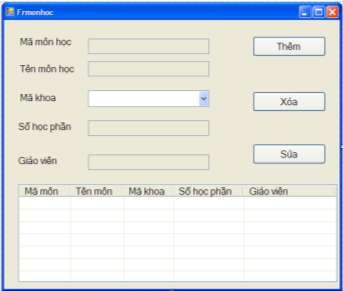
Figure 3. 45
Request :
a) When the program executes frmMonHoc, it will display the entire list of subjects.
learning loaded from database
into Listview and at the same time Delete, Edit and other buttons
TextBox, combobox will be dimmed (disabled).
b) When clicking on the "Add" button, it becomes the "Save" button, the TextBox and combobox will light up (allow to operate) to enter subject information (with duplicate subject code check), all faculty codes in the faculty table are loaded
to the key code combobox. When you click the “Save” button, the data you just entered will be saved in the database and the ListView will be updated.
c) The “Delete” button will light up when the user clicks on the ListView and when the user clicks the delete button, the subject will be deleted from the database and the ListView will be updated.
d) The “Edit” button will light up when the user clicks on the ListView and the edit button is
element information editing permission
Job 4:
select and save in database .
Using the data base in question 1 , create a form according to the template and perform the following requirements:
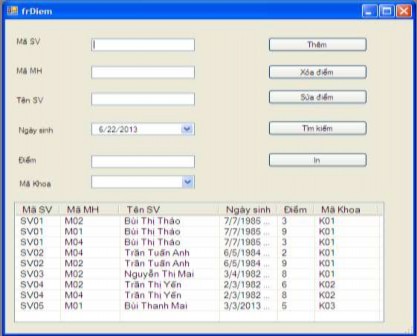
Figure 3. 46
Request :
1. When the program executes frmDiem will display the entire list of student scores.
tablets loaded from the database
into Listview, when user clicks on listview
then the information of the selected element appears on the corresponding textbox and combobox.
2. Build an “Add” function to add point information into the database and
Update again in ListView. Note: If the entered data is incorrect , the program will report an error and not perform the "Add" function .
3. Build a “DELETE” function to delete all selected elements on the listview and update the listview after deletion.
4. Build
g function “ EDIT ” allows to edit the information of the element
select and
save in database , update on listview .
5. Construction
Student Name.
The function "SEARCH " students by course to search is : MaSV ,
Lesson 3
To manage business at a store, we create a database named
QLKD has 7 tables:
Supplier table: NCC
School name
Interpretation | |
Mancc | Supplier Code |
Tenncc | Supplier Name |
AddressNCC | Supplier address |
Maybe you are interested!
-
 Programming Techniques Practice - 1
 -
 Practice database programming with VB.net - 39
 -
 Practice database programming with VB.net - 19
 -
 Practice database programming with VB.net - 17
 -
 Java programming Web design profession - Dalat College of Technology - 8
Purchase invoice table: HDMUA
School name
Interpretation | |
SoHD | Invoice number |
Buy Now | Date of purchase |
Mancc | Supplier Code |
Purchase Invoice Details Table: CHITIETMUA
School name
Interpretation | |
SoHD | Invoice number |
Mahang | Product code |
Soluongmua | Purchase quantity |
Dongiamua | Purchase price |
Goods Table: GOODS
School name
Interpretation | |
Mahang | Product code |
Tenhang | Product name |
DVT | Unit of measure |
Sales Invoice Table: HDBAN
School name
Interpretation | |
SoHDB | Sales invoice number |
Today | Sale date |
Makh | Guest code |
Sales Invoice Details Table: CHITIETBAN
School name
Interpretation | |
SoHDB | Sales invoice number |
Mahang
Product code | |
Sales volume | Sales quantity |
Dongiaban | Unit price |
Guest Table: CUSTOMER
School name
Interpretation | |
Makh | Guest code |
Tenkh | Guest name |
Address | Customer address |
Job 1. Create the QLKD database and the 7 tables above (select the data type of the fields accordingly), Create a Diagram (diagram) connecting the tables in the database,
Enter
Enter at least 3 records in each table .
Job 2
Create forms to make purchases in the QLKD database; the form has a grid to display data and buttons to add, edit, save, delete, and exit.
Job 3:
a) Create a purchase statistics form that provides the following information: Item name, unit, supplier, purchase date, purchase quantity, purchase unit price, total amount (purchase quantity * purchase unit price).
b) Create a sales statistics form that provides the following information: Product name, unit, customer, date of sale, quantity sold, unit price, total amount (quantity sold * unit price).
c) Create a form to search for information on sold goods by sales invoice number.
Job 4:
Create the main interface of the program including a menu (or menu link) to call and execute the required parts in Tasks 2 and 3 above.
Lesson 4
To manage the project of an Information Technology Institute, we create a database named QLDA with 5 tables:
Project Board: DUAN
School name
Interpretation | |
Mada | Project code |
Tenda | Project name |
Job | Project implementation work |
Songayda | Number of project days |
Employee table: NHANVIEN
School name
Interpretation | |
Manv | Employee code |
Hoten | Employee Name |
National Identity Card | ID number |
Born | Date of birth |
sex | Sex |
Address | Address |
Expertise Board: SPECIALTY
School name
Interpretation | |
Manv | Employee code |
Specialization | Expertise |
Level Table: TRINHDO
School name
Interpretation | |
Manv | Employee code |
Trinhdo | Level |
Employee – project table: NHANVIEN_DUAN
School name
Interpretation | |
Manv | Employee code |
Mada | Project code |
Now | Start date |
Right now | End date |
Job 1
a) Create the QLDA database and the 5 tables above (select the data type of the fields accordingly).
b) Create a Diagram of connections between tables in the database
c) Enter
Job 2:
Enter at least 3 records in each table .
Create forms to perform project management in the QLDA database; the form has a grid to display data and buttons to add, edit, save, delete, and exit.
Job 3:
a) Create a statistical form for the Institute's ongoing projects, including the following information: Project name, work performed, start date, name of the implementing staff, date of birth, address.
b) Create a form to count the number of employees of the Institute including the following information: Employee name, date of birth, address, qualifications, and expertise.
c) Create a form to search for employees.
d) Create a form to search for projects by project name and by time.
Job 4
Create the main interface of the program including a menu (or menu link) to call and execute the required parts in Tasks 2 and 3 above.
REFERENCES
[1]. Pham Huu Khang. C#2005 Basic programming. Social Labor Publishing House.2006 [2]. Pham Huu Khang. C#2005 Windows Forms programming. Labor Publishing House
society. 2006
[3]. Pham Huu Khang. C#2005 Object Oriented Programming . Social Labor Publishing House. 2006
[4]. Pham Huu Khang. C#2005 Database programming . Social Labor Publishing House. 2006
[5] Erik Brown, Manning. Windows Forms Programming with C#
[6] Jesse Liberty, O'Reilly. Programming C#
[7] MSDN Library – April 2002.