
INDEX
LIST OF DRAWINGS iii
LESSON 1. PROGRAMMING ON FORMS WORKING WITH SIMPLE DATA STRUCTURES 1
1.1. Working with simple data structures 1
Maybe you are interested!
-
 Programming Techniques Practice - 38
 -
 Practice database programming with VB.net - 39
 -
 Practice database programming with VB.net - 19
 -
 Practice database programming with VB.net - 17
 -
 Java programming Web design profession - Dalat College of Technology - 8
1.1.1 Summary of knowledge to remember 1
1.1.2. Sample exercise 7
1.1.3. Practice exercise 35
1.2.4. Homework 50
1.2. Working with 1-dimensional arrays 53
1.2.1. Summary of knowledge to remember 53
1.2.2. Sample exercise 53
1.2.3. Practice exercise 59
1.2.4. Homework 74
1.3. Working with two-dimensional arrays 77
1.3.1. Summary of knowledge to remember 77
1.3.2. Sample exercise 77
1.3.3 Practice Exercise 83
1.3.4. Homework 99
1.4. Working with character strings 101
1.4.1. Summary of knowledge to remember 101
1.4.2. Sample exercise 102
1.4.3. Practice Exercise 107
1.4.4. Homework 116
LESSON 2. PROGRAMMING ON FORMS TO PROCESS ADVANCED DATA STRUCTURES 118
2.1. Working with structure 118
2.1.1. Summary of knowledge to remember 118
2.1.2. Sample exercise 119
2.1.3. Practice exercises 128
2.1.4. Homework 156
2.2. Working with files 158
2.2.1. Summary of knowledge to remember 158
2.2.2. Sample exercises 160
2.2.3. Practice exercises 168
2.2.4. Homework 203
LESSON 3. PROGRAMMING ON FORMS - FIRST STEPS OF WORKING WITH DATABASE .206 3.1. Summary of related theory 206
3.2. Sample exercise 209
3.3. Practice exercises 284
3.4. Homework 287
LIST OF DRAWINGS
Figure 1. 1. Record form 1
Figure 1. 2. One-to-many-two form
Figure 1.3 Solotion Window 2
Figure 1.4 Toolbox 2 window
Figure 1.5. Sample interface 7
Figure 1. 6. New Project Creation Window 8
Figure 1. 7. Create a new Windows Forms 8 application
Figure 1. 8. Properties dialog box 9
Figure 1.9. Form 9 renaming result
Figure 1. 10 Drag and drop Label into Form 10
Figure 1. 11 Drag and drop Textbox into Form 10
Figure 1. 12 Changing Textbox Properties 11
Figure 1. 13. Changing Label Properties 11
Figure 1.14 Form 11 design results
Figure 1.15 Test run program 12
Figure 1. 16. Results of running program 13
Figure 1. 17. Program to find GCD and BCNN 13
Figure 1. 18. Design results of the Form to find GCD and BCNN 15
Figure 1. 19. Results of running the program to find GCD and BCNN 17
Figure 1.20. Program to calculate area and perimeter of triangle 18
Figure 1. 21. Design results of the form to calculate the area and perimeter of a triangle 20
Figure 1. 22. Results of running the program to calculate the area and perimeter of a triangle 23
Figure 1. 23. Program form to calculate sum 23
Figure 1. 24 - Design result of the form to calculate the sum of 25
Figure 1.25. Results of running the program to calculate the sum of 27
Figure 1. 26. Working with Listbox 27
Figure 1.27. Results of designing a working Form with Listbox 30
Figure 1.28. Results of running the program with Listbox 32
Figure 1. 29. Login form 32
Figure 1.30. Login Form Design Results 34
Figure 1. 31. Running the login program 35
Figure 1. 32. Form for performing basic operations with two operands 36
Figure 1.33. Design result of the form to perform calculation 37
Figure 1. 35. Form for solving first-degree equations 39
Figure 1.36. Results of running the program to solve the first-degree equation system 43
Figure 1.37. Solving inequality 43
Figure 1.38. Results of running the program to solve inequality 45
Figure 1.39. Program to solve inequality 45
Figure 1.40. Program to solve equation 46
Figure 1. 41. Program to solve quadratic equation 47
Figure 1. 42. Sample interface 47
Figure 1. 44. Sample interface 49
Figure 1. 45. Sample interface 50
Figure 1. 46. Sample interface 50
Figure 1.47. Sample interface 51
Figure 1.49 Sample interface 52
Figure 1. 50 One-dimensional array exercises 53
Figure 1.51. Designing Form for operations on one-dimensional arrays 55
Figure 1. 52. Results of running the program to perform operations on a one-dimensional array 59
Figure 1. 53. One-dimensional array exercises 59
Figure 1.54. Design results of one-dimensional array exercise form 63
Figure 1.55 Program execution result when clicking on the add button 68
Figure 1.56. Program execution result when clicking on the remove button 69
Figure 1.57. Program execution result when clicking on search button 69
Figure 1.58. Program to convert 69 number system
Figure 1.59. Design results of the program form to convert the 71 number system
Figure 1.60. Results of running the program to convert the 73 number system
Figure 1. 61. Contact import program 75
Figure 1. 62. Student list program 75
Figure 1.64. Results of selecting a student 76
Figure 1. 65. Exercises on two-dimensional arrays 77
Figure 1. 66. Design results of sample exercise form on two-dimensional array 79
Figure 1.67. Results of running the sample exercise program on two-dimensional arrays 83
Figure 1. 68. Operations on two-dimensional arrays 83
Figure 1. 69. Results of running program 89
Figure 1. 70. Sum of two matrices 89
Figure 1. 71. Results of running program 93
Figure 1.72. Square matrix input form 94
Figure 1. 73. Square Matrix Form 95
Figure 1.74. Results of running program 99
Figure 1.75. Symmetric string test form 103
Figure 1.76. Results of running the program to check for symmetric string 104
Figure 1.77. Normalize and count words in string 105
Figure 1.78. Results of running the program to normalize and count words in string 107
Figure 1.79. String processing program 107
Figure 1.80. Results of designing the Form of the program to process string 109
Figure 1.81. Results of running the string processing program 112
Figure 1.82. Program for evaluating suffix expression 112
Figure 1. 83. Design results of the form for evaluating the suffix expression 114
Figure 1.84. Results of running the program to evaluate the postfix expression 116
Figure 1.88. Form to convert full infix expression to suffix 116
Figure 2.1. Primary school teacher management form 119
Figure 2.2 - Design results of Primary school teacher management form 123
Figure 2. 3. Results of running the primary school teacher management program 128
Figure 2.4. Motorcycle sales management form 128
Figure 2.5. Results of running the motorcycle sales management program 135
Figure 2. 6. Student list form 135
Figure 2.7. Results of designing Student Management Form 139
Figure 2.8. Results of running the student management program 145
Figure 2.9. Employee salary management program 145
Figure 2.10. Design results of Employee salary management form 149
Figure 2. 11. Results of running the employee salary management program 155
Figure 2.12. Information technology student class form 156
Figure 2. 13. Item Information Form 160
Figure 2. 14. Item Information Form 168
Figure 2. 15. Teacher Management Form 168
Figure 2.16. Results of designing Teacher Management Form 172
Figure 2.19. Design results of Employee salary management form 182
Figure 2.20. Results of running the employee salary management program 190
Figure 2. 21. Employee salary management program 191
Figure 2.22. Design results of mechanical engineering student form 194
Figure 2.23. Results of running the program for mechanical engineering students 203
Figure 2. 24. Mining industry staff management 203
Figure 2. 25. Car rental management 205
Figure 3. 1. Customer information form 211
Figure 3. 2. Item information form 211
Figure 3. 3. Sales detail form 212
Figure 3. 4. Customer information search form 213
Figure 3.5. Item information search form 214
Figure 3.6. Sales information search form 215
Figure 3. 7. MDI Form 217
Figure 3.8. Customer information form design results 219
Figure 3.9. Results of running Customer Information Form 226
Figure 3. 10. Item Information Form 227
Figure 3. 11. Design results of Item Information Form 227
Figure 3. 12. Result of running Item Information Form 234
Figure 3.13. Sales Detail Form Design Results 235
Figure 3.14. Results of running Sales Details Form 242
Figure 3.15. Customer search form design results 243
Figure 3.16. Results of running Customer Search Form 244
Figure 3.17. Design results of Item Search Form 245
Figure 3.18. Result of running the Item Search Form 246
Figure 3. 19. Add New Item window 247
Figure 3. 20. Form frmMain 247
Figure 3. 21. Items Collection Editor window 248
Figure 3. 22. Main Menu Form Results 248
LESSON 1. PROGRAMMING ON FORMS WORKING WITH SIMPLE DATA STRUCTURES
Target
After the lesson, students will be able to:
- Knowledge: Know how to design Forms and use C# to program on forms to process simple data structures and manipulate arrays and character strings.
- Skills: Apply knowledge of design and programming on forms to solve problems in computer science.
- Attitude:
+ Serious, creative
+ Actively practice
Prepare tools, materials and equipment
Prepare a computer with Windows XP operating system or higher, Microsoft Office software, Vietnamese language editor, Visual Studio 2008 software or higher.
1.1. Working with simple data structures
1.1.1 Summary of knowledge to remember
1. Some basic controls on Form
a. Form
A form is an object used as an interface to perform interactions with a database, including data update operations.
There are many forms for updating data, some of which are common. For example:
- Record format
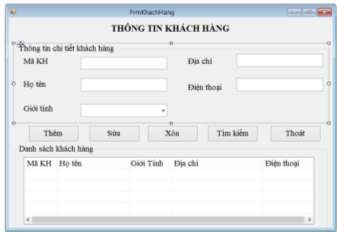
Figure 1. 1. Record form
- One-to-many form
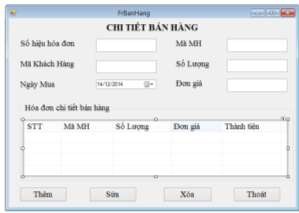
Figure 1. 2. One-to-many form
Sometimes these forms are combined together to form a new form.
b. Solution Explorer window:
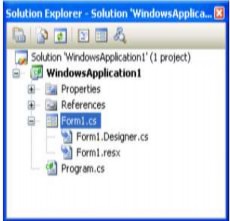
- Show Projects in Solution, bold Project is run first
- Show all files in Project
- Toolbar
+ Show All files: Show files
+ Refresh: Reread files
+ View Code: Show command code
+ View Design: Show design
+ Class Diagram: Display class diagram
Figure 1 Solution Explorer window
Figure 1.3 Solotion window
c. Toolbox window
- Contains intuitive Programming controls
- Group by function
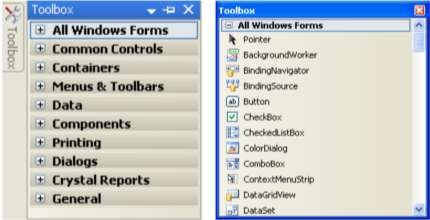
Figure 1.4 Toolbox window
d. Some basic controls:
Lable : is a control that allows users to display a string of characters on a form but cannot change that string of characters directly.