
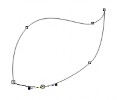
Double click to finish
Polyline Tool
Maybe you are interested!
-
 Corel Draw graphics application, web design profession, college level - 9
 -
 Corel Draw graphics application, web design profession, college level - 11
 -
 Java programming Web design profession - Dalat College of Technology - 8
 -
 Java programming Web design profession - Dalat College of Technology - 10
 -
 SQL server database management system course, web design profession, Dalat College of Technology - 14
Select the Polyline tool
The drawing method is similar to the Bezier tool but with a line segment that follows when moving the tool and the method of drawing curves is similar to the Freehand tool
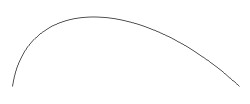
3 Point Curve Tool
Select the 3 Point Curve tool
Click at a point to start, drag the mouse to a new location – release the mouse
Continue dragging the mouse, an arc will follow, click to finish
Artistic Media Tools
Click to select the Artistic Media Tool
Select the following shapes on the Property bar:
1. Preset: helps draw curves with different types of brush strokes
2. Brush: draw strokes in special shapes such as arrows..
3. Sprayer: draw with special shapes like goldfish, leaves, bubbles, candy...
4. Calligraphic: drawing with a flat pen tip.
5. Pressure: draw with a round pen tip
6. Softness of lines
7. Stroke size
8. Stroke styles
Shortcut: I
1 2 3 4 5 6 7 8
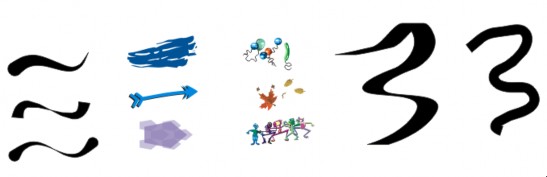
Preset Brush Sprayer Calligraphic Pressure
Interactive Connector Tool
Select the Interactive Connector tool
Click on the corner point of an object
Drag and click on the corner point of another object
A connector line will connect two objects together.
When moving one of the two objects, the connecting segment will also move accordingly.
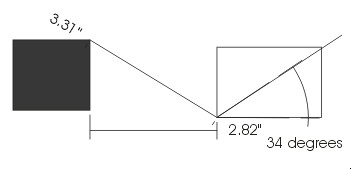
Dimension tool
Select the Dimension tool
On the Property bar, click:
Auto Dimension tool : automatically draw measurement lines
Vertical Dimension tool : draw vertical measurement lines
Horizontal Dimension tool : draw horizontal measurement lines
Slanted Dimension tool : draw diagonal measurement lines
Callout tool: automatically fill in parameters after drawing measurement lines
Angular Dimension tool : draw angle measurement line
Horizontal Dimension tool Slanted Dimension tool
Vertica Dimension tool Auto Dimension tool
Callout tool
Angular Dimension tool
Rectangle Tool
Draw a rectangle
Select the Rectangle tool
Click somewhere to start on the Drawing page and drag diagonally, releasing the mouse at another point to finish.
Shortcut: F6
Draw a square
Ctrl + mouse
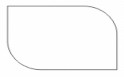
Rounded edges
Drag the cursor to the right corner of the drawn shape, the cursor turns into a black arrow with a small plus sign. Drag the arrow, you will create a rounded corner.
Change the parameters in the right angle icon on the Property bar. When changing the parameters, if you click lock  , you will change 4 angles at a time, if you do not click lock, you will change each angle.

lock
3 Point Rectangle Tool
Do not select Select lock
Use to draw rectangles or squares How to draw:
Click - drag the mouse to the new point, release the mouse
Drag the mouse to the next position, a rectangle appears and drags as the mouse moves.
Click again to finish
Hold down the Ctrl key while drawing to get a square
Ellipse Tool
Draw an ellipse
Select the Ellipse tool  on the toolbox.
Click a point to start on the Drawing page and drag diagonally, releasing the mouse at another point to finish.
Shortcut: F7
Draw a circle
Hold down the Ctrl key while drawing.
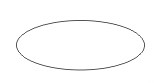
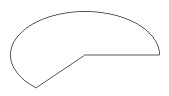
Draw ellipses, fan shapes, arcs
Click one of the three options above the Property bar
Ellipse: draw an Ellipse.
Pie : draw a closed fan shape.
Arc: to draw an arc.
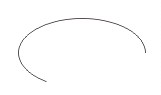
Ellipse Pie Arc
180 degrees
90 o
270 degrees
Start angle End angle
0 o

3 Point Ellipse Tool
Use to draw an ellipse or circle How to draw:
Click - drag the mouse to the new point, release the mouse
Drag the mouse to the next position, an ellipse appears and follows as the mouse moves.
Click again to finish
Hold down the Ctrl key while drawing to get a circle

Polygon Tool
Used to draw polygons and squares
Select the Polygon tool ï
Click one point to start and another point to end.
sense
Number of corners/edges Sharpness of corners
Shortcut: Y
Draw regular polygons
Select the Polygon tool ï
Click and hold Ctrl + drag mouse
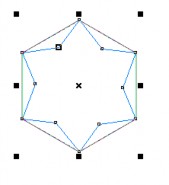
Draw polygons, stars
On the Property bar
Draw a star Draw a poly
Click on the Polygon Star icon
Drag the slider to change the star angle parameters (from 7 points or more)
Click on the parameter box to select the number of sides of the shape
Drag diagonally to draw a shape
To draw stars with non-intersecting edges, first draw a polygon, then click one of the corner - edge nodes and drag to the center.

Spiral Tool
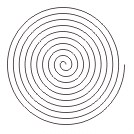
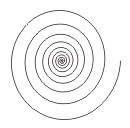
Drag diagonally to draw a spiral
Shortcut: A
Number of twists
Symmetrical Logarithmic
Symmetrical
Logarithmic
Symmetrical: draw spirals with even twists.
Logarithmic: draw a spiral with increasing spiral depending on the Expansion parameter .
Graph paper tool
Select the Graph paper tool in the Polygon Tool toolbar .
Drag diagonally to draw a grid
Shortcut: D
Determine the number of rows and columns of the frame to be drawn by the following method:
Enter the number of rows and columns of the frame to be drawn into the icon box on the Property bar.
Number of columns
Number of lines

Basic Shapes Tool
Draw basic shapes (triangle, cross...)
Select tool
Drag diagonally to draw shapes
On the Property bar, click to select shapes and line styles.
Arrow Shapes Tool
Draw arrows
Select tool
Drag diagonally to draw shapes
On the Property bar, click to select shapes and line styles.
Flow Chart Shapes Tool
Select tool
Drag diagonally to draw shapes
On the Property bar, click to select shapes and line styles.
Star Shapes Tool
Draw star shapes
Select tool
Drag diagonally to draw shapes
On the Property bar, click to select shapes and line styles.
Select stroke style Select shape
Select stroke style Select shape

Callout Shapes Tool
Select tool
Drag diagonally to draw shapes
On the Property bar, click to select shapes and line styles.
Summary
Distinguish how to draw straight lines, zigzag lines and freehand curves using the Freehand, Bezier, Pen, Polyline, 3 Point Curve tools
Note some similar methods when drawing simple objects such as rectangles, ellipses, spirals, polygons...
How to draw measuring lines and connecting lines