
// Starting form
// ###############
default: require('startform.php'); break; break;
}
}
Maybe you are interested!
-
 Practice database programming with VB.net - 39
 -
 SQL Database Administration - Hanoi University of Business and Technology - 14
 -
 Database Content Structure In GIS Environment
 -
 Overview of Water Resources Database Development
 -
 Application of Information Technology in Database Construction
?>
2. Create a file named startform.php and enter the following code
<html>
<head>
<title>Multipurpose Form</title>
<style type=”text/css”> TD{color:#353535;font-family:verdana}
TH{color:#000000;font-family:verdana;background- color:#336699}
</style>
</head>
<body>
<form action=”form4.php?step=1” method=”post”>
<table border=”0” width=”750” cellspacing=”1” cellpadding=”3” bgcolor=”#353535” align=”center”>
<tr>
<td bgcolor=”#FFFFFF” width=”30%”>Name</td>
<td bgcolor=”#FFFFFF” width=”70%”>
<input type=”TEXT” name=”Name”>
</td>
</tr>
<tr>
<td bgcolor=”#FFFFFF”>Item Type</td>
<td bgcolor=”#FFFFFF”>
<input type=”radio” name=”type” value=”Movie:Movie” checked> Movie<br>
<input type=”radio” name=”type” value=”Person:Actor”> Actor<br>
<input type=”radio” name=”type” value=”Person:Director”> Director<br>
</td>
</tr>
<tr>
<td bgcolor=”#FFFFFF”>Movie type (if applicable)</td>
<td bgcolor=”#FFFFFF”>
<select name=”MovieType”>
<option value=”” selected>Movie type...</option>
<option value=”Action”>Action</option>
<option value=”Drama”>Drama</option>
<option value=”Comedy”>Comedy</option>
<option value=”Sci-Fi”>Sci-Fi</option>
<option value=”War”>War</option>
<option value=”Other”>Other...</option>
</select>
</td>
</tr>
<tr>
<td bgcolor=”#FFFFFF” width=”50%”>Display Debug Dump</td>
<td bgcolor=”#FFFFFF” width=”50%”>
<input type=”checkbox” name=”Debug” checked>
</td>
</tr>
<tr>
<td bgcolor=”#FFFFFF” colspan=2 align=”center”>
<input type=”submit” name=”Submit” value=”Search”>
<input type=”submit” name=”Submit” value=”Add”>
</td>
</tr>
</table>
</form>
</body>
</html>
4. Create a new file named AddMovie.php:
<?php
if ($_POST['type'] == “Movie:Movie” &&
$_POST['MovieType'] == “”) { header(“Location:form4.php”);
}
$title = $_POST['Submit'] . “ “ .
$_POST['type'] . “ : “ .
$_POST['Name'];
$name = $_POST['Name'];
$name[0] = strtoupper($name[0]);
?>
<html>
<head>
<title><?php echo $title; ?></title>
<style type=”text/css”> TD{color:#353535;font-family:verdana}
TH{color:#000000;font-family:verdana;background-color:#336699}
</style>
</head>
<body>
<form action=”form4.php?step=2” method=”post”>
<input type=”hidden” name=”type” value=”<?php echo $type[1]; ?>”>
<input type=”hidden” name=”action”
value=”<?php echo $_POST['Submit']; ?>”>
<table border=”0” width=”750” cellspacing=”1” cellpadding=”3” bgcolor=”#353535” align=”center”>
<tr>
<td bgcolor=”#FFFFFF” width=”30%”>Movie Name</td>
<td bgcolor=”#FFFFFF” width=”70%”>
<?php echo $name; ?>
<input type=”hidden” name=”Name” value=”<?php echo $name; ?>”>
</td>
</tr>
<tr>
<td bgcolor=”#FFFFFF”>Movie Type</td>
<td bgcolor=”#FFFFFF”>
<?php echo $_POST['MovieType']?><br>
<input type=”hidden” name=”type”
value=”Movie: <?php echo $_POST['MovieType']; ?>”>
</td>
</tr>
<tr>
<td bgcolor=”#FFFFFF”>Movie Year</td>
<td bgcolor=”#FFFFFF”>
<select name=”MovieYear”>
<option value=”” selected>Select a year...</option>
<?php
for ($year=date(“Y”); $year >= 1970 ;$year--) {
?>
<option value=”<?php echo $year; ?>”><?php echo $year; ?></option>
<?php
}
?>
</select>
</td>
</tr>
<tr>
<td bgcolor=”#FFFFFF”>Movie Description</td>
<td bgcolor=”#FFFFFF”>
<textarea name=”Desc” rows=”5” cols=”60”></textarea>
</td>
</tr>
<tr>
<td bgcolor=”#FFFFFF” colspan=”2” align=”center”>
<input type=”submit” name=”SUBMIT” value=”Add”>
</td>
</tr>
</table>
</form>
</body>
</html>
5. Create a new file named AddPerson.php and enter the following code
<?php
$title = $_POST['Submit'] . “ “ .
$_POST['type'] . “ : “ .
$_POST['Name'];
$name = $_POST['Name'];
$name[0] = strtoupper($name[0]);
?>
<html>
<head>
<title><?php echo $title; ?></title>
<style type=”text/css”> TD{color:#353535;font-family:verdana}
TH{color:#000000;font-family:verdana;background- color:#336699}
</style>
</head>
<body>
<form action=”form4.php?step=2” method=”post”>
<input type=”hidden” name=”type” value=”Person: <?php echo $type[1]; ?>”>
<input type=”hidden” name=”action” value=”<?php echo $_POST['Submit']; ?>”>
<table border=”0” width=”750” cellspacing=”1” cellpadding=”3” bgcolor=”#353535” align=”center”>
<tr>
<td bgcolor=”#FFFFFF” width=”30%”>
<?php echo $type[1]; ?> Name
</td>
<td bgcolor=”#FFFFFF” width=”70%”>
<?php echo $name?>
<input type=”hidden” name=”Name” value=”<?php echo $name; ?
>”>
</td>
</tr>
<tr>
<td bgcolor=”#FFFFFF”>Quick Bio</td>
<td bgcolor=”#FFFFFF”>
<textarea name=”Bio” rows=”5” cols=”60”></textarea>
</td>
</tr>
<tr>
<td bgcolor=”#FFFFFF” colspan=”2” align=”center”>
<input type=”submit” name=”SUBMIT” value=”Add”>
</td>
</tr>
</table>
</form>
</body>
</html>
6. Run form4.php on the browser. The result is as follows:
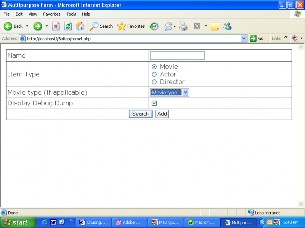
Figure 5.3.1
7. Enter movie name: “Grand Canyon.”
8. Click on the Add button, giving you the following image:
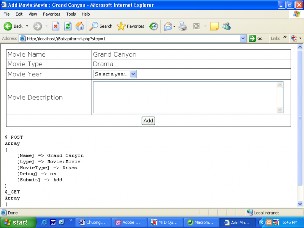
Figure 5.3.2
9. Choose a date in the year the film was produced
10. Select Drama from the movie type list.
11. Quickly display movies, if you want to enter something, enter it there
12. Click on the Add button and see the information displayed as follows:
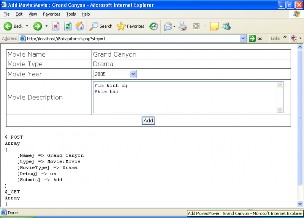
Figure 5.3.3
When you press the Add button the screen displays:
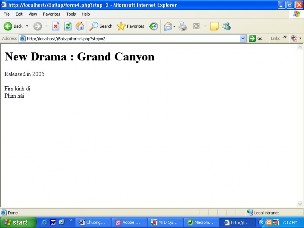
Figure 5.3.4
How it works
This script is designed
around a simple idea: a script
frame (form4.php) and multiple flesh-andmuscle scripts on URL with query string.
5.3.1. Frame script
The skeleton here is the form4.php script. It all revolves around using the switch case structure. It starts with defining the function for rendering the compiler (which contains the rendering of the global $_GET ).
In practice the form uses the POST method and so passes information to the $_POST array, the page's conversion content will be passed through the query string of the $GET array.