
If Btn_Update.Text ="Edit" Then Btn_Add.Text ="Save" Btn_Update.Text ="Cancel" Set_Enabled(False)
Else
Btn_Add.Text ="Add" Btn_Update.Text ="Edit" Set_Enabled(True)
i = 0 Display(i)
End If End Sub
- Click event of Delete button
Private Sub Btn_Delete_Click(ByVal sender As System.Object, ByVal e As System.EventArgs) Handles Btn_Delete.Click
Dim sqlstr As String
sqlstr ="Delete from student where masv=@masv" Dim cmd As New SqlCommand(sqlstr, cn)
cmd.Parameters.Add("@masv", SqlDbType.NVarChar).Value
= txt_masv.Text
If MsgBox("Do you want to delete this student?", MsgBoxStyle.OkCancel, "Notification") = MsgBoxResult.Ok Then
cmd.ExecuteNonQuery() DisplayTable()
End If End Sub
- Click event of Exit button
Private Sub Btn_New_Click(ByVal sender As System.Object, ByVal e As System.EventArgs) Handles Btn_Close.Click
Me.Close() End Sub
Note that for the events of adding, editing, and deleting, we can use Stored Procedures instead of writing commands directly in the VB.Net environment. The advantage of using Stored Procedures is that we can control the data when adding, editing, and deleting.
In SQL Server we create the following procedures:
- Procedure to add record to student table: CREATE PROCEDURE sp_Insert_SV
@masv as nvarchar(10),
@hoten as nvarchar(50),
@ns as of date,
@gt as nvarchar(3),
@address as nvarchar(30),
@mal as nvarchar(20) AS
BEGIN
declare @kt as bit set @kt=1
if exists (select 'true' from sinhvien where masv=@masv) begin
set @kt=0
raiserror('Duplicate student code',16,6) end
if LEN(@masv)=0 begin
set @kt=0
raiserror('Invalid student code',16,6)
end
if LEN(@hoten)=0 begin
set @kt=0
raiserror('Invalid student name',16,6)
end
if LEN(@address)=0 begin
set @kt=0
raiserror('Invalid address',16,6)
end
if LEN(@mal)=0
begin
set @kt=0
raiserror('Invalid class code',16,6)
end
if @kt=1 begin
insert into student(Masv,hoten,ns, gt,diachi,malop) values (@Masv,@hoten,@ns , @gt, @diachi ,@mal) end
END
- Procedure to update records for student table: CREATE PROCEDURE [dbo].[sp_UPDATE_SV]
@masv as nvarchar(10),
@hoten as nvarchar(50),
@ns as of date,
@gt as nvarchar(3),
@address as nvarchar(30),
@mal as nvarchar(20) AS
BEGIN
declare @kt as bit set @kt=1
if LEN(@masv)=0 begin
set @kt=0
raiserror('Invalid student code',16,6)
end
if LEN(@hoten)=0 begin
set @kt=0
raiserror('Invalid student name',16,6)
end
if LEN(@address)=0 begin
set @kt=0
raiserror('Invalid address',16,6)
end
if LEN(@mal)=0
end
begin
set @kt=0
raiserror('Invalid class code',16,6)
if @kt=1 begin
student update
set hoten=@hoten,ns=@ns, gt=@gt,diachi=@diachi, malop=@mal where masv=@masv
end END
- Procedure to delete students:
CREATE PROCEDURE sp_Delete_SV
@masv as nvarchar(10)
AS BEGIN
delete from student where masv=@masv delete from diem where masv=@masv
END
Once stored procedures have been created, we can use them to program add, edit, and delete events.
- Click event of the Add button
Private Sub Btn_Add_Click(ByVal sender As System.Object, ByVal e As System.EventArgs) Handles Btn_Add.Click
Dim cd As New SqlCommand() cd.Connection = cn cd.CommandText ="sp_Insert_SV"
cd.CommandType = CommandType.StoredProcedure If Btn_Add.Text ="Add" Then
Btn_Add.Text ="Save" Btn_Update.Text ="Cancel" Set_Null() Set_Enabled(False)
Else
Btn_Add.Text ="Add"
Btn_Update.Text ="Edit" Set_Enabled(True)
cd.Parameters.Add("@masv", SqlDbType.VarChar).Value
= txt_masv.Text
cd.Parameters.Add("@hoten", SqlDbType.VarChar).Value = txt_hoten.Text cd.Parameters.Add("@ns", SqlDbType.Date).Value
= DateAndTime.DateValue(txt_ns.Text) cd.Parameters.Add("@gt", SqlDbType.Varchar).Value
= txt_gt.Text
cd.Parameters.Add("@diachi", SqlDbType.VarChar).Value = txt_qq.Text cd.Parameters.Add("@mal", SqlDbType.Varchar).Value
= txt_mal.Text cd.ExecuteNonQuery() DisplayTable()
End If End Sub
- Click event of Edit button
Private Sub Btn_Update_Click(ByVal sender As System.Object, ByVal e As System.EventArgs) Handles Btn_Update.Click
Dim cd As New SqlCommand() cd.Connection = cn cd.CommandText ="sp_Update_SV"
cd.CommandType = CommandType.StoredProcedure If Btn_Update.Text ="Edit" Then
Btn_Add.Text ="Save" Btn_Update.Text ="Cancel" Set_Enabled(False)
Else
Btn_Add.Text ="Add" Btn_Update.Text ="Edit" Set_Enabled(True)
i = 0 Display(i)
End If End Sub
- Click event of Delete button
Private Sub Btn_Delete_Click(ByVal sender As System.Object, ByVal e As System.EventArgs) Handles Btn_Delete.Click
Dim cd As New SqlCommand() cd.Connection = cn cd.CommandText ="sp_Delete_SV"
cd.CommandType = CommandType.StoredProcedure cmd.Parameters.Add("@masv", SqlDbType.NVarChar).Value
= txt_masv.Text
If MsgBox("Do you want to delete this student?", MsgBoxStyle.OkCancel, "Notification") = MsgBoxResult.Ok Then
cmd.ExecuteNonQuery() DisplayTable()
End If End Sub
Example 2: Design and program a student information management form according to the following template.
The form allows sorting and searching by student code, full name, date of birth, address.
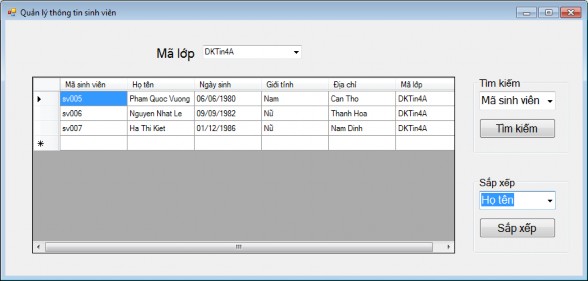
Figure 8.8. Student sorting and searching form
Step 1: In the Solution Explorer-QLDiem window, select the QLDiem project/Right-click/Select Add/Select Window Forms/Enter the form name in the Name/Add section
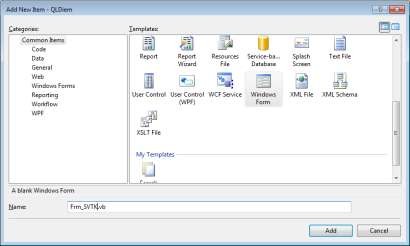
Figure 8.9. Create a new form
Step 2: Create a View named lop, only get information of class code.
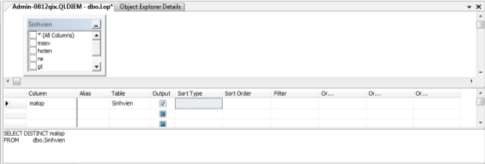
Figure 8.10. Create a View class
Step 3: Design Student Information Management Form (frm_SVTK)
STT
Object | Properties | Value | |
1 | Form | Name | Frm_SVTK |
Text | Student information management | ||
2 | Label | Text | Class code |
3 | Group Box | Text | Arrange |
4 | Group Box | Text | Search |
5 | Combo | Name | Cb_malop |
6 | Combo | Name | Cb_Sort |
Items | Student code, Full name, Date of birth, Hometown | ||
7 | Combo | Name | Cb_malop |
Items | Student code, Full name, Date of birth, Hometown | ||
8 | DataGridView | Name | Dgv_SV |
9 | Button | Name | Btn_Sort |
Maybe you are interested!
-
 Management Status of Tcm Results Evaluation Through NCBH Form Table 2.9: Current Status of Evaluation of Professional Team Performance Results Through Form
 -
 Current Status of Cooperation Between School, Family, and Society in Educating Children Through Student Activities
 -
 Student Survey Questionnaire
 -
 Dpcsv Curve And Standard Addition Graph For Determination Of Selenium Form In Aqueous Phase After Defatting With 5ml N-Hexane (1 Time)
 -
 Student Satisfaction Level for TVHN Programs
Text | Arrange | ||
10 | Button | Name | Btn_Search |
Text | Search |
Step 4: Program events and procedures
- Domain declaration: Imports System.Data
Imports System.Data.SqlClient Imports System.Configuration
- Declare objects used within the scope of the form: Dim cnn As New SqlConnection()
Dim da As New SqlDataAdapter Dim oDS As DataSet
Dim oDV As DataView
- Procedure to put data of student table into DataGridView object. Private Sub FillDataSetAndView()
oDS = New DataSet()
da.SelectCommand = New SqlCommand() da.SelectCommand.Connection = cnn
da.SelectCommand.CommandText ="SELECT * FROM Student WHERE MaLop='"&cb_malop.SelectedItem(0)&"'" da.SelectCommand.CommandType = CommandType.Text
da.Fill(oDS, "Student")
oDV = New DataView(oDS.Tables("Sinhvien")) End Sub
- Procedure to decorate DataGridView object. Private Sub Grid() Dgv_SV.Columns(0).HeaderText ="Student code" Dgv_SV.Columns(1).HeaderText ="Full name" Dgv_SV.Columns(2).HeaderText ="Date of birth" Dgv_SV.Columns(3).HeaderText ="Gender" Dgv_SV.Columns(4).HeaderText ="Address" Dgv_SV.Columns(5).HeaderText ="Class code"
End Sub
- Change event of cb_malop
Private Sub cb_malop_SelectedIndexChanged(ByVal sender As System.Object, ByVal e As System.EventArgs) Handles cb_malop.SelectedIndexChanged