
3.1
3.2
3.3
3.4
3.5
Figure 1.2: Steps to select a new Project Visual Studio 2010
 Note: If you want to create a Project using another language, you can select that language in the Other Languages section. As shown in Figure 1.2, you can select Visual Basic or Visual C++.
- Step 4: After creating a new Project, select the Program.cs file in the Solution Explorer window as shown in Figure 1.3. In the Main method, add the following code:
// Display the message string 'Welcome to C# 2010' Console.WriteLine("Welcome to C# 2010");
// Enter two real numbers a, b from the keyboard
//Execute two declarations of two real variables a, b float a, b;
//Import a
Console.Write("Enter a ="); a = float.Parse(Console.ReadLine());
//Import a
Console.Write("Enter b ="); b = float.Parse(Console.ReadLine());
//Declare variable max and find the largest number between two numbers a, b float max;
max = a;
if (max < b) max = b;
Console.WriteLine("Max = {0}", max); System.Console.ReadLine();
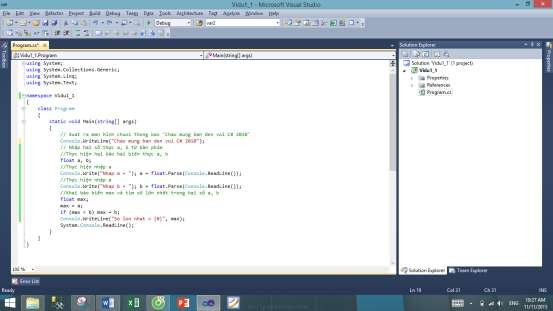
Figure 1.3: Program.cs file
- Step 5: To run the program, press F5 or click the button  . Result in figure 1.4.
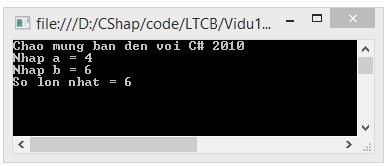
Figure 1.4: Results of program Vidu1.1
The simple example above is called a Console application, this application is communicated through the keyboard and does not have a user interface (User Interface), like the applications commonly found in Windows. In the chapters on building advanced applications on Windows or the Web, only graphical interfaces are used. As for learning about pure C# language, the best way is to write Console applications.
In the simple application above, we use the WriteLine() method of the Console class. This method will output to the screen the input parameter string, specifically the string
―Welcome to C# 2010‖ and then move the screen cursor to the beginning of the next line, you can also use the Write() method to display the string but not move the cursor to the beginning of the next line. Next, declare two real numbers a, b and enter data for these two variables.
float a, b;
//Import a
Console.Write("Enter a ="); a = float.Parse(Console.ReadLine());
//Import a
Console.Write("Enter b ="); b = float.Parse(Console.ReadLine());
The ReadLine() method returns a string entered from the keyboard and the float.Parse() method returns a real number corresponding to the entered string. Following is the code used to find the largest number in two variables a, b and display the result on the screen.
float max; max = a;
if (max < b) max = b;
Console.WriteLine("Max = {0}", max);
After declaring variable max and assigning the value of variable a to max, the if statement will compare max with b, if max is less than b then the value of b will be max and display the largest number.
The last statement Console.ReadLine() at the end of the program is used to wait until the Enter key is pressed to close the running program.
1.2.4. Comments in C# programs
A well-written program should have comments in the code it writes. These comments are not compiled and do not participate in the program. The main purpose is to make the source code clear and easy to understand.
In example 1.1 there is a comment line:
// Display the message 'Welcome to C# 2010' on the screen
A comment string on a line begins with the character ―//‖. When the compiler encounters these two characters, it ignores that line.
In addition, C# also allows comments for one or more lines and must declare ―/*‖ at the beginning of the comment and the end of the comment is the character ―*/‖.
Example 1.2: Illustration of using multi-line comments.
namespace Vidu1_2
{
class Program
{
static void Main(string[] args)
{
}}}
/* Output the string 'welcome' to the screen
Use the WriteLine function of the System.Console class
*/
System.Console.WriteLine("Welcome to C# 2010"); System.Console.ReadLine();
Program execution results:
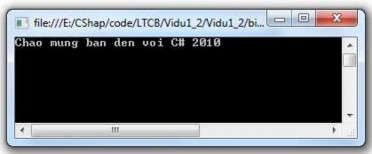
Figure 1.5: Result of example program 1.2.
1.2.5. Namespace
The source code inside the Framework is organized inside namespaces. There are hundreds of namespaces inside the Framework that are used to organize thousands of object classes and other data types. Some namespaces are stored inside other namespaces. A namespace is a package of entities that have attributes and behaviors independent of the outside world. The advantages of namespaces are listed as follows:
- Avoid duplicate names between classes.
- Allows to organize source code scientifically and logically.
Declare a Namespace
namespace NamespaceName
{
// where all classes are stored
}
In there,
- namespace: is the keyword that declares a NameSpace
- NamespaceName: is the name of a Namespace. For example:
namespace CSharpProgram
{
Basic class
{
}
Advanced class
{
}
}
CHAPTER 2: PROGRAMMING BASIS IN C#
This chapter discusses the data type system, distinguishing between built-in data types (such as int, bool, string, etc.) and user-defined data types (programmer-created classes or structures, etc.). Other basic programming concepts such as creating and using data variables or constants are also covered, along with how to construct expressions with operators such as assignment, logical operations, relational and mathematical operations, etc., and control structures such as if, switch, for, while, do…while.
As we know, C# is a very powerful object-oriented language and the programmer's job is to inherit, create and exploit objects. Therefore, to master and develop well, programmers need to start from the first steps, that is, to learn the most basic and essential parts of the language.
2.1. Name
Names are used to identify different components in a program. In C#, a name is a sequence of characters that begins with a letter or a hyphen ( _ ), followed by letters, numbers, or hyphens.
Example 2.1: Naming in C#. Correct names:
a_1 delta x1 _step GAMA
Incorrect names:
wrong name
Explain | |
3MN | The first character is a digit |
m#2 | Use the # character |
f(x) | Use the () sign |
by | Matches keywords |
Maybe you are interested!
-

 Steps to Determine the Competitiveness of a Business
 -
 Analysis of Current Data on the Implementation of the Project for Developing a Primary School with 2 Sessions/Day Teaching in Primary Schools
 -
 Research on Building a Test Project for Iá Knvđcb CO for Children 3-6 Years Old at Kindergartens in Ho Chi Minh City Area
 -
 Steps to Create a Presentation Using Storymap Tool on Arcgis Online Platform
 -
 Ph Effect on Vsv (A): For Improved Ebb, (B) Control Sample The Study Also Aims to Select the Appropriate Ph Range for Growth
te ta
Use white space | |
Y-3 | Use the - sign |
 Note: C# is a case-sensitive language. Therefore, delta and Delta are two different names.
2.2. Keywords
As introduced in chapter 1, table 1.1, C# language has about 77 keywords, each keyword has a special meaning and keywords cannot be used to name other quantities in the program. For example, class, do, using are keywords. The meaning of most keywords will be introduced in the lecture series.
 Note: In the Code and Text Editor window of Visual Studio 2010, the keyword will be colored blue when entered correctly.
2.3. Constants and Variables
2.3.1. Basic data types
C# is a programming language that is strong in data types. A strong language in data types is to declare the type of each object when creating (integer, real, string, ...) and the compiler will help the programmer avoid errors when only allowing one type of data type to be assigned to other data types. C# is divided into two main sets of data types: Built-in types that the language provides to the programmer and user-defined types created by the programmer.
C# divides this set of data types into two categories: value data types and reference data types. This division is due to the difference in storing value data types and reference data types in memory. For a value data type, the actual size will be stored in the allocated memory, which is the stack. Meanwhile, the address of the reference data type is stored in the stack, but the actual object is stored in the heap memory. This chapter only focuses on introducing basic data types or built-in types.
The C# language provides very useful built-in data types, suitable for a modern programming language, each data type is mapped to a data type supported by the Common Language Specification (CLS) in MS.NET.
Mapping C# primitive data types to .NET data types ensures that objects created in C# can be used side by side with objects created in any other language compiled to .NET, such as VB.NET.
Each data type has a value domain and size that does not change, unlike C++, int in C# is always 4 bytes in size because it is mapped from Int32 type in .NET.
C# style
Number of bytes | .NET Type | Value Domain | |
byte | 1 | Bytes | Integer from 0 to 255 |
character | 2 | Character | Unicode characters |
Boolean | 1 | Boolean | {true, false} |
byte | 1 | Sbyte | Integers from -128 to 127 |
short | 2 | Int16 | Integers from -32768 to32767. |
ushort | 2 | User16 | Unsigned integers from 0 – 65535 |
int | 4 | Int32 | Integers from –2,147,483,647 to 2,147,483,647 |
uint | 4 | Uint32 | Integers from 0 to 4,294,967,295 |
float | 4 | Single | Floating point type, approximate value from 3.4E- 38 to 3.4E+38, with 7 significant digits. |
double | 8 | Double | Integers from 0 to 4,294,967,295 |
decimal | 8 | Decimal | With an accuracy of up to 28 digits and decimal values, used in financial calculations, this type requires the suffix ―m‖ or ―M‖ following value. |
long | 8 | Int64 | Signed integer type with value in the range: -9.223.370.036.854.775.808 to 9.223.372.036.854.775.807 |
ulong | 8 | Uint64 | Integers from 0 -18,446,744,073,709,551,615 |
Table 2.1: Description of built-in data types
Select data type
Usually, choosing an integer data type to use such as short, int or long is often based on the size of the value you want to use. For example, a ushort variable can store values from 0 to 65,535, while a ulong variable can store values from 0 to 4,294,967,295, so depending on the value range of the variable, choose the most appropriate data type. The int data type is most commonly used in programming because its 4 byte size is enough to store the necessary integer values.
The float, double, and decimal types offer different levels of size and precision. For operations on small fractions, the float type is most suitable. Note, however, that the compiler always interprets any real number as a double unless explicitly declared. To assign a float number, the number must be followed by the letter f.
float soFloat = 24f;
The character data type represents Unicode characters, including simple characters, Unicode characters, and other escaped characters enclosed in single quotes. For example, A is a simple character while u0041 is a Unicode character. Escape characters are special characters consisting of two consecutive characters where the first character is a backslash ‗'. For example, t is a tab character. Table 3.2 lists some special characters.
Character
Meaning | |
' | Apostrophe |
‖ | Double quote |
Cross | |
null character | |
a | Alert |
b | Backspace |
f | Go to Form feed page |
n | New line |
r | Header |
t | Horizontal tab |
v | Vertical Tab |
Table 2.2: Special character types.
2.3.2. Variables
A variable is declared with the following syntax:
Variable_name data_type;
In which Data_Type can be a built-in data type or a user-defined data type, the variable_name is set by the user and follows the naming rules.
Example 2.2: Variable declaration
int a; //declare an integer variable named a float b,c;//declare two real variables b and c
 Note: In a statement, multiple variables of the same type can be declared, separated by a comma ",".
A variable can be initialized to a value when it is declared, or it can be assigned a new value at any time in the program. Example 2.3 illustrates the use of variables.
Example 2.3: Initializing and assigning a value to a variable.
namespace Vidu2_3{ class Program