
Summary and exercises
A process is a running program.
To efficiently utilize the CPU, multiprogramming needs to be introduced into the system.
Maybe you are interested!
-

 Determining the price of residential land for compensation when the State recovers land according to current Vietnamese law - 2
 -
 Savings And Investment Flow Diagram
 -
 Directions for Improving State Management of Tourism Activities in Dak Nong Province
 -
 State management of compensation, support and resettlement when the State acquires land in Buon Ho town, Dak Lak province - 12
 -
 The impact of state ownership and bank loans on investment decisions of companies in Vietnam - 18
Multiprogramming is accomplished by storing multiple processes in memory at a time, and routing the CPU back and forth between the processes in the system.
The multithreading model allows each process to execute multiple threads simultaneously in the same address space to perform tasks more efficiently in some cases.
Reinforce the lesson
Questions to be answered after this lesson:
1. Why do modern operating systems support multitasking environment?
2. Distinguish between multitask, multiprogramming and multiprocessing.
3. What is the purpose of the concept of process?
4. What is the difference and relationship between process and thread?
Exercise
Lesson 1. Many operating systems do not allow concurrent processing. Discuss the complications that arise when an operating system allows multitasking?
Lesson 2. Find some applications that are suitable for the multi-process model; and some applications that are suitable for the multi-thread model.
Process Management
In this article we will learn about the process management function of the Operating System.
: How to divide CPU for processes? Trace the process? And operations on the process?
Process management organization
Process states
The state of a process at a given time is determined by the current activity of the process at that time. During its life, a process changes state for many reasons such as: waiting for an event to occur, waiting for an input/output operation to complete, being forced to stop due to timeout, etc.
At any given time, a process can be in one of the following states:
Newly created : process is being created.
Running : instructions of the process being processed.
Blocked : a process waiting to be allocated a resource, or waiting for an event to occur.
Ready : process waiting to be allocated CPU for processing.
Finish : the process is complete.
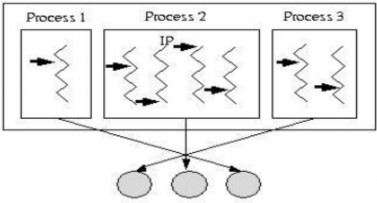
Figure 2.2 State transition diagram between processes
At a time, only one process can be in the running state on any processor. Meanwhile, multiple processes can be in the blocked or ready state .
The transition arcs in the state diagram represent six possible state transitions under the following conditions:
The newly created process is added to the system.
The scheduler allocates a period of CPU time to the process. The process terminates.
The process requested a resource but it was not granted because the resource was not available at that time; or the process had to wait for an event or I/O operation.
The dispatcher selects another process to handle.
A resource requested by the process becomes available for allocation; or an event or I/O operation the process is waiting to complete.
Process processing mode
To ensure the proper functioning of the system, the operating system must be protected from the intrusion of processes. The processes and data themselves must also be protected from corrupting each other. One approach to solving the problem is to distinguish two processing modes for processes: non-privileged mode and privileged mode with the help of hardware mechanisms. The CPU instruction set is divided into privileged and non-privileged instructions. Hardware mechanisms allow only privileged instructions to be executed in privileged mode. Normally, only the operating system operates in privileged mode, user processes operate in non-privileged mode, and privileged instructions that could potentially affect the system cannot be executed. Thus, the operating system is protected. When a user process invokes a system call, the operating system process that handles the call operates in privileged mode, and upon completion returns control to the user process in unprivileged mode.

Figure 2.3 Two processing modes
Process management block data structure
The operating system manages processes in the system through the process control block (PCB). The PCB is a memory area that stores information describing the process, with the main components including:
Process identifier (1) : helps to distinguish processes
Process status (2) : determines the current activity of the process.
Process context (3) : describes the process resources that are in process, either to serve the current operation, or to serve as a basis for restoring the process operation, including information about:
CPU state : includes the contents of the registers, most importantly the instruction pointer IP which stores the address of the next instruction the process will execute. This information needs to be stored when an interrupt occurs, in order to allow the process to resume its operation exactly as it was before the interrupt.
Processor : used for machines with multiple CPU configurations, identifies the CPU number that the process is using.
Main memory : list of memory blocks allocated to the process.
Resources used : list of system resources that the process is using.
Created resources : list of resources created by the process.
Communication information (4) : reflects information about the relationship of the process with other processes in the system:
Parent process : the process that created this process.
Child processes : processes created by this process.
Priority : helps the dispatcher have information to choose the process to be assigned the CPU.
Statistical information (5) : this is statistical information about the process's activities, such as CPU usage time, waiting time. This information can be useful for evaluating the system situation and predicting future situations.
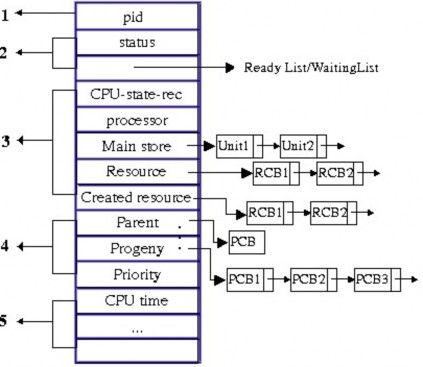
Figure 2.4 Process description block
Actions on the process
The operating system provides the following major operations on a process: process creation (create)
destroy process suspend process resume process change process priority create process
During execution, a process can create many new processes by using a corresponding system call. The process that calls the system call to create a new process is called the parent process , the created process is called the child process . Each child process in turn can create new processes…this process continues to create a process tree .
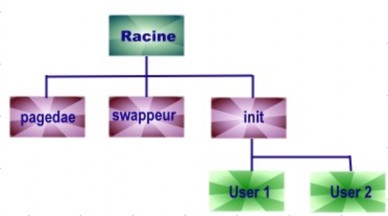
Figure 2.5 A process tree in a UNIX system
The tasks that the operating system needs to perform when creating a process include: identifying the newly created process.
put the process into the management list of the system that determines the priority for the process
Create PCB for process
allocate initial resources to the process
When a process creates a child process, the child process may be directly allocated resources by the operating system or may inherit some of the original resources from the parent process.
When a process creates a new process, the original process can behave in one of two ways:
The parent process continues to execute concurrently with the child process.
The parent process waits until some child process, or all child processes, finish processing.
Different operating systems may choose different settings for performing the process creation operation.
End of process
A process terminates when it completes its last instruction and uses a system call to request the operating system to cancel it. Sometimes a process may request the operating system to terminate the execution of another process. When a process terminates, the operating system does the following:
reclaim system resources allocated to the process kill the process from all system management lists kill the process PCB
Most operating systems do not allow child processes to continue to exist if the parent process has terminated. In such systems, the operating system automatically initiates a series of operations to terminate the child process.
Allocate resources to the process
When multiple users are working on the system at the same time, the operating system needs to allocate resources to each user on demand. Since system resources are often limited and sometimes cannot be shared, it is rare that all concurrent resource requests can be satisfied. Therefore, it is necessary to study a method to share some limited resources among multiple concurrent user processes. The operating system manages many different types of resources (CPU, main memory, peripheral devices
…), each type requires an allocation mechanism and effective allocation strategies. Each resource is represented through a data structure, which differs in detail for each resource type, but basically contains the following information:
Resource identifier
Resource status : this is information that describes the detailed status of the resource: which part of the resource has been allocated to the process, which part is still usable?
Queue on a resource : list of processes waiting to be allocated the corresponding resource.
Allocator : is the code responsible for allocating a particular resource. Some resources require specialized algorithms (such as CPU, main memory, file system), while others (such as I/O devices) may need more general allocation and freeing algorithms.