
SMTP communication example:
Once the connection between the sender (client) and the receiver (server) has been established, the following actions are perfectly valid for an SMTP session. In the following conversation, what the client sends is marked with a C: in front of it, and what the server sends is marked with an S:. Any computer system can establish a connection using the telnet software commands on a client. For example:
telnet www.example.com 25
initiates an SMTP connection from the sender to the server www.example.com .
S: 220 www.example.com ESMTP Postfix C: HELO mydomain.com
S: 250 Hello mydomain.com
C: MAIL FROM:<sender@mydomain.com> S: 250 Ok
C: RCPT TO:<friend@example.com> S: 250 Ok
C: DATA
S: 354 End data with <CR><LF>.<CR><LF> C: Subject: test message
C: From: sender@mydomain.com C: To: friend@example.com
C: Hello,
C: This is a test.
C: Goodbye.
S: 250 Ok: queued as 12345 C: QUIT
S: 221 Bye
SMTP Status Codes
When one
sending host send a
SMTP command to receiving host , host
return one
Status codes tell the sender what happened. The list below is a summary of the codes .
by first number (5xx is error , 4xx is triple error , 1xx-3xx is success ):
Code
Meaning | |
211 | Help reply, system status |
214 | Help message |
220 | Service ready |
221 | Close the connection |
250 | Requested action accepted |
251 | The user is not on the local network, move to |
354 | Start typing mail |
421 | Service not available |
450 | Action not accepted, mailbox is empty |
451 | Action cancelled, local error |
452 | Unacceptable action, lack of storage space |
500 | Command not understood or syntax error |
501 | Error in parameter syntax |
502 | Command not supported |
503 | Wrong order of command |
504 | Command parameters are not supported. |
550 | Action not accepted, mailbox not available . |
551 | Not a local user |
552 | Cancel command due to exceeding storage space |
553 | Action not accepted, mailbox name not allowed |
554 | The trading session has failed. |
Maybe you are interested!
-
 Practice database programming with VB.net - 39
 -
 Java programming Web design profession - Dalat College of Technology - 8
 -
 Mitsubishi PLC Programming Guide - 3
 -
 Java programming Web design profession - Dalat College of Technology - 10
 -
 Advanced XML Web Programming - Dalat College of Technology - 10
Post Office Protocol (POP)
POP allows mail clients (UA – User Agent) on the local computer to connect to the POP server (MTA – Message Transfer Agent) and retrieve mail to the local computer where the user can access it.
readable
and reply to messages . POP is enabled .
definition
first in 1984 , was
lift
issued in POP2 in 1988. Current standard
the action is POP3 .
POP3 UA connects with TCP /IP to the server (standard port 110). UA enters
into one
name
Login
(username) and password. After logging in
, Use the following commands
POP3 to retrieve and delete mail.
POP3 is a protocol for multiplication only.
mail. POP3 UA uses SMTP to send mail to the server.
POP3 is supported.
described in RFC 1939.
The following table describes the POP3 commands.
Command
Meaning | |
USER | Only username leak |
PASS | Password leak only |
STAT | Request mailbox status ( number of messages, size of messages) |
LIST | List messages |
RETR | Get a specific message |
DELE | Delete a specific message |
NOOP | Do nothing |
RSET | Undo the action of DELE commands (rollback) |
QUIT | Accept the changes and disconnect . |
Internet Mail Access Protocol (IMAP)
POP3 is a simple protocol. IMAP4 is a
Other mail standards support multiple features .
more powerful. IMAP4 is IMAP4 Commands
described in RFC 2060. IMAP4 uses TCP port 143.
Command
Meaning | |
CAPABILITY | Request a list of supported functions |
AUTHENTICATE | Leaked login mechanism only |
LOGIN | Provide username and password |
SELECT | Mailbox leak only |
EXAMINE | Specify mailbox as read-only |
CREATE | Create a mailbox |
DELETE | Delete a mailbox |
RENAME | Rename a mailbox |
SUBSCRIBE | Add a mailbox to the permission list |
UNSUBSCRIBE | Remove mailbox from whitelist |
List all mailboxes | |
LSUB | List all mailboxes allowed |
STATUS | Request mailbox status |
APPEND | Add a message to the mailbox |
CHECK | Request a mailbox checkpoint |
CLOSE | Accept all delete actions and close mailbox |
EXPUNGE | Accept all actions |
SEARCH | Search mailbox for messages that match specific conditions |
FETCH | Get a portion of a specific message |
STORE | Change the data of a specific message |
COPY | Copy message to another mailbox |
NOOP | Do nothing |
LOGOUT | Close the connection |
LIST
RFC commands are not actually programming language commands, they are strings used to send to the Server via a Socket created with the corresponding port. For example, if you want to send
mail, create a TCP socket on port 25 with the Server (for example, Post Office) then
RFC command (command ends with ENTER ) and receives responses from the server to send mail .
The quickest way to test RFC commands is to use the Telnet program. For example, to send an email, do the following:
In Command Prompt type the command: Telnet mail.myserver.com 25 Then type the commands as in the example given in the previous section .
send me
If you write a Windows Application , you can use Windows ' MAPI control , if
write (asp) Webmail can use CDO , these controls help programmers do not need
know RFC but still
can write
Use email by using both methods .
The above controls all use RFC directives to do their job .
work
send and receive
monk.
Work
write one
Apply g by using g directly
RFC invites developers
must show
code a lot (almost every letter ) , have to learn many other standards (MIME), encoding types
(Base64, unicode,...), if you write Webmail , you must learn more about uploading files (to attach), how to organize
on the Webserver to manage read mail
already read
, or
I
add folders
1.4.2. File Transfer Protocol - FTP (File Transfer Protocol)
FTP service is used to transfer data files between hosts on the Internet. The tool to perform the file transfer service is the ftp program, it uses an Internet protocol called FTP (File Transfer Protocol). As the name of the protocol says, the job of the protocol
This protocol is used to transfer files from one computer to another. This protocol allows file transfer regardless of the geographical location or operating system of the two computers. The only thing required is that both computers have software that understands the FTP protocol. ftp is such software on the Unix operating system.
To use this service, we must first have a user registration on the remote machine and must have a corresponding password. This will reduce the number of people allowed to access and update files on the remote system. Some servers on the Internet allow us to log in with an anonymous account, and the password is our e-mail address, but of course, then we only have limited rights to the file system on the remote machine.
To make an FTP session work, we also need two pieces of software. One is the FTP client application running on the user's computer, allowing us to send commands to the FTP host. The other is the FTP server running on a remote server, used to process the user's FTP commands and interact with the file system on the host it is running on.
FTP allows us to search for information on the server using common commands such as ls or dir. When the user types these commands, ftp will transfer them to the server, at which the server will execute this command and send back information about the list of files found. After receiving this information, the user will send a request for a certain file using the command: get source_file_name destination_file_name. When wanting to transfer a file to a remote computer, the user uses the command: put source_file_name destination_file_name. To be able to download or transfer many files to a remote computer at once, people can use the mget and mput commands and use wild cast characters like in the DOS environment. The following example will download files named
*.dat:
mget *.dat
Here is an example of a file transfer transaction:
# ftp ftp.vnd.net connected to server Connected to ftp.vnd.net
220 FTP Server ready.
name: anonymous enter user name to login 331 send your e-mail as password Password: password not displayed
230 User guest logged in. Access restricted is apply ftp>dir command displays list of files
sendmail-7.5 tcp-wrapper innd w project.dat ftp>get project.dat download file to local
ftp>quit exit service 221 Goodbye.
To use FTP service, users can run FTP client software such as: WS_FTP or CUTFTP, these are programs with quite user-friendly graphical interfaces. We can download these software from the Internet to install on our computers.
1.4.3. World Wide Web (WWW) global information network service
This is the newest and most powerful service on the Internet. WWW is built on a technique called hypertext. Hypertext is a technique of presenting information on a page in which some words can "bloom" into a new information page with more complete content. On the same information page, there can be many different types of data such as TEXT, images or sounds. To build data pages with different types of data like this, WWW uses a language called HTML (HyperText Markup Language). HTML language is built on the basis of SGML (Standard General Markup Language). HTML allows formatting information pages, allowing information to be connected to each other.
On information pages, there are some words that can "bloom", each of which actually has a link to other information. To link these resources, WWW uses a method called URL (Universal Resource Locator). With URL, WWW can also access information resources from different services such as FTP, Gopher, Wais... on different servers.
Users use a Web Browser software to view information on WWW servers. The server must have a Web server software. This software receives requests from the Web Browser and executes those requests.
With the explosion of WWW services, this service is increasingly expanded and many advanced techniques are added to increase the ability to express information for users. Some new technologies are formed such as Active X, Java allowing the creation of dynamic Web pages, which really opens up a huge development direction for this service.
1.4.4. HTTP (HyperText Transfer Protocol)
HTTP stands for HyperText Transfer Protocol. It is the basic protocol that the World Wide Web uses. HTTP defines how messages (text files, graphics, audio, video, and other multimedia files) are formatted and transmitted, and what actions Web servers and browsers must take in response to a wide variety of commands. For example, when we type a Web URL into a Web browser, an HTTP command is sent to the Web server, instructing it to find the correct Web page and pull it up in the Web browser. In simpler terms, HTTP is the protocol for transferring files from a Web
server into a Web browser so that users can view a Web page that is present on the Internet. HTTP is an application protocol of the TCP/IP protocol suite (the foundation protocols for the Internet).
Another major standard that also governs how the World Wide Web works is HTML (HyperText Markup Language), which governs how Web pages are formatted and displayed.
HTTP is called a "stateless" protocol because each command is executed independently, and each subsequent command has no knowledge of the previous commands. This is a limitation and shortcoming of HTTP. It is the main reason why it is very difficult to implement Web pages that can react intelligently to the commands that users enter. And this limitation is being overcome by developers in new technologies such as ActiveX, Java, JavaScript, and cookies.
The latest version of HTTP is 1.1. Compared to the original version (HTTP 1.0), this new version delivers Web pages faster and reduces Web traffic congestion.
1.4.5. Chat Protocol
Internet Relay Chat (IRC) is a "real-time" medium, meaning that the words we type appear almost instantly on the recipient's screen and their responses appear on ours. Instead of waiting minutes or days for a message, we can communicate instantly at the speed of our own typing. IRC can be as personal as e-mail, where strangers cannot discover the content of our exchanges, or we can create "open channels" for anyone we want to join. It is not uncommon for IRC channels to have 10 or more participants. In addition to exchanging words, IRC users can also send each other files such as pictures, programs, documents, and other things.
As with other Internet services, the scope of conversations on IRC channels is very wide and may include topics that are not suitable for children, so measures should be taken to monitor children who wish to use this service.
1.4.6. URL (Uniform Resource Locator)
URL stands for "Uniform Resource Locator", used to refer to resources on the Internet. The power of the web is the ability to create hypertext links to related information. This information can be other web pages, images, sounds... These links are often represented by blue underlined letters called anchors. URLs can be accessed through a browser such as IE or Netscape.
A URL is used to identify the address of a document (or other data) on the World Wide Web. A complete address would look like this:
http://goccongnghe.net/html/trangtruoc.htm and follow the following syntax: Scheme://host.domain:port/path/filename
Scheme: One of the Internet protocols, including http, ftp, gopher, news (USENET news), nntp (Network News Transfer Protocol), Telnet and WAIS (Wide Area Information Servers), and others. The following addresses use the http protocol:
http://goccongnghe.net/html/html_basic.htm
Domain: identifies the domain name of the website on the Internet, for example goccongnghe.net
Host: specifies the domain name of the host. If omitted, the default host for http is www.
Port : specifies the port number at the host. The port number is usually omitted. The default port number for http is 80.
Path: specifies the path on the server. If the path is omitted, the document must be located in the root directory of the website.
Filename: specifies the name of the document. The default name of a document can be default.asp or index.html or something else depending on the server settings.
1.4.7. Web Browser.
A web browser is a software application for retrieving, displaying, and transferring information resources on the World Wide Web. An information resource is identified by a Uniform Resource Identifier (URI) and can be a web page, video, image, or other information.
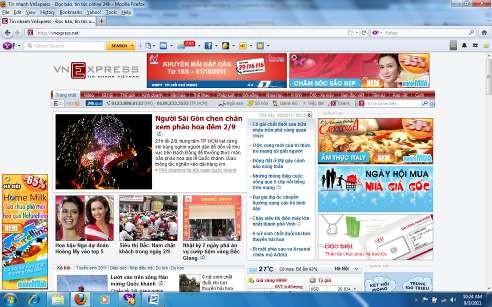
Figure 1.1. Web browser to view information on a website