
Chapter V. Application of e-commerce in business
1. Building an e-commerce system in the enterprise
Information technology is a set of scientific methods, technologies and modern technical tools for producing and transmitting, collecting, processing, storing and exchanging digital information. (Clause 1 - Article 4 - Law on Information Technology 2006).
Information systems in a broad sense are the collection and combination of hardware, software and communication networks built and used to collect, create and reproduce, distribute and share information to serve the goals of the organization. ( http://vi.wikipedia.org/wiki/H%E1%BB%87_th%E1%BB%91ng_th%C3%B4n g_tin )
Figure 8.1: Components of the IT system
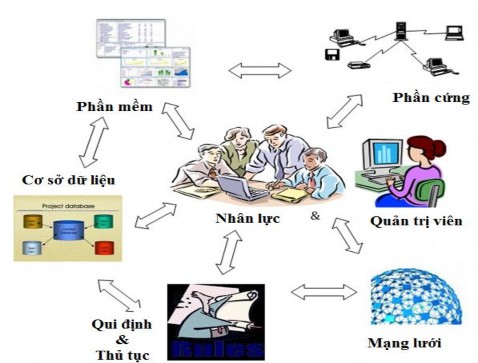
Source: Foundations of Information Systems, DSYadas
Functions of information systems
- Data entry: collect and receive data for processing
use
- Data processing: converting data into information meaningful to users
- Information output: distributing information to the people or activities that need it
use that information
- Information storage
- Provide feedback: to support the process of testing, re-evaluating and perfecting the system.
1.1. E-commerce website hosting
1.1. 1. Some website hosting methods
The nature of a website is a collection of web pages (webpages) in the form of existing web pages (static pages) or web pages created from resources and databases (dynamic pages). Website storage is one of the most important issues of e-commerce, similar to the synthesis of storing documents, papers, accounting books, warehouses, stores... in traditional commerce.
Hosting an e-commerce website includes storing data (information about businesses, production, business, customers, etc.), software systems that process electronic transactions (online shopping, invoice management, customer service, etc.) and other content on the website (electronic catalogs, reports, digital resources, etc.). Depending on the scale of the e-commerce system, the number and configuration of the server system needed to host e-commerce websites will vary.
Currently, there are some basic methods to host e-commerce websites as follows:
- Invest in purchasing servers to install at the company's premises, hire experts to design and build network systems, and install necessary software to manage the company's server systems.
+ Disadvantages: The investment cost to build a business's own server system is very large, in terms of infrastructure, machinery, equipment, and rental costs.
system design and system administration later. To minimize infrastructure costs, businesses can still invest in servers but rent space to place servers at these service providers. This way, they avoid investing in building server rooms that have very high technical standards and avoid renting private lines to connect to their servers. This method still ensures the confidentiality of business information because the servers are stored in highly secure rooms. Currently, in Vietnam, server systems of banks, universities, customs, taxes, etc. are often built and operated within the organization.
+ Advantages : Information security and proactive system operation as well as future upgrades and expansions. In addition, the ability to build and manage an e-commerce server system is also an important competitive advantage for businesses participating in e-commerce.
- Renting servers from service providers (renting space on a server or renting several servers). Accordingly, businesses pay a fee to be able to use a portion of the hard drive capacity on the server to host their website or rent several servers from the service provider to use. This form can be combined with the above form. Even leading e-commerce businesses such as Google also outsource website hosting services.
+ Advantages: The costs of building infrastructure, installing transmission lines, maintaining and managing servers are carried out by the service provider. Businesses only have to pay a monthly service fee. Businesses take advantage of the service provider's high-speed transmission lines.
+ Disadvantages: The level of information security is not guaranteed because the business does not have full control over the servers that store its information. Therefore, this method is often suitable for small e-commerce systems, websites that only have the function of introducing and promoting products and services... but do not have the function of online payment and other advanced functions such as data processing (data mining) or sharing information between partners (B2B integration).
1.1. 2. Leased line Internet for servers
When a business wants to build its own server system and this system is located at the business's data storage center, the business will have to rent a private Internet line to connect to these servers. Through this connection, other computers can access the business's server to perform electronic transactions such as looking up information, making purchases and sales, signing contracts, etc. A private Internet leased line is the most advanced form of Internet connection for businesses today. In addition, there are two other popular forms of Internet connection: Dial-up and ADSL. In 2008, in Vietnam, FPT began providing fiber optic cables directly connecting to each organization, business and household. Basically, these types of Internet connections have the following characteristics:
- Dial-up connection: With this service, users connect to the Internet using a telephone line, then can register for a dial-up account with an internet service provider, or through a common dial-up system such as vnn1269, .... This type of connection is simple, does not require much investment in terms of equipment, only needs a Dial-up modem and a fixed telephone line. However, the speed of this type is very slow (in theory, only reaches a maximum of about 56 kbps). This type of transmission cannot be used to connect the server to the Internet because the speed is too slow and there is no static IP address (the server's address so that other computers can access it). Up to now, this type of connection is outdated, almost very few people still use this type.
- ISDN - Integrated Services Digital Network : ISDN was born in 1976 with the purpose of unifying the transmission of data and sound. The disadvantage of the technology is that it only transmits voice services and low-speed packet switching. It is not suitable for high-speed packet switching and long-term occupancy. This is the characteristic of the current Internet. Therefore, ISDN is not widely applied but only applied to families or small businesses. However, for those who use ISDN in the US, it is difficult to forget the benefits that ISDN brings when ISDN is an open technology.
for all types of integrated services. IDSL - ISDN digital subscriber line – guaranteed 144Kbps on both B and D channels.
- ADSL - Asymmetrical DSL: ADSL is a branch of xDSL technology. ADSL provides an asymmetric bandwidth on the available telephone line. The term asymmetric here refers to the imbalance in the download and upload data streams. The download data stream has a larger bandwidth than the upload data stream. ADSL was born in 1989. ADSL1 provides 1.5 Mbps for the download data line and 16 kbps for the upload data line, supporting the MPEG-1 standard. ADSL2 can provide bandwidth up to 3 Mbps for the download line and 16 kbps for the upload line, supporting 2 MPEG-1 streams. ADSL 3 can provide 6 Mbps for the download line and at least 64 kbps for the upload line, supporting the MPEG-2 standard. The ADSL service that we often use today theoretically provides 8 Mbps for download and 2 Mbps for upload, however, for many reasons from the service providers, the quality of ADSL service at our terminals often does not reach the theoretical level. Currently, popular service providers offer a download speed of 2Mbps and an upload speed of 640kbps.
If a business registers and is assigned a static IP address, it can use this ADSL connection to maintain its own service servers such as ftp, mail, web, DNS, etc., similar to using a leased-line connection. However, currently, to save IP address space, not only with dial-up connections but also with ADSL services, providers also use dynamic address allocation methods. This makes it so that customers using high-speed ADSL services today can only improve their Internet access speed but still cannot maintain their own service servers such as mail, ftp, web like those who rent direct leased-line connections.
+ Advantages of using ADSL: Low cost and high speed with acceptable downtime. Compared to leased line service, this service has high speed and is also relatively stable.
+ Disadvantages of using ADSL: The stability of the Internet connection via ADSL is still a major obstacle when using it to connect servers to the Internet.
- Internet connection via leased line
The provider will also provide the business with a minimum of 8 IP addresses. The business will use 6 of these 8 addresses for its servers. The two unused addresses are the first IP address (subnet address) and the last IP address (subnet broadcast address). Since this is a private connection from the business to the Internet service provider, the Internet connection speed will be stable and can increase or decrease depending on the business's needs. In addition, the upload and download speeds are equal, stable and continuous 24/7. However, the service fee for using this type of transmission line is still high, not suitable for most small and medium-sized businesses today.
Table 7.1: List of major Internet service providers in Vietnam
male
STT
Company name | Website | |
1 | VDC | home.vnn.vn |
2 | FPT | www.fpt.vn |
3 | Viettel | www.vietel.com.vn |
4 | NetNam | www.netnam.vn |
Maybe you are interested!
-
 Building an e-commerce website - 6
 -
 Building and developing the Vietnam - China e-commerce portal WWW.vietnamchina.net - 1
 -
 Necessary Conditions for Successfully Building and Developing a Vietnam - China B2B E-commerce Portal
 -
 E-Commerce Risks Originate From Within the Enterprise
 -
 Building a system to monitor water level, temperature and send warnings via SMS/GSM network - 2
Source: www.vnnic.com.vn
1.1. 3. Web server
Web servers generally have more memory, larger, faster hard drives, and faster processors than typical personal computers. Many web servers use multiple processors, while very few personal computers have more than one processor. The basic requirement for servers is the ability to operate 24/7 and process a lot of information simultaneously when multiple users access them at the same time. Therefore, web servers use a lot of hardware, so they are often more expensive than typical workstations. Good personal computers today typically cost only about USD 1,000 - USD 3,000 while
Web servers typically cost between $6,000 and $400,000. Companies that sell web servers, such as Dell, Gateway, Hewlett Packard, and Sun, all have configuration tools on their websites that allow customers to view and select the appropriate server configuration.
1.1. 4. Evaluate the capacity of the web server
A combination of web server hardware and software benchmarks can help evaluate a website system . Factors that affect the performance of a server include: hardware, operating system software, server software, connection speed, number of users, and type of web pages being served . When evaluating web server performance, it is important to know exactly what factors are being measured and to make sure that they are important in relation to the web server's usage. Another factor that affects web server performance is connection speed. A server connected via a T3 line (44.736Mbps) will be able to deliver web pages to clients faster than if it were using a T1 line (1.544Mbps).
The number of users a server can handle is also an important factor. This can be difficult to measure because the results are affected by the server's line speed, the client's line speed, and the size of the web page being served . Two factors to evaluate when measuring the speed of a web server's web page delivery are throughput and response time . Throughput is understood as the number of requests that the server's hardware and software can handle in a unit of time. Response time is the time it takes for the server to process a request.
For small website systems with few simultaneous visitors, we can use servers with Pentium processors at 3.0 Ghz speed, 2Gb RAM or more is acceptable. For large systems with large number of transactions and many visitors, it is necessary to use multiple servers with stronger configurations and a reasonably designed network system, dividing the transactions that need to be processed through a load balancing device. For example, for large enterprises such as Amazon, Alibaba... the server system is not just 1 but can be up to hundreds.
The servers form a distributed network, and these servers may not be located in one place but are scattered in several locations around the world to increase the processing speed as fast as possible for customers.
To be able to choose good hardware for web server, we can use the testing method on many combined factors. To be able to perform the test, of course we have to install both hardware and software for the server. This will be difficult to do when we have not paid for the server. However, we can use independent testing labs of other companies such as Mindcraft to test the hardware and software of the system. This company's website has many reports and statistics comparing the hardware and operating systems and web server software products. (See www.mindcraft.com for more information )
1.1. 5. Operating systems for web servers
The operating system is responsible for executing programs and allocating resources such as memory and storage space for the program. The operating system software also provides input and output services to devices connected to the computer such as the keyboard, monitor and printer. A computer must have operating system software installed to control the execution of programs. With large systems, the operating system must also monitor the activities of many different users when they log into the system and must ensure that the activities of these users do not interfere with each other.
Most web servers are installed on one of the following operating systems: Microsoft Windows NT Server, Microsoft Windows 2000 Server, Microsoft Windows 2003 Server, Linux, or UNIX-based operating systems such as Solaris or FreeBSD. Many companies believe that Microsoft products are simpler for their information systems staff to learn and use than UNIX-based operating systems. Other companies are concerned about security weaknesses due to the integration of application software and operating systems in Microsoft products. Web servers run