
The query language of Microsoft SQL Server is Transact–SQL(T–SQL). T-SQL is an extended SQL language based on the standards of ISO (International Organization for Standardization) and ANSI(American National Standards Institute) used in SQL Server.
SQL Server 2005 provides many new popular utilities, data types, functions, clauses and objects,... helping software developers store, calculate, compile statistics, search and report for all management applications.
Function
- Create and manage data
Maybe you are interested!
-

 Building and developing the Vietnam - China e-commerce portal WWW.vietnamchina.net - 1
 -
 Necessary Conditions for Successfully Building and Developing a Vietnam - China B2B E-commerce Portal
 -
 Building E-Commerce System in Enterprise
 -
 E-commerce in small and medium enterprises: current situation and solutions - 11
 -
 E-commerce in small and medium enterprises: current situation and solutions - 1
- Prepare reports and summarize data
- Manage usage rights
- Interact with other management systems
Advantage
- Provides commands for querying data
- Insert, update, delete rows in a relation.
- Ensure database consistency and constraints
- Improve enterprise data management, programmer performance.
- Good support for analysis system, decision support
- High security.
- Suitable for large projects.
Disadvantages
- Takes up large memory space
- Difficult to install
3.1.1.3. Introducing DevExpress
DevExpress is a component library that supports the interface for the .NET Framework very powerfully. Currently, many programming companies use Devexpress to work for customers, and many students use it to do projects at school. Supports C#, VB, ASP.NET, WPF, Silver Light. What's special about DevExpress is its main interface, similar to the Word 2007, 2010 interface, and its GridControl, TreeList ... are impeccable, supporting you from advanced search, image display ... Crystal Report supports reporting much better than the Report in .NET that is already supported.
3.1.1.4. Introducing CKEditor
CKEditor (also known as FCKeditor) is an open source WYSIWYG (hand-seen-by-hand) code editor from CKSource. This program can be integrated into web sites without requiring installation.
CKEditor uses JavaScript as its foundation, and for interacting with the server, CKEditor uses the following languages: Active-FoxPro, ASP, ASP.NET, ColdFusion, Java, JavaScript, Lasso, Perl, PHP and Python…
3.1.2. Data manipulation techniques
3.1.2.1. Writing according to the 3-layer model
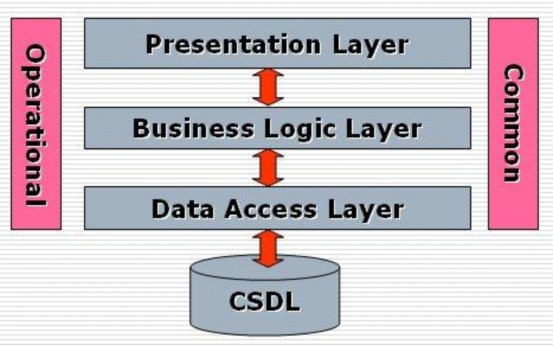
Figure 14: 3-tier model
Data Access Layer
- This class performs operations related to data storage and retrieval.
- Use services of database management systems such as SQL Server, Oracle,...
- Usually performs tasks: Connect to the database and use queries: Select, update, Delete, Insert
- Content is saved in *.cs files
Business Logic Layer
- This class performs the main operations of the system.
- Use the services provided by the Data Access layer, and provide services to the Presentation layer.
use
- This layer can also use the services of third party providers to perform
- Show your work (for example using payment gateway services)
- Online like VeriSign, Paypal...).
- Content is saved in *.cs files
Presentation Layer
- This layer is responsible for communicating with the end user to collect data and
- Display results/data through components in the user interface
- Content is saved in *.aspx and *.aspx.cs files
- This layer will use the services provided by the Business Logic layer.
Common Ingredients
- Contains common components for all 3 layers
- Contains components that transmit information between layers5
- Content is saved in *.cs files
Operational Components
- Contains ingredients that are used repeatedly
- Content is saved in *.cs files
3.1.2.2. Write directly to *.aspx.cs file
In addition to writing code in the three-layer model, I also write code directly on the
*aspx.cs file by defining Stored Procedures and calling SQL commands to save time and diversify data usage.
3.1.2.3. Some other subjects
Sqlcommand
The SqlCommand object allows you to specify the types of interactions that you want to perform with a database. For example, you can use select, add, edit, and delete statements on a row of data in a data table.
SqlDataSource
SqlDataSource is a component introduced from .NET Framework 2.0. Using SqlDataSource to access data will not require writing programming code, just need to declare all necessary properties. SqlDataSource should only be used when there is no need to use too complex SQL queries to manipulate the database.
AJAX (Asynchronous JavaScript and XML)
AJAX is a set of tools that speed up web applications by breaking down data and displaying only what is needed, instead of loading the entire web page over and over again. AJAX is not a single technology but a combination of a group of technologies. HTML and CSS act as data display, the DOM model presents dynamic information, the XMLHttpRequest object exchanges data asynchronously with the web server, and XML is the main format for transmitting data. These are all available technologies, but JavaScript has assembled them to perform admirable "missions".
ASPxMenu
The ASPxMenu family consists of two single controls, ASPxMenu and ASPxPopupMenu, which support the creation of both fixed and dynamic contextual menus.
Control Features:
- Can create menu from Datasource by exploiting XML file structures or Database tables.
- Can easily set up an attractive Menu with just a few clicks
mouse.
- Can change the expression depending on each state, through customization
Edit properties or edit CSS files.
- Can insert necessary images before the Text of each Item in the menu, can customize the position of the Text relative to the image. Can customize the handling of user-side events
User side features:
- Users can use user side events to customize a task for hiding or showing Sub-Menu and when the user clicks on the Menu.
ASPxNavBar
ASPxNavBar allows us to create concise information, placed in navigation bars, creating an interface similar to Microsoft Outlook Sidebar or Windows Explorer. This control allows us to change many options, and place anywhere desired on the website. Like other DevExpress ASP.NET Controls, it strongly supports AJAX and CSS technology.
Control characteristics
- Can create ASPxNavBar from Datasource to create groups and items by exploiting XML file structures.
- We can easily change the interface display by editing the classes.
CSS.
- To support AJAX, set the EnableCallbacks property to True, now
ASPxNavBar only loads the content of the default open Group, not the entire content of the Group when displayed to the user. When the user clicks to open a Group, the content inside will be loaded via the callbacks event. Once the content of a group has been loaded, the user can open or close this group without having to call the callbacks or postback events.
- Images can be associated with Items.
- Can customize the position where the user clicks on the Item to execute the function of that Item. (Text, image or both).
- We can customize the position of the image relative to the text of the Item. (Top, bottom, left,
Right).
- We can also highlight and mark each Item.
ASPxGridView
ASPxGridView is a very powerful Control, supporting the display of data in grid form,
allows us to create display fields manually or through the Database.
Tool features:
- Supports data mining from many different database management systems: Microsoft Access, SQL Server
- Allows displaying Master-Detail data with diverse structures.
- There are 2 editing modes: from the editing form or editing directly on the row.
- Validate data rows and indicate errors: ASPxGridView allows us to manually validate edited rows, and display error messages for invalid fields.
- Automatic data grouping: Allows users to group data, with unlimited number of columns.
- Full data summary: Allows displaying statistical information such as MIN, MAX, AVG, SUM and COUNT directly on the grid.
- Allows filtering data and displaying Text: For each column, we can specify how the data is sorted according to its display value. In addition, we can allow filtering any data by typing the value we want to filter directly into the textbox.
- Allows selecting multiple lines at once.
XtraReport
The report part on the Web environment also uses the XtraReport Component like the Windows environment. It contains tools to create reports from complex data, preview mode, print and export reports to many different formats.
XtraReport works in both Winform and Webform applications. We can just create one Report and use it in 2 different environments.
Tool properties
- Fully integrated Visual Studio .Net: Integrated Report Designer. Supports HTML and print preview modes. When there is a change in the report design, we do not need to recompile the entire application but can still update the preview mode in time.
- XtraReports works with all data objects supported by Visual Studio .NET such as: standard .NET Data Objects, Ilist Interface, XML Data Objects.
- Allows filtering of data at multiple levels: Data adapter, Data set, Data views.
Allows data grouping: multi-level and nested grouping.
- Supports many standard controls such as: Label, Line, BarCode, CheckBox, PageInfo, Panel, PictureBox, PageBreak, Table, ZipCode, etc.
- Chart support via XtraCharts 85 control
- SubReports: We can reuse XtraReport classes in the application through the Subreport control. Just drop it into the Subreport control, set the Report source property, and we have 2 reports from one source.
- Summary support: easily create a summary for a textbox or a cell in a table. Just set 2 properties Summary position (group or report) and Summary type (Avg, min, max, sum, count…)
- Supports a variety of output formats: PDF, HTML, MHT, RTF, TXT, CSV and MS Excel. Can export reports to image formats such as: BMP, EMF, GIF, JPEG, PNG, TIFF, WMF.
- Importing: can reload your old reports from MS Access, Crystal Reports, Data Dynamics Active Reports into XtraReport.
- Search in preview mode: helps users find the desired text.
- Support inheritance, Bookmarks, Watermarks.
ASPxComboBox
ASPxComboBox is a standard control of Windows, as well as in .Net FrameWork. It allows displaying a list in list form, in normal state it is quite similar to other ComboBox, with a drop-down arrow to select the list. The advantage of ASPxCombobox is that users can display content in many columns, belonging to different categories such as IDNews and news category name.
3.2.Website interface
Website Structure:
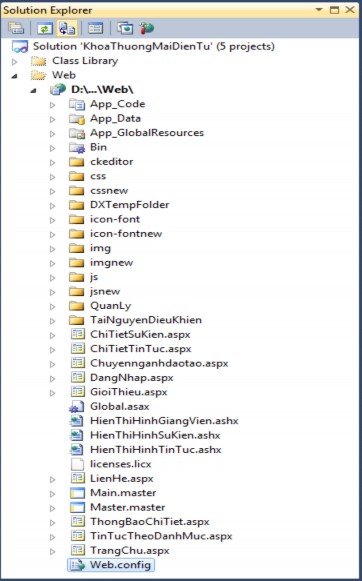
Figure 15: Website Structure
3.2.1. User subsystem
3.2.1.1. Home page:

Figure 16: Home page interface