
70
Maybe you are interested!
-
 Car body electrical practice - 8
zt2i3t4l5ee
zt2a3gs
zt2a3ge
zc2o3n4t5e6n7ts
If the voltage is out of specification, replace the wire or connector.
If the voltage is within specification, install the front fog light relay and follow step 5.
Step 5 Check the front fog light switch
- Remove the D4 connector of the fog light switch
- Use a multimeter to measure the resistance of the front fog light switch.
Measurement location
Condition
Standard
D4-3 (BFG) -D4-4 (LFG)
Light switchFront Fog OFF
>10kΩ
D4-3 (BFG) -D4-4 (LFG)
Front fog light switchON
<1 Ω
- Standard resistor
D4 connector is located on the combination switch assembly.
If the resistance is out of specification, replace the combination switch (the fog light switch is located in the combination switch).
If the resistance is within specification, follow step 6.
Step 6 Check wiring and connectors (front fog light relay-light selector switch)
- Disconnect connector D4 of the combination switch assembly
- Use a voltmeter to measure the voltage value of jack D4 on the wire side.
Measurement location
Control modecontrol
Standard
D4-3 (BFG) - (-) AQ
TAIL
11 to 14 V
D4 connector for the wiring of the combination switch assembly
If the voltage does not meet the standard, replace the wire or connector.
If the voltage is within standard, there may have been an error in the previous measurements.
Step 7 Check the front fog lights
- Remove the front fog light electrical connector.
- Supply battery voltage to the fog lamp terminals
Jack 8, B9 of front fog lamp on the electrical side
blind first.
Power supply location
Terms and Conditions
Battery positive terminal - Terminal 2Battery negative terminal - Terminal 1
Fog lightsbefore morning
- If the light does not come on, replace the bulb.
If the light is on, re-plug the jack and continue to step 8.
Step 8 Check wiring and connectors (relay and front fog lights)
- Disconnect the B8 and B9 connectors of the front fog lights.
- Use a voltmeter to measure voltage at the following locations:
Measurement location
Switch location
Terms and Conditions
B8-2 - (-) AQ
Electric lock ON TAIL size switchFog switch ON
11 to 14 V
B9-2 - (-) AQ
Electric lock ONTAIL size switch Fog switch ON
11 to 14 V
B8 and B9 connectors on the front fog lamp wiring side
Voltage is not up to standard, repair or replace the jack. If up to standard, there may have been an error in the measurement process.
2.2.4. Procedure for removing, installing and adjusting fog lights 1. Procedure for removing
- Remove the front inner ear pads
Use a screwdriver to remove the 3 screws and remove the front part of the front inner ear liner
-Remove the fog light assembly
+ Disconnect the connector.
+ Use a screwdriver to remove 3 screws to remove the fog light cover
2. Installation sequence
-Rotate the fog lamp bulb in the direction indicated by the arrow as shown in the figure and remove the fog lamp from the fog lamp assembly.
-Rotate the fog light bulb in the direction indicated by the arrow as shown in the figure and install the light into the fog light assembly.
- Use a screwdriver to install the fog light cover
-Install the electrical connector
Attention: Be careful not to damage the plastic thread on the lamp assembly.
- Install the front inner ear pads
Use a screwdriver to install the front inner bumper with 3 screws.
3. Prepare the vehicle to adjust the fog light convergence. Prepare the vehicle:
- Make sure there is no damage or deformation to the vehicle body around the fog lights.
- Add fuel to the fuel tank
- Add oil to standard level.
- Add engine coolant to standard level.
- Inflate the tire to standard pressure.
- Place spare tire, tools and jack in original design position
- Do not leave any load in the luggage compartment.
- Let a person weighing about 75 kg sit in the driver's seat.
4. Prepare to check the fog light convergence
a/ Prepare the vehicle status as follows:
- Place the car in a dark enough place to see the lines. The lines are the dividing line, below which the light from the fog lights can be seen but above which it cannot.
- Place the car perpendicular to the wall.
- Keep a distance of 7.62 m between the center of the fog lamp and the wall.
- Park the car on level ground.
- Press the car down a few times to stabilize the suspension.
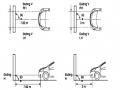
Note: A distance of approximately 7.62 m is required between the vehicle (fog lamp center) and the wall to adjust the convergence correctly. If the distance of 7.62 m cannot be achieved, set the correct distance of 3 m to check and adjust the fog lamp convergence. (Since the target area varies with the distance, please follow the instructions as shown in the figure.)
b/ Prepare a piece of thick white paper about 2 m high and 4 m wide to use as a screen.
c/ Draw a vertical line through the center of the screen (line V).
d/ Set the screen as shown in the picture. Note:
- Keep the screen perpendicular to the ground.
- Align the V line on the screen with the center of the vehicle.
e/Draw the reference lines (H, V LH and V RH lines) on the screen as shown in the figure.HINT:
Mark the center of the fog lamp on the screen. If the center mark cannot be seen on the fog lamp, use the center of the fog lamp or the manufacturer's name mark on the fog lamp as the center mark.
H line (fog light height):
Draw a line across the screen so that it passes through the center mark. Line H should be at the same height as the center mark of the fog light bulb.
Line V LH, V RH (center mark position of left fog lamp LH and right fog lamp RH):
Draw two lines so that they intersect line H at the center marks.
5. Check the fog light convergence
a/ Cover the fog lamp or remove the connector of the other side fog lamp to prevent light from the unchecked fog lamp from affecting the fog lamp convergence test.
b/ Start the engine.
c/ Turn on the fog lights and make sure that the dividing line is outside the standard area as shown in the drawing.
6. Adjust the fog light convergence
Use a screwdriver to adjust the fog light to the standard area by turning the toe adjustment screw.
Note: If the screw is adjusted too far, loosen it and then tighten it again, so that the last rotation of the light adjustment screw is clockwise.
3. Self-study questions
1. Describe the operating principle of the lighting system with automatic headlight function
2. Describe the operating principle of the lighting system with the function of rotating headlights when turning
3. Draw diagram and connect lighting system on Hyundai Porter car
4. Draw diagram and connect lighting system on Honda Accord 1992
5. Draw the lighting circuit on a 1993 Toyota Lexus
LESSON 3 MAINTENANCE AND REPAIR OF SIGNAL SYSTEM
I. IMPLEMENTATION GOAL
After completing this lesson, students will be able to:
- Distinguish between types of signals on cars
- Correctly describe common symptoms and suspected areas causing damage.
- Connecting signal circuits ensures technical requirements
- Disassemble, install, check, maintain and repair the signal system to ensure technical requirements.
- Ensure safety in work and industrial hygiene
II. LESSON CONTENT
1. General description
The signal system equipped on cars aims to create signals to notify other vehicles participating in traffic about the vehicle's operating status such as: stopping, parking, braking, reversing, turning...
Signals are used either by light such as headlamps, brake lights, turn signals….. or by sound such as horns, reverse music….
Just like the lighting system. A signal system circuit usually consists of: battery, fuse, wire, relay, electrical load and control switch. Only some switches of the signal system are on the combination switch. The switches of other signals are usually located in different locations such as in the gearbox or brake pedal……
2. Maintenance and repair
2.1. Turn signals and hazard lights
The installation location of the turn signal is shown in Figure 3.1. The turn signal control switch is located in the combination switch under the steering wheel. Turning this switch to the right or left will make the turn signal turn right or left.
The hazard light switch is used when the vehicle has a problem while participating in traffic. When the hazard light switch is turned on, all the turn signals on the vehicle will light up at a certain frequency. The hazard light switch is usually placed separately from the turn signal switch (some old cars integrate the hazard and turn signal switches on the same combination switch cluster).
Figure 3.1 Turn signal switch Figure 3.2 Hazard switch
The part that generates the flashing frequency for the lights is called a turn signal relay. The turn signal relay usually has 3 terminals: B (positive power supply); E (negative power supply); L (providing the turn signal switch to distribute to the
lamp)
2.1.1. Circuit diagram
To generate the frequency for the turn signal, a turn signal relay is used in the turn signal circuit. The current from the turn signal relay will be sent to the turn signal switch assembly to distribute the current to the turn signal lights for the driver's purpose.
Figure 3.3. Schematic diagram of a turn signal circuit without a hazard switch
1. Battery; 2. Electric lock; 3. Turn signal relay; 4. Turn signal switch; 5. Turn signal lamp; 6. Turn signal lamp; 7. Hazard switch
Figure 3.4 Schematic diagram of turn signal circuit with hazard switch
1. Battery; 2. Combination switch cluster; 3. Turn signal;
4. Turn signal light; 5. Turn signal relay
Today's cars no longer use three-pin turn signal relays (B, L, E) but use eight-pin turn signal relays (figure 3.5) (pin number 8 is used for hazard lights).
For this type, the current supplying the turn signal lights is supplied directly from the turn signal relay to the lights.
div.maincontent .p { color: black; font-family:"Times New Roman", serif; font-style: normal; font-weight: normal; text-decoration: none; font-size: 14pt; margin:0pt; } div.maincontent p { color: black; font-family:"Times New Roman", serif; font-style: normal; font-weight: normal; text-decoration: none; font-size: 14pt; margin:0pt; } div.maincontent .s1 { color: black; font-family:"Times New Roman", serif; font-style: normal; font-weight: normal; text-decoration: none; font-size: 13pt; } div.maincontent .s2 { color: black; font-family:"Times New Roman", serif; font-style: italic; font-weight: normal; text-decoration: none; font-size: 14pt; } div.maincontent .s3 { color: black; font-family:"Times New Roman", serif; font-style: normal; font-weight: normal; text-decoration: none; font-size: 14pt; } div.maincontent .s4 { color: black; font-family:"Times New Roman", serif; font-style: normal; font-weight: normal; text-decoration: none; font-size: 13pt; } div.maincontent .s5 { color: black; font-family:"Times New Roman", serif; font-style: normal; font-weight: normal; text-decoration: none; font-size: 13pt; vertical-align: 1pt; } div.maincontent .s6 { color: black; font-family:"Times New Roman", serif; font-style: normal; font-weight: normal; text-decoration: none; font-size: 11pt; } div.maincontent .s7 { color: black; font-family:"Times New Roman", serif; font-style: normal; font-weight: normal; text-decoration: none; font-size: 14pt; vertical-align: -9pt; } div.maincontent .s8 { color: black; font-family:"Times New Roman", serif; font-style: normal; font-weight: normal; text-decoration: none; font-size: 11pt; } div.maincontent .s9 { color: #008000; font-family:"Times New Roman", serif; font-style: normal; font-weight: normal; text-decoration: none; font-size: 14pt; } div.maincontent .s10 { color: black; font-family:"Times New Roman", serif; font-style: italic; font-weight: normal; te
Car body electrical practice - 8
zt2i3t4l5ee
zt2a3gs
zt2a3ge
zc2o3n4t5e6n7ts
If the voltage is out of specification, replace the wire or connector.
If the voltage is within specification, install the front fog light relay and follow step 5.
Step 5 Check the front fog light switch
- Remove the D4 connector of the fog light switch
- Use a multimeter to measure the resistance of the front fog light switch.
Measurement location
Condition
Standard
D4-3 (BFG) -D4-4 (LFG)
Light switchFront Fog OFF
>10kΩ
D4-3 (BFG) -D4-4 (LFG)
Front fog light switchON
<1 Ω
- Standard resistor
D4 connector is located on the combination switch assembly.
If the resistance is out of specification, replace the combination switch (the fog light switch is located in the combination switch).
If the resistance is within specification, follow step 6.
Step 6 Check wiring and connectors (front fog light relay-light selector switch)
- Disconnect connector D4 of the combination switch assembly
- Use a voltmeter to measure the voltage value of jack D4 on the wire side.
Measurement location
Control modecontrol
Standard
D4-3 (BFG) - (-) AQ
TAIL
11 to 14 V
D4 connector for the wiring of the combination switch assembly
If the voltage does not meet the standard, replace the wire or connector.
If the voltage is within standard, there may have been an error in the previous measurements.
Step 7 Check the front fog lights
- Remove the front fog light electrical connector.
- Supply battery voltage to the fog lamp terminals
Jack 8, B9 of front fog lamp on the electrical side
blind first.
Power supply location
Terms and Conditions
Battery positive terminal - Terminal 2Battery negative terminal - Terminal 1
Fog lightsbefore morning
- If the light does not come on, replace the bulb.
If the light is on, re-plug the jack and continue to step 8.
Step 8 Check wiring and connectors (relay and front fog lights)
- Disconnect the B8 and B9 connectors of the front fog lights.
- Use a voltmeter to measure voltage at the following locations:
Measurement location
Switch location
Terms and Conditions
B8-2 - (-) AQ
Electric lock ON TAIL size switchFog switch ON
11 to 14 V
B9-2 - (-) AQ
Electric lock ONTAIL size switch Fog switch ON
11 to 14 V
B8 and B9 connectors on the front fog lamp wiring side
Voltage is not up to standard, repair or replace the jack. If up to standard, there may have been an error in the measurement process.
2.2.4. Procedure for removing, installing and adjusting fog lights 1. Procedure for removing
- Remove the front inner ear pads
Use a screwdriver to remove the 3 screws and remove the front part of the front inner ear liner
-Remove the fog light assembly
+ Disconnect the connector.
+ Use a screwdriver to remove 3 screws to remove the fog light cover
2. Installation sequence
-Rotate the fog lamp bulb in the direction indicated by the arrow as shown in the figure and remove the fog lamp from the fog lamp assembly.
-Rotate the fog light bulb in the direction indicated by the arrow as shown in the figure and install the light into the fog light assembly.
- Use a screwdriver to install the fog light cover
-Install the electrical connector
Attention: Be careful not to damage the plastic thread on the lamp assembly.
- Install the front inner ear pads
Use a screwdriver to install the front inner bumper with 3 screws.
3. Prepare the vehicle to adjust the fog light convergence. Prepare the vehicle:
- Make sure there is no damage or deformation to the vehicle body around the fog lights.
- Add fuel to the fuel tank
- Add oil to standard level.
- Add engine coolant to standard level.
- Inflate the tire to standard pressure.
- Place spare tire, tools and jack in original design position
- Do not leave any load in the luggage compartment.
- Let a person weighing about 75 kg sit in the driver's seat.
4. Prepare to check the fog light convergence
a/ Prepare the vehicle status as follows:
- Place the car in a dark enough place to see the lines. The lines are the dividing line, below which the light from the fog lights can be seen but above which it cannot.
- Place the car perpendicular to the wall.
- Keep a distance of 7.62 m between the center of the fog lamp and the wall.
- Park the car on level ground.
- Press the car down a few times to stabilize the suspension.
Note: A distance of approximately 7.62 m is required between the vehicle (fog lamp center) and the wall to adjust the convergence correctly. If the distance of 7.62 m cannot be achieved, set the correct distance of 3 m to check and adjust the fog lamp convergence. (Since the target area varies with the distance, please follow the instructions as shown in the figure.)
b/ Prepare a piece of thick white paper about 2 m high and 4 m wide to use as a screen.
c/ Draw a vertical line through the center of the screen (line V).
d/ Set the screen as shown in the picture. Note:
- Keep the screen perpendicular to the ground.
- Align the V line on the screen with the center of the vehicle.
e/Draw the reference lines (H, V LH and V RH lines) on the screen as shown in the figure.HINT:
Mark the center of the fog lamp on the screen. If the center mark cannot be seen on the fog lamp, use the center of the fog lamp or the manufacturer's name mark on the fog lamp as the center mark.
H line (fog light height):
Draw a line across the screen so that it passes through the center mark. Line H should be at the same height as the center mark of the fog light bulb.
Line V LH, V RH (center mark position of left fog lamp LH and right fog lamp RH):
Draw two lines so that they intersect line H at the center marks.
5. Check the fog light convergence
a/ Cover the fog lamp or remove the connector of the other side fog lamp to prevent light from the unchecked fog lamp from affecting the fog lamp convergence test.
b/ Start the engine.
c/ Turn on the fog lights and make sure that the dividing line is outside the standard area as shown in the drawing.
6. Adjust the fog light convergence
Use a screwdriver to adjust the fog light to the standard area by turning the toe adjustment screw.
Note: If the screw is adjusted too far, loosen it and then tighten it again, so that the last rotation of the light adjustment screw is clockwise.
3. Self-study questions
1. Describe the operating principle of the lighting system with automatic headlight function
2. Describe the operating principle of the lighting system with the function of rotating headlights when turning
3. Draw diagram and connect lighting system on Hyundai Porter car
4. Draw diagram and connect lighting system on Honda Accord 1992
5. Draw the lighting circuit on a 1993 Toyota Lexus
LESSON 3 MAINTENANCE AND REPAIR OF SIGNAL SYSTEM
I. IMPLEMENTATION GOAL
After completing this lesson, students will be able to:
- Distinguish between types of signals on cars
- Correctly describe common symptoms and suspected areas causing damage.
- Connecting signal circuits ensures technical requirements
- Disassemble, install, check, maintain and repair the signal system to ensure technical requirements.
- Ensure safety in work and industrial hygiene
II. LESSON CONTENT
1. General description
The signal system equipped on cars aims to create signals to notify other vehicles participating in traffic about the vehicle's operating status such as: stopping, parking, braking, reversing, turning...
Signals are used either by light such as headlamps, brake lights, turn signals….. or by sound such as horns, reverse music….
Just like the lighting system. A signal system circuit usually consists of: battery, fuse, wire, relay, electrical load and control switch. Only some switches of the signal system are on the combination switch. The switches of other signals are usually located in different locations such as in the gearbox or brake pedal……
2. Maintenance and repair
2.1. Turn signals and hazard lights
The installation location of the turn signal is shown in Figure 3.1. The turn signal control switch is located in the combination switch under the steering wheel. Turning this switch to the right or left will make the turn signal turn right or left.
The hazard light switch is used when the vehicle has a problem while participating in traffic. When the hazard light switch is turned on, all the turn signals on the vehicle will light up at a certain frequency. The hazard light switch is usually placed separately from the turn signal switch (some old cars integrate the hazard and turn signal switches on the same combination switch cluster).
Figure 3.1 Turn signal switch Figure 3.2 Hazard switch
The part that generates the flashing frequency for the lights is called a turn signal relay. The turn signal relay usually has 3 terminals: B (positive power supply); E (negative power supply); L (providing the turn signal switch to distribute to the
lamp)
2.1.1. Circuit diagram
To generate the frequency for the turn signal, a turn signal relay is used in the turn signal circuit. The current from the turn signal relay will be sent to the turn signal switch assembly to distribute the current to the turn signal lights for the driver's purpose.
Figure 3.3. Schematic diagram of a turn signal circuit without a hazard switch
1. Battery; 2. Electric lock; 3. Turn signal relay; 4. Turn signal switch; 5. Turn signal lamp; 6. Turn signal lamp; 7. Hazard switch
Figure 3.4 Schematic diagram of turn signal circuit with hazard switch
1. Battery; 2. Combination switch cluster; 3. Turn signal;
4. Turn signal light; 5. Turn signal relay
Today's cars no longer use three-pin turn signal relays (B, L, E) but use eight-pin turn signal relays (figure 3.5) (pin number 8 is used for hazard lights).
For this type, the current supplying the turn signal lights is supplied directly from the turn signal relay to the lights.
div.maincontent .p { color: black; font-family:"Times New Roman", serif; font-style: normal; font-weight: normal; text-decoration: none; font-size: 14pt; margin:0pt; } div.maincontent p { color: black; font-family:"Times New Roman", serif; font-style: normal; font-weight: normal; text-decoration: none; font-size: 14pt; margin:0pt; } div.maincontent .s1 { color: black; font-family:"Times New Roman", serif; font-style: normal; font-weight: normal; text-decoration: none; font-size: 13pt; } div.maincontent .s2 { color: black; font-family:"Times New Roman", serif; font-style: italic; font-weight: normal; text-decoration: none; font-size: 14pt; } div.maincontent .s3 { color: black; font-family:"Times New Roman", serif; font-style: normal; font-weight: normal; text-decoration: none; font-size: 14pt; } div.maincontent .s4 { color: black; font-family:"Times New Roman", serif; font-style: normal; font-weight: normal; text-decoration: none; font-size: 13pt; } div.maincontent .s5 { color: black; font-family:"Times New Roman", serif; font-style: normal; font-weight: normal; text-decoration: none; font-size: 13pt; vertical-align: 1pt; } div.maincontent .s6 { color: black; font-family:"Times New Roman", serif; font-style: normal; font-weight: normal; text-decoration: none; font-size: 11pt; } div.maincontent .s7 { color: black; font-family:"Times New Roman", serif; font-style: normal; font-weight: normal; text-decoration: none; font-size: 14pt; vertical-align: -9pt; } div.maincontent .s8 { color: black; font-family:"Times New Roman", serif; font-style: normal; font-weight: normal; text-decoration: none; font-size: 11pt; } div.maincontent .s9 { color: #008000; font-family:"Times New Roman", serif; font-style: normal; font-weight: normal; text-decoration: none; font-size: 14pt; } div.maincontent .s10 { color: black; font-family:"Times New Roman", serif; font-style: italic; font-weight: normal; te -
 Model system to assess the suitability of Vietnam's population-economic development process - 21
 -
 Illustration of Teaching Organization Model Using M-Learning
 -
 Building a system to monitor water level, temperature and send warnings via SMS/GSM network - 2
 -
 VNPT brand building strategy in the process of international economic integration - 10
The system must have full functions to assign rights to teachers, students and objects to log in and use the system, allowing management, assigning rights to users (by unit, role, application function group, by each field of the record, by each user...) and authenticating system users. In addition, the system also needs to be able to monitor (audit) the activities of each user for the objects of the system.
The system needs to have process-based and decentralized management functions through a WAP-based interface; Provide the ability to connect and share data with other online training systems.

The system must have the functions of access authorization, granting access accounts, granting access rights to data, indicators, and using shared catalog information; The system can perform lookups, searches, and outputs general information of the entire system. Users can check and manage their own work in the most convenient and effective way; Leaders and managers can access, look up, and search for necessary information in a convenient, fast, and accurate way; manage and check the summary information of course participants.
(2) Have a data security and safety mechanism
The system must have security and data safety functions to undertake information security and security during operation; ensure flexible user authorization mechanism, prevent unauthorized access to the system; control access, only allow authorized people to access. All user access is controlled by the system and has access and usage history.
The system has a mechanism that allows multiple users to exploit data simultaneously according to different levels of authorization. Data entered after the system reports a successful update (transaction committed) is not lost in any case and has a data trace.
71
The system needs to have functions such as: Data backup function to external storage devices so that it can be put into the data warehouse in case of transmission line failure that interrupts data transmission between the unit and the data center; Archiving function to another location and deleting old data to ensure processing speed and storage space and functions to look up this data when necessary.
(3) Rich utility systems
The system's utilities must ensure popularity and convenience for users; Maximum convenience for people updating and processing information, and meet the requirements for standardizing Vietnamese encoding.
The system must allow data interoperability and be scalable in the future, meeting data storage and synchronization requirements.
The system needs to have a flexible mechanism in the process of searching according to many different criteria when used, allowing students to search in the entire content of the lesson, learning materials, forums, emails, etc. Learners can also set constraints for searching when necessary. The system can provide the function of reading and searching for recorded information. Allow printing of system data with common printers and printing on types of paper used for certificates and stamps.
The system needs to have functions for statistics and analysis; have a user-friendly error notification mechanism (the notification should indicate the cause, the solution, or where to find instructions for fixing the error; and keep a record of these errors for system maintenance purposes).
(4) Has a friendly interface
The entire interface including both the user interface and the system administrator interface must be built on the WAP platform. The interface must be highly aesthetic, friendly and simple, creating an impression on the user.
72
viewers. The interface must be designed according to the principles of uniformity, ease of use and user-oriented design. WAP sites must comply with standards. The interface must be designed to be optimized for the most common browsers and screen resolutions (320 x 480 pixels).
In addition, there must be an interface customization feature, the administrator can change the system interface without programming, for example: Changing the display position of components on the WAP page, changing the color, display method of information on the WAP page, changing the display method of the entire WAP page... ( see Appendix 10 ).
In addition, the program interface must be user-friendly and highly automated. The interface must be consistent across the entire system. Discussion content may contain links (URLs), attached files, and may contain HTML code and a text editor that allows the creation of mathematical formulas.
2.2.1.2. Some requirements from pedagogical perspective
With the goal of supporting students in self-study, from a pedagogical perspective, we propose some specific pedagogical requirements that the system must meet, including:
(1) Has basic functions to manage teaching and learning
This group of functions ensures that teachers can create lesson content, create courses, create and manage course lists by topic... in a simple way without requiring in-depth knowledge of IT as well as knowledge of WAP programming.
The system can (according to authorization) define additional topics, or create topics for courses from available topics; allow defining general course information, setting modes and access rights to course content for users and user groups; create and update course components, define and update learning materials, exercises, tests, and exams.
The system needs to be able to create and manage test databases as well as online tests and examinations for students.
73
The system also needs to be able to allow creating and managing the structure of the course, the order of appearance of the learning materials in the course, creating and managing discussion threads in the course, creating and updating, designing the content of the lesson; creating and managing the structure of the lesson, managing the order of appearance of the components in the lesson (possibly according to the scenario); importing and exporting the content of the lesson (including importing the content of the lesson from different learning materials sources) into the system or exporting the created learning materials for use in other online training systems of the same standard.
(2) Has basic functions to design and compile training documents.
The system must allow the creation of lectures in multimedia format, including richmedia (a new format on the Internet, which is a combination and synchronization of video, table of content and slide content)...
The system allows for semi-automation of part of the work in the process of creating lectures; Ability to reuse data or reuse the same type of learning materials for other lectures or within the lecture itself, create course content, and can easily connect to the simulation lesson creation module, update simulation exercises created from the simulation program into the course.
The system allows the option of delivering course materials based on the start and end dates of the course, and can build special course content (the required knowledge is delivered on a specific date and students must complete it before they continue with the main course).
The system allows for quick and easy online delivery of lectures (including relevant learning materials, presentation text, and links using a user-friendly interface), creating self-scoring tests in the form of multiple choice: true or false, single or multiple choice,
74
Fill in the blanks, find pairs, essays, create and publish questions to test students' understanding.
The system allows the use of a mathematical formula editor in MML (mathematics markup language) and allows entering and editing mathematical symbols while taking tests and in online discussions.
(3) Has functions to implement teaching and learning
The system must have the function to allow direct teaching through the system with webcam and microphone or teachers to send lectures to the system so that students can then conduct online self-study while supporting teachers to answer students' questions directly or via messages.
Teachers can create notifications to send to students, or send students reference materials, class schedules, syllabuses, glossaries, course descriptions, and other informational content.
The system allows creating and managing forums by topic, by time or by thread, with teachers being able to limit discussions within a certain period of time, manage anonymous users participating in exchanges and discussions, and be able to check the retention of student learning materials. The system allows teachers to create separate discussion environments for each group of students and teaching assistants, collect information and frequency of participation in discussions to evaluate the participation of each student. Discussion content in the forum can be saved and printed for use outside the system in different file formats.
The system allows teachers to post events and announcements to the system calendar. Meets the requirements for reports and statistics according to the requirements of online training and development.
(4) Has functions to support students in self-study
The system must ensure that students can exchange knowledge, use the electronic library, share learning materials with other students and teachers, and access knowledge exchange forums.
75
The system allows students to upload files to shared folders. Students will have their own folders to download and upload their files and learning materials, can create bookmarks in their own folders, can also bookmark any content in the course and use the calendar in the system to store private events... (see Appendix 10 ).
2.2.2. Process of building an M-learning system to support 12th grade students in self-studying Math
Based on the process of designing, building and developing a web-based application system, we choose the process of designing an M-learning system to support 12th grade students to self-study Math, including the following main steps:
Analyze system requirements:
Based on the pedagogical goals of the M-learning system, we identify the functional and non-functional requirements that the M-learning system must have. To have a specification, we have studied documents and experiences in implementing E-Learning, especially carefully studying self-study and self-study in virtual environments to gather as complete as possible the requirements that the M-learning system must satisfy, thereby indicating the services that must be included in the M-learning system.
Identify the system functions:
Based on the analysis of the expected services in the M-learning system, we clearly define which modules and specific functions the system will include to meet the function of supporting students in self-studying Math. In addition to defining the modules and functions, we are also interested in how those functions will operate to ensure pedagogical requirements. The service provider will base on this system specification to write code to install the modules and functions.
Design and edit electronic learning resources:
76
Within the scope of the research topic, we have designed and edited a HLĐT system for pedagogical testing ( this content is presented in section 2.3 of the thesis ).
Implement and test each component:
In collaboration with our technology partner, we tested each implemented function and tested the integration of this function into the system. To get feedback, we invited both Math teachers and 12th grade students to participate in the testing. The feedback was analyzed and processed.
Exploit, use each part and update the system:
Our approach is to exploit each part. After each application of the M-learning system is integrated and put on the Internet, we test the exploitation in parallel with continuing to update and perfect the system.
2.2.3. M-learning system structure supports 12th grade students to self-study Math
In terms of technology, the M-learning system supporting 12th grade students to self-study Math was developed in collaboration with ARTIFICIAL INTELLIGENCE CO.LTD ( 118c Hoang Quoc Viet, Cau Giay District, Hanoi ) according to the thesis specifications and posted at mlearningvn.com. The M-learning system supporting students to self-study Math is a combination of mobile technology, social networks and E-Learning technology to provide learners with an interactive environment with mobile devices for online learning purposes ( diagram 2.1 ).
The core of the system consists of the following main components:
(1) Database: Stores all system data.
(2) Video Streaming: Store data, stream lectures to clients.
(3) Files: Store all system data (documents, photos...).
77
(4) API Gateway: Contains all functions, methods, algorithms, etc. that process business operations and store and process data of the entire system. API Gateway also interacts with SMS systems of network operators and other payment service providers.
(5) Application block: Is where the servers are located, providing interfaces and utilities for workstations to operate with the system. There will be many different servers, serving different needs. For example: The Web system will provide CMS interfaces for system administration, providing websites for users; The WAP system will provide WAP sites for mobile users to access via phone browsers...
In addition, the system also allows communication, provision, and sale of services to other service providers, exploitation and use of mlearningvn.com's content services to provide to end users (for example, providing API communication with MyTV's IPTV system; deploying lecture viewing service on MyTV's system. With this service, users can watch mlearningvn.com's lectures directly on TV).