
Zero values: Hide or show zero values in cells on the Sheet.
Sheet tabs: Hide or show Sheet tabs on the Workbook, now it's like we only have one Sheet
General Tab
Maybe you are interested!
-

 Research on the application of smartphone utility software to evaluate traffic noise and road surface iri index - 14
 -
 Research on the application of smartphone utility software to evaluate traffic noise and road surface iri index - 15
 -
 Legal Status of Open Market Operations Tools and Practical Application
 -
 Measure 4: Make Tools and Toys to Use in Children's Play Activities
 -
 Situation of Information Technology Application in Enterprises

Figure B.13.11: General tab functions
Recently used file list: Select the number of files that Excel remembers in the file menu from the most recent openings (1-9). If unchecked, Excel will not record files that have been opened recently.
Sheet in new workbook: Select the number of Sheets to display when opening a new workbook (maximum 255).
Standard font: Allows us to choose the default font style for Excel.
Size: Select the default font size for Excel.
* Note: The Standard font and Size items only take effect when Excel is restarted.
Default file location: Allows you to select the default location to save files.
In addition to the two applications Word and Excel in the Microsoft Office suite, there are other applications such as:
Microsoft Office PowerPoint : This application is used to create Slide Shows to support presentations. The file has the extension .ppt
Microsoft Office Access : Is a database management system and supports a programming environment commonly known as Visual Basic Application (VBA). Data created on Access is saved as a database file with the extension *.mdb.
Microsoft Office ProntPage : Web design support tool, file extension is *.html, *.htm.
Microsoft Office Visio : Program to support drawing flowcharts, file extension is *.vsd
Microsoft Office Outlook : This is a program used to send and receive mail like Outlook Express.
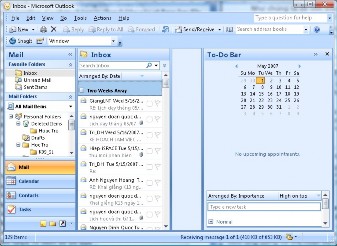
Figure B.13.12: Microsoft Outlook
If you install the full Microsoft Office suite, there will be some other programs such as Microsoft Office Project: Used for project management...
Summary:
How to install Microsoft Office suite
Solve common problems during installation
Features and settings of working environment on applications
Fix errors while using Microsoft Office suite
Set options for applications in Office
Exercise:
1. Install VNI font set on the computer you are using
2. Download and install Unikey typing program
3. Install Microsoft Office 2003
4. Perform the following cases on Microsoft Word
a. Turn off spell check
b. Set Arial font as default
c. Select the default save folder on D:Vanban
d. Select the unit on the ruler as cm
e. Turn on/off two sliders
f. Uncheck Highlight mode
g. Select the file name memory mode in the file menu as 15 files, for comments
h. Fix the case where the text background is blue and the text is white
5. Perform the following requests on Excel
a. Turn on/off sheet tabs
b. Turn on/off Task pane
c. Fix the case where the grid lines on the sheet are lost
d. Implement the protection mechanism on sheet 1 then check on sheet 2 to see if it is affected?
e. Is it possible to protect an arbitrary block of cells on a spreadsheet?
f. Want to move the selection down when pressing enter.
g. How to get back lost row and column titles of Sheet?
h. Fix field not showing zero value in cell.
i. Fix the case where the comment content is not displayed.
Lesson 14: GRAPHICS APPLICATIONS
Purpose:
Introduction to graphics software
Graphics tool application
Graphic design applications
How to install graphics applications
Features of some graphics applications
14.1. Introduction
Graphics applications are software used for tasks such as: viewing images, designing technical drawings, processing images, 3D modeling, etc. Currently, there are many application programs for many tasks depending on usage requirements. Graphics applications can be divided into two basic groups:
Graphics Tools are programs that mainly serve the purpose of viewing and managing photos stored on disk such as ACDSee, Picasa...
Graphic Design Program: This is specialized software for those who work professionally in design, publishing...
Depending on your needs, work needs and a very important factor is your computer configuration, you should choose the appropriate program.
So to decide which graphics program to choose for users, we need to have some basic knowledge about it because most graphics programs require high requirements in terms of equipment as well as usage knowledge.
Device requirements to use that program
User's ability to use the program
And some other requirements as required by the program.
Here are some issues with graphics programs.
14.2. Graphic Tools Application
14.2.1 Introduction
To help manage and view images on the computer easily, Windows has a built-in Windows pictures and fax viewer tool. However, on the market there are many programs that support viewing images with many features, and can view images from many other sources.
The common features of these programs are compact, lightweight, do not require high computer configuration and are easy to use. Therefore, it is suitable for almost all users, but there are too many programs so when there is a request to install, you should choose the right one according to your usage requirements.
14.2.2. Graphics tools
As introduced above, choosing software is very important. So here are some popular programs listed today. One thing to note is that software and its features will change over time, so we must also update our knowledge regularly to easily access a new software without difficulty.
The most popular program today for managing and viewing photos is ACDSee, which in addition to viewing photos also supports managing program information and data.
14.3. Features of ACDSee
As a licensed software, the latest version at this time is ACDSee 9.
ACDSee9 has many types such as: ACDSee9.0 Photo Manager, ACDSee9.0 Editor, ACDSee9.0 Pro.
ACDSee 9 Photo Manager: A very good and popular photo management and editing application with outstanding features such as:
Browse photos at fast speed
Secure images with Private Folder function
Edit photos with functions like Convert File
Format (convert image format), Rotate (rotate image in different modes), Resize (change image size),
Adjust Images Exposure (enhance image quality), Ajust Image Time Stamp and some other features.
Supports printing images with many functions
This version is about 22.6MB in size
Compatible with all Windows operating systems
image),
Price at this time is about 40 USD
ACDSee9.0 Pro is the full version with all features and costs around 70 USD.
A 30-day trial version is available at the Website: http://www.acdsee.com/.
14.3.1 Installation
ACDSee is easy to install, the program does it almost automatically. Installation requirements:
Minimum processor Intel Pentium® III / AMD Athlon processor or equivalent
Minimum RAM 256 MB RAM (512 MB RAM recommended)
Minimum 100 MB free hard disk space (1 GB recommended)
Resolution 1024 x 768 (1280 x 1024 recommended)
CD/DVD
Operating system: Windows 2000/XP/Vista
In addition, the computer also has a poor program such as Internet Explorer 6.0 or higher, Microsoft DirectX 9.0 used when creating slide shows and screen savers...
Before installing, you should read more information about the program's requirements or from http://www.acdsee.com/products/acdsee/requirements/
14.3.2. Setting up the working environment on ACDSee
ACDSee Interface
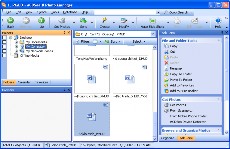
Figure B.14.1: ACDSee program
The ACDSee program lists all the data currently on the disk and can execute the program from this file like Windows Explorer.
During the process of using ACDSee, there are some problems such as:
Do not open files created from Cad: Files created from Cad must be exported to files
images (like jpeg) can only be viewed.
The displayed image is blurry: The reason is that the brightness is not adjusted properly. To fix this, go to the Tools -> Option -> General menu and adjust Enable gamma correction.
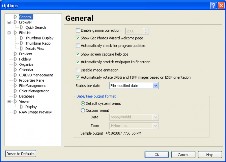
Figure B.14.2: Error correction
How to display date/month/year: Also from General select Date/Time output format.
How to display images as a slide show: In the Tools menu, select Configure
14.4. Graphic Design Applications
14.4.1. Introduction
Talking about design is talking about the professional environment in the field of construction design, advertising, logo design, image processing and technical drawing in the field of construction, creating animations, making cartoons, perspective modeling, 3D modeling, etc. The software serving this job is also very diverse, diverse in terms of programs, usage as well as computer configuration requirements.
Therefore, in this field, computer technicians do not require in-depth knowledge of the use, but must clearly understand the characteristics of each program such as technical parameters, how to set up the working environment and common problems that occur during use. To meet the above requirements, it is necessary to have a foundation in basic technology. Here are some descriptions of the programs.
Specific instructions on installation, features of popular programs…
14.4.2. Popular image processing and design software
Overview
A very useful tool for non-professional users in the field of graphic design is Windows PaintBrush, a simple, easy-to-use drawing program. This application can handle simple images such as cropping, coloring, etc. The weakness of this program is that it has few features and large saved files (.bmp files). In addition, there are many other programs such as Paintshop, Style, Photo Filter, etc. Usually these programs do not require a large computer configuration, are easy to use, easy to install and run on Windows.
For professional users who need to edit designs and images, etc., we must mention more professional programs such as:
Photoshop: Is a specialized program for image processing, a product of Adobe Systems. The latest version at this time is Photoshop CS2 9.0, version CS3 is in Beta.
Files created from
Photoshop has open source
width is .jpg,
.psd, .tiff. Other Adobe graphics products such as Illustrator, ImageReady are also specialized programs for graphic design.
CorelDraw: This is a software for logo design and advertising. The latest version is currently called X3, files created from CorelDraw have the extension .cdr.
3ds Max: Specialized in 3D modeling in construction such as building plans, elevations, sections, perspective construction or in animation technology, making animated films, online games, etc.
AutoCad: Widely used in the construction field, used to design technical drawings. The latest version of Cad currently in use is Autocad 2008. Cad files can be identified based on the extension name .dwt, .bak. In addition, with Cad we can export to jpg, bmp files to be read in other applications, can export to Word as an image file, export to CorelDraw application files as objects, through 3ds max, ...