
Next, assign addresses to each computer on the network. For example, in the Net1 network, the computers are assigned addresses 192.168.1.2 (The .2 is an IP address abbreviation that represents the Computer Identifier) and 192.168.1.3. Each router has two interfaces that join two different networks. For example, the interface that joins the NET1 network of router R1 has the IP address 192.168.1.1 and the interface that joins the NET4 network has the address 192.168.4.1.
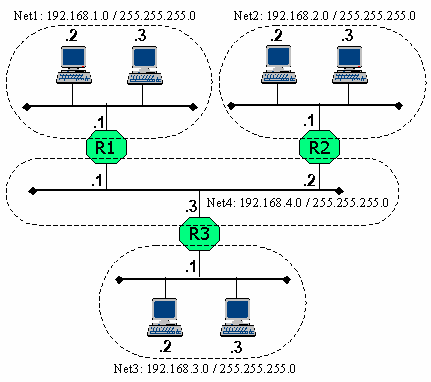
Figure 5.7 – Internet using IP protocol
In order for computers in a network to communicate with each other, they need information about routes. The router's routing table can be created manually or automatically. For small networks, the network administrator will load routes for the routers through commands provided by the router's operating system. The routing table in the IP protocol has four important pieces of information:
Destination network address
Destination network mask
The next router will receive the packet (Next Hop)
Outgoing packet forwarding interface
In the above example, the routers will have the following routing table:
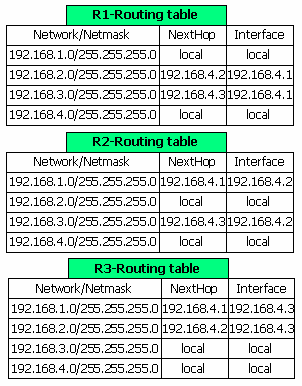
Figure 5.8 – Routing table of routers
Computers also have routing tables. Here is the routing table for the computer with the address 192.168.3.3:
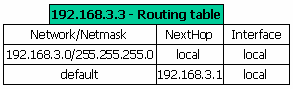
Figure 5.9 – Computer routing table
The default destination network means that in addition to the routes to the networks listed above, the remaining routes are sent to the NextHop of this default network. Thus, to send a packet to any computer outside the 192.168.3.0 network, the 192.168.3.3 computer will forward the packet to router 3 at address 192.168.3.1.
5.5.2. Packet path
To understand how the IP protocol works, let's consider two cases of sending packets: the case where the sending and receiving computers are on the same network and the case where the sending and receiving computers are on two different networks.
Suppose the computer with address 192.168.3.3 sends a packet to computer 192.168.3.2. The second layer of the sending computer will put the packet into a frame with the receiving address being the physical address of computer 192.168.3.2 and send the frame onto the NET3 line, on which computer 192.168.3.2 will receive the packet.
Now let's consider the case where the computer with address 192.168.3.3 on network NET3 sends a packet to the computer with address 192.168.1.2 on network Net1. According to the routing table of the sending computer, packets with addresses outside the network 192.168.3.0 will be forwarded to router R3 (address 192.168.3.1). Therefore, the sending computer will put the packet into a frame with the receiving address being the physical address of interface 192.168.3.1 and send it to the NET3 transmission line. Upon receiving the packet, R3 analyzes the IP address of the receiving computer to determine the destination of the packet. The routing table shows that, with the destination being network 192.168.1.0, the packet needs to be forwarded to router R1 at address 192.168.4.1 via interface 192.168.4.3.
So R3 puts the packet into a frame with the destination address being the physical address of the interface 192.168.4.1 of router R1 and puts it on the NET4 link. Similarly, R1 will forward the packet to the receiver 192.168.1.2 using a frame on the NET1 link.
We see that, to reach the receiver, the packet is transmitted by many different frames. Each frame will have a different receiving address, however, the packet's address is always unchanged.
5.5.3. Address Resolution Protocol
If a computer wants to transmit an IP packet, it needs to place the packet into a frame on the physical link to which it is connected. In order to successfully transmit the frame, the sending computer needs to know the physical address (MAC) of the receiving computer. This can be done by using a table to map IP addresses to physical addresses. The IP protocol uses the Address Resolution Protocol (ARP) to map an IP address to a MAC address.
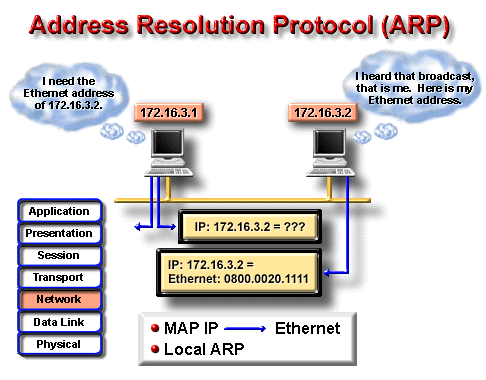
Figure 5.10 – ARP protocol
A computer determines its physical address at boot time by reading its hardware and determines its IP address by reading its configuration file, then stores the information about the correspondence between its IP and MAC addresses in a cache (ARP cache). When it receives an IP address for which ARP cannot find the corresponding physical address based on the current cache, it will perform a broadcast frame with the following format:
Schools | Size (bytes) | Values | |
Ethernet Header | Ethernet Destination Address | 6 | The recipient address, in this case a broadcast address |
Ethernet Source Address | 6 | Address of the sender | |
Frame Type | 2 | Frame type, whose value is 0x0806 when ARP requests and 0x8035 when ARP replies | |
ARP request/reply | Hardware Type | 2 | The value is 1 for Ethernet networks. |
Protocol Type | 2 | Has a value of 0x0800 for the IP address | |
Hardware Address Size in bytes | 1 | The length of the physical address, which is 6 for Ethernet networks | |
Protocol Address Size in bytes | 1 | Protocol address length, which is 4 for the IP protocol | |
Operation | 2 | 1 if it is a request frame, 2 if it is a response frame | |
Destination Ethernet Address | 6 | Not used in ARP requests | |
Destination IP Address | 4 | IP address of the machine whose MAC address needs to be found |
Maybe you are interested!
-

 Basic electronic engineering - City College of Construction. HCM Part 1 - 1
 -
 Design and construction of color TV PAN model - 2
 -
 Network design - Master Tran Van Long, Master Tran Dinh Tung Compiled - 24
 -
 Bridge and road structure - Ho Chi Minh City College of Construction Part 2 - 9
 -
 Basic Electronic Engineering - Ho Chi Minh City College of Construction Part 2 - 7
Overview
If a computer on the network recognizes its IP address in an ARP request packet, it will send an ARP reply packet to the requesting computer containing information about its MAC address.
By sending these requests, a computer can update the ARP cache, keeping it up to date with any changes to the network topology. The time-out for an information in the cache is typically 20 minutes. An ARP request for a computer that does not exist on the network branch is repeated a certain number of times.
If a computer is connected to more than one network using network interfaces, then separate ARP caches exist for each network interface.
Note that ARP on a computer only performs physical address determination for addresses on the same network/subnet as it. For packets sent to other computers
Computers with IP addresses not on the same network/subnet as the sender will be redirected to a router on the same network as the sender for further transmission.
Since ARP requests are broadcast, any computer that maintains a cache can monitor all of these broadcasts for the physical and IP addresses of the requesting machine and add them to its cache as needed. When a computer boots up, it sends an ARP request (possibly to itself) as a way to notify other computers of its presence on the local network.
It is possible to assign more than one IP address to a physical address. Note that the format of the ARP request is designed to support protocols other than IP and Ethernet.
5.5.4. Reverse Address Resolution Protocol (RARP)
Diskless workstations are widely used today. Each computer needs only a processor and memory, all storage is provided by a server using a standard network file system. Since there are no configuration files, the boot process of these computers often uses a very simple file transfer protocol such as TFTP. However, before a workstation can connect to a server, its IP address must be known. The RARP protocol is used in this case. RARP uses the same request format as ARP, but the Operation field has a value of 3 for the request and 4 for the reply. The server maintains a table describing the correlation between the physical and IP addresses of the workstations. When a RARP request is received, the server looks it up in the address table and returns the corresponding IP address to the workstation that sent the request.
5.5.5. Internet Control Message Protocol (ICMP)
The ICMP protocol is implemented in almost all TCP/IP computers. Protocol messages are sent in IP packets and are used to send error reports or control information.
ICMP generates many useful message types such as:
Destination Unreachable,
Echo Request and Reply,
Redirect,
Time Exceeded,
Router Advertisement
Router Solicitation
....
If a message cannot be delivered, it will not be resent. This is to avoid the never-ending flow of ICMP messages.
If a « Destination Unreachable » message is sent by a router, it means that the router cannot deliver the packet to the destination. The router will then remove the packet from its queue. There are two reasons why a packet cannot be delivered. Most often, the sender describes a destination address that does not exist. Less often, the router does not know the route to the destination.
Destination Unreachable messages are divided into four basic types:
Network unreachable: Means there is a problem with the routing or receiving address of the packet.
Host unreachable: Usually used to indicate
problems with delivery, such as incorrect subnet mask.
Protocol unreachable: The receiving machine does not support
higher layer protocols as described by the packet.
Port unreachable: TCP protocol socket or port does not exist.
A « Ping and Reply » message is generated by the ping command, which is generated by a computer to test connectivity on a network. If there is a reply message, it shows that the sending and receiving computers can communicate with each other.
A “Redirect” message is sent by a router to the sending machine to recommend a better route. The current router still forwards the packet it receives. Redirect messages keep computers’ routing tables small because they only need to contain the address of one router, even if that router offers a different route. Sometimes, after receiving a Redirect message, the sending machine still uses the old route.
A time-out message is sent by a router if the packet's Time -to-Live, in routers or seconds, is 0. The Time-to-Live prevents packets from being sent around the network and never reaching their destination. Routers discard packets that have expired.
5.5.6. Routing Information Protocol (RIP)
5.5.6.1. Introduction
RIP is a dynamic routing algorithm based on distance vector. RIP is defined in two documents, RFC 1058 and Internet Standard 56, and is updated by the IETF.
–(Internet Engineering Task Force). Version 2 of RIP was defined in RFC 1723 in October 1994. RIP 2 allows RIP messages to carry more information to use a simple authentication mechanism to ensure confidentiality when updating routing tables. Most importantly, RIP 2 supports subnet masks, a feature missing in the original RIP.
5.5.6.2 Routing Update
RIP sends routing-update messages periodically and when the network topology changes. When a router receives a routing-update message that contains a change in an entry, it updates its routing table to reflect the new route. The new path length is incremented by 1 and the sending router becomes the next hop for the updated route. Once its routing table is updated, the router immediately sends a routing-update message to its neighbors.
5.5.6.3. RIP Path Metric
RIP uses a hop count as a route metric between the sending and receiving networks. Each hop on the path from the sender to the destination is assigned a value, usually 1. When a router receives a routing update message that contains a new destination, or a new route, the router adds 1 to the route cost and places it in its routing table with the next hop being the IP address of the sending router.
5.5.6.4. Stability of RIP
RIP protects against routing loops by limiting the maximum hop count from a sender to a receiver to 15. If a router receives a new route from a neighbor and adds 1 to the route cost, it reaches 16, and the destination is considered unreachable. This means that the RIP network diameter limit must be less than 16 routers.
5.5.6.5. RIP Timer
RIP uses a digital timer to regulate its performance. It consists of a routing-update timer, a route-timeout timer, and a route-flush timer. The routing-update timer keeps track of the periodic routing update interval, typically 30 seconds. Each entry in the routing table has a flush timer associated with it. If this timer elapses, the corresponding route is marked as no longer valid, but it is retained in the routing table until the flush timer expires.
5.5.6.6. RIP packet format
RIP packet consists of nine fields as shown below:
1.Octer Command
Field
1. Octer Version number Field | 2. Octer Zero Field | 2. octer AFI Field | 2. Octer Zero Field | 4. Octer IP Add Field | 4. Octer Zero Field | 4. Octer Zero Field | 4. Octave Metric Field |
In there:
Command — Specifies whether the packet is a request or a reply. A request packet requests a router to send all or part of its routing table. A reply can be a periodic routing update message or a reply to a request. The reply message contains the routing table entries. Large routing tables can be sent in multiple messages.
Version number —Describes the RIP version used.
Zero —This field is not used by RIP according to the RFC 1058 specification
Address-family Identifier (AFI) —Describes the address family used.
This field is designed to allow RIP to be used with multiple protocols.
If using IP protocol, then the value is 2.
Address —Describes the IP address for the entry (destination).
Metric —The cost of the path
Note: Up to 25 instances of the AFI, Address and Metric fields can appear in the same RIP packet. That is, 25 destinations can be described in just one RIP packet .
5.5.6.7. RIP 2 packet format
RIP 2 is described in RFC 1723 and has the following packet format:
1.Octer Command
Field
1. Octer Version number Field | 2. Octer unused Field | 2. octer AFI Field | 2. Octer Router tag Field | 4. octer network IP add Field | 4. Octer Subnet-mask Field | 4. Octer Nexthop Field | 4. Octave Metric Field |
RIP 2 has some new fields compared to RIP:
Unused —Has a value of 0.
Address-family IDentifier (AFI) —Describes the address family used. Unlike RIP, if the AFI of the first entry in the packet is 0xFFFF, the remaining entries contain authentication information. Currently only simple password-based authentication is used.
Route tag —Provides a way to distinguish between internal routes (learned by RIP) and external routes (learned by other protocols).
IP address —The IP address of the destination.
Subnet mask —The mask for the destination address. If zero, no mask is specified.
Next hop —The next IP address to forward the packet.
Note that a maximum of 24 routes can be described in a RIP packet, since one entry in the packet is used to describe the password.
5.5.7. OSPF routing algorithm
5.5.7.1. Introduction
The Open Shortest Path First (OSPF) algorithm was developed for IP networks by the Internet Engineering Task Force (IETF) Interior Gateway Protocol (IGP) working group. The group was formed in 1988 to design an Interior Gateway Protocol (IGP) based on the Shortest Path First (SPF) algorithm for use in the Internet.
OSPF has two main characteristics. The first is that it is an open protocol, which means that its specification is in the public domain. OSPF is specified in RFC 1247. The second characteristic of OSPF is that it is based on the SPF protocol, sometimes called the Dijkstra algorithm.
OSPF is a Link-State routing protocol, in which each router sends Link-State Advertisements (LSAs) to other routers in the same area of a hierarchical network. Information about attached interfaces, metrics used, and other parameters are included in the LSAs. Each router collects information about the link states of other routers, reconstructs the topology of the network, and uses Dijkstra's algorithm to find the shortest paths to the remaining nodes.
5.5.7.2. Routing Hierarchy.
Unlike RIP, OSPF can operate in a hierarchical structure. The largest entity of this structure is the autonomous system (AS), which is a collection of networks under a common management and sharing a common routing strategy. OSPF is an Intra Autonomous System (Interior gateway protocol) routing protocol although it is capable of receiving/sending routes to/from other ASs.
An AS can be divided into a number of areas, which are groups of adjacent networks (neighbors) and the computers on those networks. Routers with multiple interfaces can participate in multiple areas. These routers, called Area Border Routers, maintain a separate database of network topologies for each area.
A topology database is a global picture of the network in relation to the routers. A topology database stores a collection of LSAs received from routers in the same area. Because routers in the same area share information with each other, they have exactly the same topology database about the area they belong to.
Note : The term domain is sometimes used to describe a part of a network in which all routers have exactly the same topology database. However, a Domain is often used as an AS.