
LIST OF FIGURES, TABLES AND CHARTS
LIST OF IMAGES
Figure 2-1: Computer structure 8
Figure 2-2: 9-key keyboard
Figure 2-3: Mouse 9
Maybe you are interested!
-
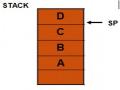
 Computer Structure - Hanoi Industrial College - 15
 -
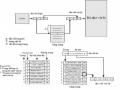 Computer Architecture Course - 10
 -
 Protein Docking Simulation with 60 Ligands and Evidence
 -
 Basic Features of Authoring a Computer Program
 -
 Computer Architecture - 27
Figure 2-4: CPU 9
Figure 2-5: MAINBOARD 9
Figure 2-6: HDD 10
Figure 2-7: SSD 10
Figure 2-8: RAM 10
Figure 2-9: Projector 10
Figure 2-10: Screen 10
Figure 2-11: Models in StarUML 17
Figure 2-12: ADO.NET Enity Framework 19 Structure
Figure 2-13: Ways to use Enity Framework 20
Figure 3-1: General Usecase Diagram 26
Figure 3-2: Usecase Diagram of Import Management 27
Figure 3-3: Installation Management Usecase Diagram 28
Figure 3-4: Class diagram 37
Figure 3-5: Sequence diagram “Import goods” 41
Figure 3-6: Sequence diagram “Building a computer” 42
Figure 3-7: Functional decomposition chart of “Import Management” 43
Figure 3-8: Functional decomposition chart “Installation management – Installation formula” 43
Figure 3-9: Functional decomposition diagram “Building a computer” 44
Figure 3-10: Relationship diagram 45
Figure 4-1: Login interface 46
Figure 4-2: Main interface 47
Figure 4-3: Password change area 48
Figure 4-4: Product Search Area 49
Figure 4-5: Product Details Interface 50
Figure 4-6: Software information interface 50
Figure 4-7: Import Management Interface 51
Figure 4-8: Installation Management Interface 52
Figure 4-9: Computer Construction Interface – Customer Information 52
Figure 4-10: Computer Construction Interface – Installation 52
Figure 4-11: Computer Construction Interface – Select product by formula 53
Figure 4-12: Device Management Interface 53
LIST OF TABLES
Table 3-1: Data table specifications 23
Table 3-2: List of Actors 24
Table 3-3: Description of Usecases 25
Table 3-4: Device Class 34
Table 3-5: Product Class 34
Table 3-6: Production Water Class 35
Table 3-7: Class of Device Type 35
Table 3-8: Installation Class 35
Table 3-9: Customer Installation Class 35
Table 3-10: Customer Class 35
Table 3-11: Manufacturer Class 35
Table 3-12: Equipment Detail Class 36
Table 3-13: Installation Details Layer 36
Table 3-14: Customer Installation Details Class 36
Table 3-15: Table tblThietBi 38
Table 3-16: Table of tblSanPham 38
Table 3-17: Table of tblNuocSanXuat 38
Table 3-18: Table of Equipment Types 38
Table 3-19: Table tblLapDat 38
Table 3-20: Table tblKhachHangLapDat 39
Table 3-21: Table tblKhachHang 39
Table 3-22: Table of tblHangSX 39
Table 3-23: Table of Equipment Details 39
Table 3-24: Table tblChiTietLapDat 39
Table 3-25: Table of Customer Details for Installation 40
SUMMARY
The research topic of building a simulation software, assembling and quoting computers aims to help individuals have more opportunities to research, learn about technology and gain more knowledge about computer installation, besides contributing to helping individuals know how to choose the right equipment to assemble a complete computer case. The research thesis is within the scope of serving individuals and computer stores. The system provides all the basic functions of a management software, supports product search for users, the software helps computer companies to be more flexible in managing devices, components and have accurate installation formulas. Besides, it contributes to improving the competitiveness in assembling computers of stores based on each store's own formula.
ABSTRACT
The topic of research Construction simulation software, and computer assembly aims to help every individual has more opportunity to research, understand the technology and have more knowledge about the installation of your computer, besides helping individuals know how to choose appropriate equipment to assemble a complete computer . Research thesis in malformed caters to individuals and the information store. The system provides a full range of basic functions of a management software, product search support for users, the software helps companies can more flexibility in the management of the equipment, components and installation formula exactly. Besides contributing to enhancing competitiveness in the Assembly of computer stores based on the formula of each of the rows.
Keywords:
1. Computer simulation, assembly and quotation software.
2. Build a computer
3. Necessary solutions
INTRODUCTION
Information technology is a broad term that covers methods, means, computer techniques, telecommunications, programming techniques... to exploit and use rich and diverse information resources to serve human interests.
Information technology has a great influence on the continuous development of our country. It improves the efficiency of production, business and socio-economic activities.
Nowadays, Information Technology is gradually becoming popular and developing in most professions and in the training environment.
As we know, for a computer to work effectively for each need, it is necessary to assemble hardware components and install appropriate software. Realizing the importance of this, I chose the topic "Computer simulation, assembly and quotation software" with the desire to contribute part of the knowledge that I have about computer components to help those who are new to computer assembly and have more knowledge about computer configuration at each level.
CHAPTER 1: OVERVIEW

REASONS FOR CHOOSING THE TOPIC
In recent years, computers have played an increasingly important role in technical fields and daily life. The rapid development of both hardware and software technology has created new generations of machines that allow data collection and processing to be faster and more powerful. Thanks to computers, human labor productivity has increased significantly, they can replace humans to complete work quickly, which sometimes takes humans a long time to complete. Computers are so useful to humans, have users ever wondered: What is the structure of a computer? How is a computer assembled? What would it be like if we went to a computer store to assemble it?
Currently, the problem of assembling computers for individuals and organizations is mainly done manually at IT companies, which still has many shortcomings such as: no control over money, the assembled components may have excess features, etc. For individuals or families who want to assemble, they must seek advice from staff at the IT store or have to find components themselves to be able to buy and assemble.
When you assemble your own PC, you will get more benefits than buying a pre-assembled one. But it also requires you to have many things, the most important of which is the passion for learning because if you lack this personality, you will quickly give up when encountering problems (which often happens). Through "Computer simulation, assembly and quotation software", the purpose is to encourage young people to assemble or upgrade their own computers because only through this work can you learn a lot about the structure of the computer, how it works, and how to handle it when it breaks down.
Faced with such problems, I have built "Computer simulation, assembly and quotation software" to assemble and install computers to be able to answer my own questions as well as those of many people.
Topic “Computer simulation, assembly and quotation software”. Helps every individual have more opportunities to research, learn about technology and gain more knowledge about computer installation.
The software helps individuals know how to choose the right equipment to assemble a complete computer case with accurate technical parameters so that the computer runs at full capacity and runs more stably, helping managers to manage, add new and update devices on the system easily. In addition, the program also helps technicians accurately select missing equipment when repairing the machine without having to look for each device.

DEVELOPMENT HISTORY
For many generations, people have performed calculations with numbers mainly by hand or with rudimentary calculating tools (spreadsheets, rulers, etc.).
- In 1943, John Mauchley and his students built the first electronic computer in the US - the computer was named ENIAC (Electronic Numerial Itergrator And Calculator). It consisted of 18,000 electronic tubes, 1500 relays, weighed 30 tons, and consumed 140KW of electricity. This machine was intended to serve the military during World War II, but it was not completed until 1946. To this day, computers have made great strides, being applied in most social activities with many types of generations depending on the job. However, since then, computers can be divided into the following generations:
Generation 1:
- Technically: electronic components, low reliability, energy loss.
Calculation speed from several thousand to several hundred thousand calculations/second.
-About software: mainly use machine language for programming.
-About application: scientific and technical research purposes.
Generation 2:
-Technically: semiconductor components are mainly transistors. Memory has quite a large capacity.
big.
- Regarding software: started using some high-level programming languages: Fortran,
Algol, Cobol, ...
-About application: participate in solving socio-economic problems.
Generation 3:
- Technically: components mainly use integrated circuits (IC), peripheral devices are improved, magnetic disks are widely used. Calculation speed reaches several million operations per second; memory capacity reaches several MB (Megabytes).
- About software: Many different operating systems appear. Parallel processing. Diverse, high-quality software, allowing the computer to be exploited in many different modes.
-About application: participate in many areas of society.
Generation 4:
- Technically: Using VLSI (Very large scale integration) circuits, designing multi-processing structures. Speed reaches tens of millions of calculations.
/second. Here we are mainly talking about the IBM compatible computer architecture so the history of the PC is closely linked to the development of the IBM-PC. The personal computer has developed along with the development of microprocessors. The IBM_PC is considered to have originated from a project of IBM's Atlanta laboratory.
+ From 1979-1980 IBM completed the Datamaster machine. This machine used Intel's 16-bit microprocessor.
+ In 1980, the plan to produce PCs began to be implemented. The first IBM_PC used an 8-bit microprocessor from Intel, the 8085 VXL.
+ In 1981-1982 IBM produced PC computers using 8086,8088 microprocessors.
year
1984 computers use 80286 chip.
+ In 1987, computers used 32-bit 80386 CPU.
+ In 1990, the 80486 processor was born with more features.
+ In 1993, the Pentium processor was born, opening a new generation of personal computers with 64 bits of data and 32 bits of address.
+ 1995-1999 new generations of CPUs such as MMX, Pentium II, III with the ability to express
act
3D space, voice recognition...
+ Since 2000, with Merced, a generation of 64-bit CPUs with a completely new structure was born, creating a new generation of computers.