
ON Ngan AFTER Delete AS
BEGIN
select * from inserted select * from deleted END
Test result of Trigger_DeleteNganh trigger when Delete action is executed: Inserted table has no data and deleted table contains deleted records.
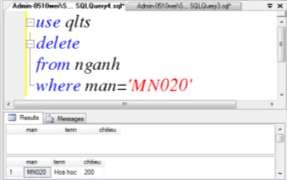
Figure 5.2. Results of performing the Delete action
Example 3: Create Trigger Trigger_UpdateNganh for Industry table. When update action occurs on Industry table, Trigger_UpdateNganh trigger is fired. SELECT statement inside trigger will display records contained in Inserted table and Deleted table.
CREATE TRIGGER Trigger_UpdateNganh ON Nganh
AFTER Update AS
BEGIN
select * from inserted select * from deleted END
Test result of Trigger_UpdateNganh trigger when Update action is executed: Inserted table contains updated record and deleted table contains record before being updated.
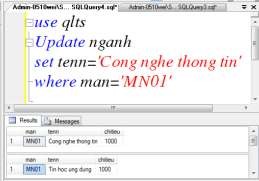
Figure 5.3. Results of performing the Update action
5.3.2. System commands and functions used in triggers
1) System functions and commands
a) @@ROWCOUNT function: Returns the number of rows affected by the T-SQL statement immediately preceding the trigger.
b) RETURN statement: If no rows are affected by the INSERT, UPDATE or DELETE action, the trigger remains active. In this case, we can use the RETURN statement to stop the unnecessary execution of the trigger's statements. The RETURN statement is used at the positions in the trigger where we want to stop the continued execution of other trigger statements.
c) RAISERROR command: Used to display error messages in Vietnamese, used to display warning messages on the screen. The message string when using RAISERROR will be sent to the client from the Server.
Syntax:
RAISERROR (<Message ID|Message String>,<Serverity>
,<State> [,<Argument>] [,<…n>]) [WITH option [,…n]] In which:
- Message ID: The ID number of the error message in the SQL Server error system. System error messages are contained in the sysmessages table.
- Message String: The content of the error message.
- Serverity: Is the Code that specifies how an error occurs. In SQL Server, the error indication depends on the domain that represents the error occurrence:
STT
Representative Domain | Meaning | |
1 | 1-9 | Errors arise due to data, |
2 | 10 | Errors arise from data, but do not output errors to the program. guest |
3 | 11-16 | Pause the procedure and return the error to the client. |
4 | 17 | Errors arise due to execution outside of database resources. |
Maybe you are interested!
-
 The Nature and Role of the Internal Control System
 -
 Some Solutions to Improve the Legal System of Alimony
 -
 Model system to assess the suitability of Vietnam's population-economic development process - 21
 -
 Building a system to monitor water level, temperature and send warnings via SMS/GSM network - 2
 -
 The Impact of Accounting Information System Quality on Operational Performance
STT
Representative Domain | Meaning | |
whether | ||
5 | 18-19 | Errors caused by system issues |
6 | 20-25 | Errors arise due to the connection process, or due to the process data transmission |
- Status: Is the status value, indicating which group the error belongs to in the system. Status has values from 1 to 27. The default value is 1.
- Argument: Are parameters used to replace variables defined in the Message ID or Message String. There can be 0 or more replacement parameters, but the total number of replacement parameters cannot exceed 20. Each replacement parameter can be a local variable or any of the following data types: tinyint, smallint, int, char, varchar, nchar, nvarchar, binary, or varbinary. No other data types are supported.
- WITH OPTION: Is a custom option for errors and can be one of the following values.
STT
Domain represent | Meaning | |
1 | LOG | Recording errors in the error log and login applies to the Microsoft SQL Server Database Engine instance. Error logging in the error log is currently limited to a maximum of 440 bytes. Only one member with the fixed sysadmin server role or one user with access The new TRACE ALTER can be specified WITH LOG. |
2 | NOWAIT | Send error messages immediately to the client. |
3 | SETERROR | Set @@ERROR and the value of ERROR_NUMBER to the value of Message ID or 50000, regardless of the error level. What. |
d) ROLLBACK TRANSACTION statement: Used to skip all previous operations that caused the trigger to be activated or to roll back the entire batch of the trigger. An unspecified error also causes the entire transaction to be rolled back. If you want to complete the transaction in all cases, you should not use the ROLLBACK TRANSACTION statement, except when an unspecified error occurs during the transaction execution.
For example: Create a Trigger to check the foreign key constraint on the candidate table with the requirement that when adding a new record, the value in the industry code field will be checked. If this value is not in the table, skip the add operation and display an error message.
CREATE TRIGGER Trigger_Hoa ON thisinh
AFTER INSERT AS
BEGIN
declare @man varchar(20) if @@Rowcount=1
begin
select @man=(select man from inserted) if not exists
(select 'true' from nganh where man=@man) begin
raiserror('This industry code is not in the industry table',16,1) rollback tran
return end end
END
else
begin
raiserror('Only one record allowed',16,1) rollback tran
return end
2) Check the updated field
a) UPDATE clause
Purpose: Determines whether an add or update action occurred on a field. This function is only valid in Triggers. The function returns TRUE if the field is updated, returns FALSE if the field is not updated.
Syntax: UPDATE(Field_Name)
Where Field_Name is the field name
Note: When an add operation occurs on a table, all fields on that table are updated even if there exists a field that the add operation did not request (the field that is not requested accepts a NULL value).
To check a field in a table, we use the syntax:
If Update(Field_Name) Begin
<Statement_SQL> End
To check more than one field in a table, we use the syntax: If Update(Field_Name1) or Update(Field_Name2)
Begin
<Statement_SQL> End
Example 1: Create a trigger when adding a record to the industry table to check if there is a change in the industry name and then give a notification.
CREATE TRIGGER Trigger_InsertN ON Nganh
AFTER Insert AS
BEGIN
IF UPDATE(Name)
RAISERROR(„The industry name field has been updated‟,16,1)
END
Trigger Trigger_InsertN is created and assigned to the Horizontal table. When an insert operation occurs on the Horizontal table, the Trigger_InsertN trigger is fired. The IF UPDATE(TenN) statement is used to check whether or not there is an Update on the TenN field. UPDATE(TenN) will return TRUE if an Update occurs on the TenN field.
Use the following command to check the Trigger operation:
Insert into Nganh values(„MN012‟)
When this test statement is executed, the trigger will output the message „The Name field has been updated‟. This shows that an update has occurred on the Name field, even though the add operation did not update the Name field.
Example 2: Create a Trigger for the MuaBan table to check that when updating the selling price of an item, the selling price cannot be less than the minimum price of each sale and does not allow updating the customer code or item code.
CREATE TRIGGER Trigger_UpdateDG ON Muaban
AFTER update AS
BEGIN
If update(mamh) or update(makh) begin
raiserror('Could not update item code or customer code',16,1) rollback tran
end
if update(dongia) begin
if exists
(select 'True' from inserted
where dongia< (select avg(dongia) from muaban where muaban=1)and muaban=1)
begin
raiserror('Invalid unit price',16,1) rollback tran
end
end
END
b) COLUMNS_UPDATED clause
Purpose: Allows multiple fields to be checked at once. The function returns a binary value that indicates which fields are checked when adding or updating.
When working with the COLUMNS_UPDATED clause, we need to know the order of the fields in the table. That order is called COLUMN_ID. To know the order of the fields in a table, we use the following syntax:
Syntax:
SELECT TABLE_NAME, COLUMN_NAME, COLUMNPROPERTY(OBJECT_ID(TABLE_SCHEMA+'.'+TABLE_NAME)
,COLUMN_NAME,'ColumnID') AS COLUMN_ID
FROM <DATABASE_NAME>.INFORMATION_SCHEMA.COLUMNS
WHERE TABLE_NAME = <Table_Name_IN_DB> In which:
- DATABASE_NAME: is the name of the database containing the table to view
- Table_Name_IN_DB: is the name of the data table to view. Example 1: View the order of fields in the industry table SELECT TABLE_NAME, COLUMN_NAME,
COLUMNPROPERTY(OBJECT_ID(TABLE_SCHEMA+'.'+TABLE_NAME)
,COLUMN_NAME, 'ColumnID') AS COLUMN_ID FROM qlmbh.INFORMATION_SCHEMA.COLUMNS
WHERE TABLE_NAME ='Muaban'
Result of order of fields of Sales table:
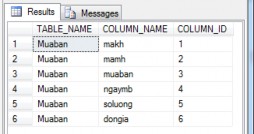
Figure 5.4. Order of fields in the Muaban table
Example 2: View the order of fields in the candidate table. SELECT TABLE_NAME, COLUMN_NAME,
COLUMNPROPERTY(OBJECT_ID(TABLE_SCHEMA+'.'+TABLE_NAME)
,COLUMN_NAME, 'ColumnID') AS COLUMN_ID FROM qlts.INFORMATION_SCHEMA.COLUMNS
WHERE TABLE_NAME ='Thisinh'
The results of the order of the fields of the candidate table:
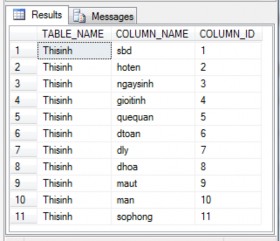
Figure 5.5. Order of fields in the Thisinh table Case 1: The table has no more than 8 fields
To specify which fields to check, we use a bit mask that represents the position of each field in the table.
We have a table representing the first 8 fields of the table and the mask bits assigned to each field.
School
1 | 2 | 3 | 4 | 5 | 6 | 7 | 8 | |
Mask | 1 | 2 | 4 | 8 | 16 | 32 | 64 | 128 |
From the table above, we have the formula to calculate the mask bit for each field:
POWER(2,(i-1))=2 i-1
Where i is the ith field in the data table.
To check if the fields are updated, a value is passed and this value is calculated as follows:
U=a 0 *2 0 +a 1 *2 1 +a 2 *2 2 +a 3 *2 3 +a 4 *2 4 + a 5 *2 5 +a 6 *2 6 +a 7 *2 7
In there,
- U is the calculated value
- a i =1 if the i+1th field needs to be checked, a i =0 if the i+1th field does not need to be checked.
- To check if field number 2 is updated or not, U=0*2 0 +1*2 1 +0*2 2 +0*2 3 +0*2 4 +0*2 5 +0*2 6 +0*2 7 =2
- To check if field 5,6 is updated or not, U=0*2 0 +0*2 1 +0*2 2 +0*2 3 +1*2 4 +1*2 5 +0*2 6 +0*2 7 =48
Syntax:
- COLUMNS_UPDATED()>0: Updated field found
- (COLUMNS_UPDATED() & U)=U or
(COLUMNS_UPDATED() & U) > 0: Find all updated fields.
- (COLUMNS_UPDATED() | U)!=U: Any other unspecified field found to be updated.
Example 1:
- To check if one of the fields in the sales table is updated or not, we use the command:
If COLUMNS_UPDATED()>0
- To check if all quantity and unit price fields in the sales table are updated, we use the command:
If COLUMNS_UPDATED() & 48)=48, or If COLUMNS_UPDATED() & 48)>0
- To check that only quantity and unit price fields in the sales table are allowed to be updated, we use the command.
If (COLUMNS_UPDATED() | 48)!=48
Example 2: Create a Trigger for the Sales table to check if the quantity and unit price fields are updated together.
Create TRIGGER Trigger_ColumnUpdate1 ON muaban
AFTER UPDATED AS