
Items
- HtmlTable
HtmlTable Control is used to control the <table> tag. In HTML the table tag is used to create a table.
Attributes:
Properties
Describe | |
Align | Specifies the table arrangement |
Attributes | Returns all attribute names and corresponding values of the tag attribute. |
BGColor | Defines the background color of the table |
Border | Determine the thickness of the edge |
BorderColor | Specifies the color of the border |
CellPadding | Determines the distance between the cell's member and its content. |
CellSpacing | Defines the space between cells |
Disabled | Boolean value that determines whether the Control is disabled or not. Default is false |
Id | Unique Id of Control |
innerHtml | Fills or returns content between the closing and opening tags. Special characters are not automatically converted to entities. |
innerText | Fills or returns content between the closing and opening tags. Special characters are automatically converted to entities. |
Rows | Returns an HtmlRowCollection object representing all rows. |
Maybe you are interested!
-
 Illustration of Linkage Forms of Textile and Garment Enterprises in Textile and Garment Industry in China
 -
 Internal control of revenue and expenditure activities at the National Children's Hospital - 2
 -
 Measurement and Remote Control – Electrical Engineering Industry - 8
 -
 The Nature and Role of the Internal Control System
 -
 Illustration of Teaching Organization Model Using M-Learning
in table | |
Style | Specifies or returns the CSS property applied to the Control |
TagName | Returns the name of the tag |
Value | Value of the card |
Visible | Boolean value that determines whether the Control will be visible or not. |
Width | Specifies the width of the table |
For example: The aspx page is as follows:
<body>
<Form id="Form1" runat="Server">
<p>line number:
<select id="rows1" runat="Server">
<option value="1">1</option>
<option value="2">2</option>
<option value="3">3</option>
</select>
<br />number of columns:
<select id="cells1" runat="Server">
<option value="1">1</option>
<option value="2">2</option>
<option value="3">3</option>
</select> <br /><br />
<input id="Submit1" type="submit" value="Show Table" runat="Server" OnServerClick="submit"></p>
<table id="t1" border="1" runat="Server" visible="false"/>
</Form>
</body>
Server side code as follows:
public partial class _Default : System.Web.UI.Page
{
protected void submit(object sender, EventArgs e)
{
int row,numrows,numcells,j,i; row=0; numrows=int.Parse(rows1.Value); numcells=int.Parse(cells1.Value);
for (j = 1; j <= numrows; j++)
{
HtmlTableRow r = new HtmlTableRow(); row = row + 1;
for (i = 1; i <= numcells; i++)
{
HtmlTableCell c = new HtmlTableCell();
c.Controls.Add(new LiteralControl("Row " + j + ", column " + i)); r.Cells.Add(c);
}
t1.Rows.Add(r); t1.Visible = true;
}
}
}
The interface has 2 HtmlSelect Control, one HtmlInputButton. The user can select the number of rows and columns of the table. When the user clicks the submit button, the button click event handler is executed and generates the table with the selected number of rows and columns.
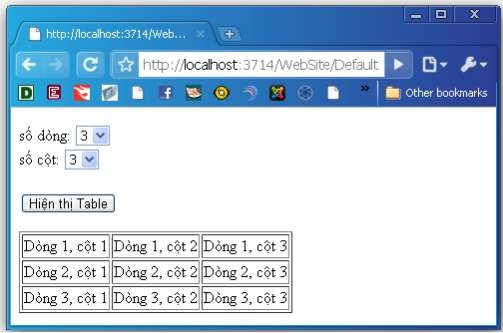
Figure 3.21. Illustration of using HtmlTable control
- HtmlTableCell
HtmlTableCell Control is used to control the <td> and <th> tags. In HTML these tags are used to create table cells and table header cells.
Attributes:
Properties
Describe | |
Align | Determines cell arrangement |
Attributes | Returns all attribute names and corresponding values of the tag attribute. |
BGColor | Defines the background color of the cell |
Border | Determine the thickness of the edge |
ColSpan | The column number of the cell is expanded. |
Disabled | Boolean value that determines whether the Control is disabled or not. Default is false |
Id | Unique Id of Control |
innerHtml | Fills or returns content between the closing and opening tags. Special characters are not automatically converted to entities. |
innerText | Fills or returns content between the closing and opening tags. Special characters are automatically converted to entities. |
RowSpan | The cell row number is expanded. |
Runat | Specifies that this Control is a Server Control. Must be specified. set to “Server”. |
Style | Specifies or returns the CSS property applied to the Control |
TagName | Returns the name of the tag |
Valign | Vertically arrange the cell contents. |
Visible | Boolean value that determines whether the Control will be visible or not. |
Width | Specifies the width of the cell |
For example: The aspx page is as follows:
<body>
<Form id="Form1" runat="Server">
<table id="table1" border="1" runat="Server">
<tr> <td>Cell 1</td> <td>Cell 2</td> </tr>
<tr> <td>Cell 3</td> <td>Cell 4</td> </tr>
</table>
<input id="Button1" type="button" value="Change content" OnServerClick="submit" runat="Server"/>
</Form>
</body>
Server side code as follows:
public partial class _Default : System.Web.UI.Page
{
protected void Page_Load(object sender, EventArgs e)
{
}
protected void submit(object sender, EventArgs e){ int i,j;
table1.BgColor="yellow"; table1.BorderColor="red";
for (i = 0; i <= table1.Rows.Count - 1; i++)
for (j = 0; j <= table1.Rows[i].Cells.Count - 1; j++) table1.Rows[i].Cells[j].InnerHtml ="Row " + i;
}
}
The interface has an HtmlTable Control and an HtmlInputButton Control. When clicking on the submit button, the click event handler of this button is executed, then the background color of the table is assigned to yellow and the border of the table is reassigned to red as shown below:
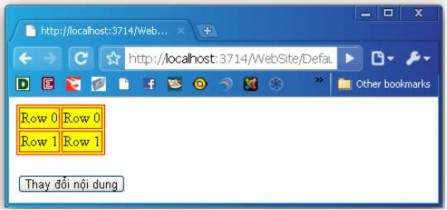
Figure 3.22. Illustration of using HtmlTableCell control
- HtmlTableRow
HtmlTableRow Control is used to control the <tr> tag. In HTML, the <tr> tag is used to create table rows.
Attributes:
Properties
Describe | |
Align | Specifies the order of rows |
Attributes | Returns all attribute names and corresponding values of the tag attribute. |
BGColor | Specifies the background color of the row |
Determine the thickness of the edge | |
Cells | The column number of the cell is expanded. |
Disabled | Boolean value that determines whether the Control is disabled or not. Defaults to false |
Id | Unique Id of Control |
innerHtml | Fills or returns content between the closing and opening tags. Special characters are not automatically converted to entities. |
innerText | Fills or returns content between the opening and closing tags. Special characters are automatically converted to entities. |
Runat | Specifies that this Control is a Server Control. Must be specified as “Server” |
Style | Specifies or returns the CSS property applied to the Control |
TagName | Returns the name of the tag |
Valign | Vertically arrange the cell contents. |
Visible | Boolean value that determines whether the Control will be visible or not. |
Border
- HtmlTextArea.
HtmlTextArea Control is used to control the <textarea> tag. In HTML, this tag is used to create text areas.
Attributes:
Properties
Describe | |
Attributes | Returns all attribute names and corresponding values of the tag attribute. |
Disabled | Boolean value that determines whether the Control is disabled or not. Default is false |
Id | Unique Id of Control |
innerHtml | Fills or returns content between the closing and opening tags. Special characters are not automatically converted to entities. |
innerText | Fills or returns content between the closing and opening tags. Special characters are automatically converted to entities. |
Name | Unique name of text area |
OnServerChange | The name of the function that is executed when the content of the textarea changes |
Rows | Number of lines displayed in the text area |
Runat | Specifies that this Control is a Server Control. Must be specified. set as “Server” |
Style | Specifies or returns the CSS property applied to the Control |
TagName | Returns the name of the tag |
Value | Contents of textarea |
Visible | Boolean value that determines whether the Control will be visible or not. |
For example: The aspx page is as follows:
<body>
<Form id="Form1" runat="Server"> Enter data:<br />
<textarea id="textarea1" cols="35" rows="6" runat="Server" />
<input id="Submit1" type="submit" value="Submit" OnServerClick="submit" runat="Server" />
<p id="p1" runat="Server" />
</Form>
</body>
Server side code as follows:
public partial class _Default : System.Web.UI.Page
{
protected void submit(object sender, EventArgs e) { p1.InnerHtml ="<b>You wrote:</b> " + textarea1.Value;
}
}
The interface consists of an HtmlTextArea Control, an HtmlInputButton Control. When the submit button is clicked, its click event handler is executed and the message written in the textArea is printed in a p tag.
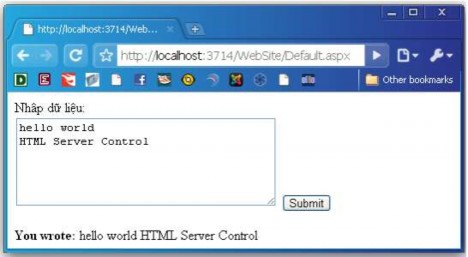
Figure 3.23. Illustration of using HtmlTextArea control
b) ASP.NET Server Control
Just like HTML Server Controls, Web Server Controls are also created on the Server and they have the runat=“Server” attribute available to execute on the Server. However, Web Server Controls do not necessarily map to any existing HTML tags and they can represent tags with more complex functionality.
Syntax for creating an ASP.NET Server Control element
<asp:PT_type attribute="value" …. runat="Server">
In which asp: is required, Type_PT can be button, textbox, calendar, select, treeview, adRotator, listview, gridview, image,….
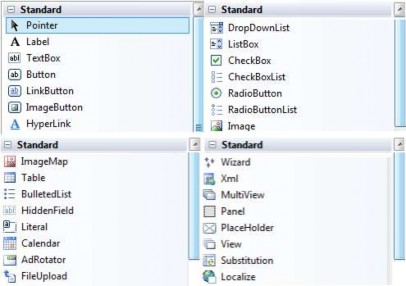
Figure 3.24 Web Server Controls on the toolbox
Example: Create an ASP.NET Server Control Calendar element
<asp:TextBox ID="txtHVT" runat="Server"></asp:TextBox>
<asp:Calendar ID="cal" runat="Server" BorderColor="Blue"></asp:Calendar>
<asp:Table> <asp:TableRow>
<asp:TableCell>cell</asp:TableCell></asp:TableRow>
</asp:Table>
To be able to access these elements in the Code file (or Server script on the Server side), each element needs to be assigned a unique id.
In all applications, where possible, ASP.NET Server Controls should be used to ensure browser compatibility.
Common properties of Web Controls:
Properties
Type | Meaning | |
ID | String | Specifies the name of the control. The name of the control is |