
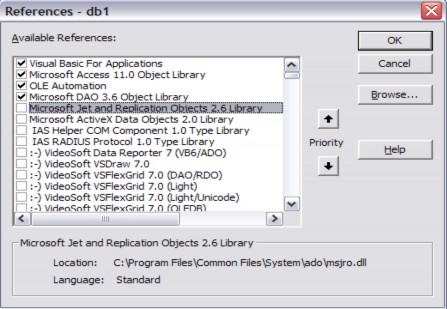
Figure 7.17. Reference to Microsoft DAO 3.6 Object Library
The following diagram illustrates the layered architecture of multiple components and objects in the DAO model.
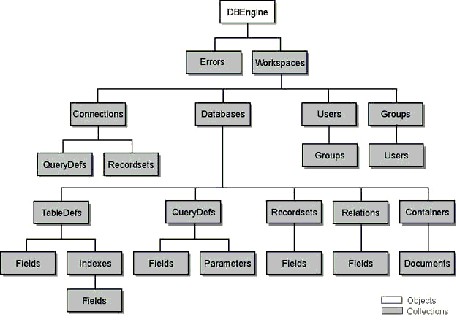
Figure 7.18. Objects and collections in the DAO architecture
1. DBEngine
DBEngine is a class that serves as a bridge between the application engine and Jet DBEngine. DBEngine represents the DBEngine object – which is the highest-level object in the DAO system.
The DBEngine object controls all database objects in the database through a hierarchy of collections, objects, and properties. When you open an MS Access database, the DBEngine object first establishes a Workspace collection and a default Workspace object. If your workgroup is secured, MS Access prompts you for a UID and Password so that the DBEngine object can create a user object and a group object in the default workspace. If the workgroup is not secured, DBEngine creates a default user account, Admin, in the default Admins group.
Finally, DBEngine creates the Database object within the default Workspace object. DBEngine uses the current User and/or Group object information to determine whether you have permission to access objects in the database.
After DBEngine creates the Database object, the application engine checks the database startup options to display the Startup Form, menu bar, title bar, or use one or more other startup options.
2. Errors
Contains all Error objects in DAO. Executing any object in the DAO model can generate one or more errors. Whenever an error occurs, VBA creates one or more Error objects and places them in the Errors collection. When an object in DAO is executed and generates an error, the current Errors collection is cleared and new Error objects are created corresponding to that error and placed in the Errors collection.
3. Workspaces
Defines a set of workspaces (active or hidden) for DBEngine. Multiple workspaces can be declared at once. The first time you reference or use a Workspace object, VBA automatically creates a default Workspace DBEngine.Workspaces(0). To reference a Workspace object, use one of the following syntaxes:
DBEngine.Workspaces(0)
DBEngine.Workspaces(“name”)
DBEngine.Workspaces![name]
4. Connections
Contains the current Connection objects of the Workspace object. When a new Connection object is opened, it is automatically added to the Connections set of the Workspace object. When a Connection object is closed, it is removed from the Connections set.
When a Connection is opened, a corresponding Database object is created and added to the Databases collection in the same Workspace and vice versa. When a Connection is closed, the corresponding Database object is deleted from the Databases collection and vice versa.
To reference a Connection object in its Connections collection, you can use one of the following syntaxes:
Connections(0)
Connections("name") Connections![name]
name: is a character string containing the path to the database file.
5. Databases
Contains a collection of opened or created Database objects belonging to a Workspace object. When creating a new or opening an existing Database object, VBA automatically adds it to the Databases collection. When deleting a Database object, it is also deleted from the Databases collection.
You can refer to a Database object in the Databases collection that contains it using one of the following syntaxes:
Databases(0)
Databases("name") Databases![name]
name: is a string containing the path to the database file.
For example: The following code opens a database named DB1.MDB in the D:DataMdb folder.
Dim db As DAO.Database
Set db = DBEngine.OpenDatabase("D:DataMdbDB1.MDB")
To open the current database, you can use the command:
Set db = CurrentDB
To close the database you just opened, use the command:
db.Close
6. Users
Contains User objects in a Workspace or Group. The User object can be referenced using one of the following syntaxes:
[workspace | group].Users(0)
[workspace | group].Users("name") [workspace | group].Users![name]
name: is the name of the user
7. Groups
Contains a collection of Workspace Group objects. Group objects can be referenced using one of the following syntaxes:
Groups(0)
Groups("name") Groups![name]
name: is the name of the Group
8. Records
Recordsets contain a collection of Recordset objects. Each Recordset object contains a set of records from a table, a query, or a set of records that are the result of an SQL statement.
Some properties and methods of the Recordset object
+ AbsolutePosition
This property specifies the absolute position of the current record from the first record with an order of 0.
+ EOF
This property indicates whether the record pointer is at the end of the file or not. If it is at the end of the file, the return value is True, otherwise it is False.
+ BOF
This property indicates whether the record pointer is at the beginning of the file or not. If it is at the beginning of the file, the return value is True, otherwise it is False.
+ RecordCount
Returns an integer that is the total number of accessible records of the Recordset.
+ Fields
Used to refer to fields in the Recordset Example: Refer to Hoten field
Rec.Fields(“Hoten”).Value
+ OpenRecordset
Create a new Recorset object and add it to the Recordsets collection.
+ Move n(n is an integer)
Move the record pointer to the nth record in the Recordset's set of records
+ MoveFirst, MoveLast, MovePrevious, MoveNext
In order are the methods to move the record pointer to the first record, the last record, the record immediately before the current record, the record immediately after the current record.
+ AddNew, Update
To add a new record to the Recordset
The process of adding a new record includes the following operations:
AddNew command
Assign values to fields using the syntax: rec.Fields(“Field name”).Value = value
Issue the Update command
For example, the following code will add a record to the Course table described below.
Field name
Data type | Binding | |
CID | AutoNumber | Primary Key |
Cname | Long Text | Not null |
DurationInHour | Number | Integer, null |
Description | Long Text | Null |
Maybe you are interested!
-
 Nmr Spectral Data (Δ Ppm) of Sd8 and Reference Compound
 -
 1H And 13C-Nmr Spectral Data Of Compound Sxh6 And Reference Substance
 -
 1H And 13C-Nmr Spectral Data Of Compound Sxe15 And Reference Substance
 -
 Table of Data Converted to Logarithm Base E
 -
 The Role of Tam Dao National Park in Biodiversity Conservation and Environmental Protection in the Northern Delta Region and Vietnam
Dim db As DAO.Database Set db = CurrentDb
Dim rec As Recordset
Set rec = db.OpenRecordset("SELECT * FROM Course") rec.addnew
rec.Fields("CName").value = “ASP.Net” rec.Fields(“DurationInHour”).value = 45 rec.Fields(“Description”).value = “Overview of ASP.net. ” rec.Update
rec.Close
set db = Nothing
Note: since CID is an AutoNumber field, you cannot set a value for this field. MS Access will automatically calculate and set a value for it when you add a record to the table.
+ Edit, Update
To edit the data of a record that already exists in a Recordset The process of editing a record includes the following operations:
Position the record pointer to the record to be edited using the Move, MoveNext, MoveFirst, MoveLast, MovePrevious methods
Edit command
Assign values to fields using the syntax: rec.Fields(“Field name”).Value = value
Issue the Update command
For example, the following code will edit the record with CID = 1 in the Course table above of the current database with new values for the CName, DurationInHour fields.
Dim db As DAO.Database Set db = CurrentDb
Dim rec As Recordset
Set rec = db.OpenRecordset("SELECT * FROM Course WHERE CID
= 1")
rec.edit
rec.Fields("CName").value ="New Name" rec.Fields(“DurationInHour”).value = 30 rec.Update
rec.Close
set db = Nothing
Still the same requirement as above, you can use another way as follows
Dim db As DAO.Database Set db = CurrentDb
Dim rec As Recordset
Set rec = db.OpenRecordset("SELECT * FROM Course") While (rec.EOF = False)
If (rec.Fields(“CID”).value = 1)
rec.edit
rec.Fields("CName").value ="New Name" rec.Fields(“DurationInHour”).value = 30 rec.Update
End If rec.MoveNext
Wend rec.Close
set db = Nothing
You can see that in terms of program execution efficiency, the first method is more efficient because it only selects one record that needs to be edited, then edits and updates it. The second method is to take all the records out, then find the record that needs to be edited, edit it and update it.
+ Delete
Delete the current record from the Recordset. The process of deleting a record in the Recordset includes the following operations:
Position the record pointer to the record to be deleted
Delete command
For example, the following code will delete the last record in the Course table above of the current database:
Dim db As DAO.Database Set db = CurrentDb
Dim rec As Recordset
Set rec = db.OpenRecordset("SELECT * FROM Course") rec.MoveLast
rec.Delete rec.Close
set db = Nothing
The following example will delete all records in the Course table above that satisfy the condition CName contains the character string “Java”. This means that courses with names containing “Java” such as “Basic Java”, “Java Programming on Android”, … will be deleted.
Dim db As DAO.Database Set db = CurrentDb
Dim rec As Recordset
Set rec = db.OpenRecordset("SELECT * FROM Course WHERE
CName LIKE „*Java*‟") While (Not rec.EOF)
rec.Delete rec.MoveNext
Wend rec.Close
set db = Nothing
+ Close
Close the Recordset object
To refer to a Recordset object in a Recordsets collection, we can use one of the following three syntaxes: