
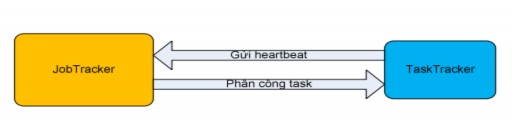
Figure 2.4.3.2.2.3: The first communication between the TaskTracker executing the Maptask and the JobTracker.
As soon as the JobTracker initializes the necessary information to run the job, the TaskTrackers in the system will send heartbeats to the JobTracker. Hadoop provides the TaskTrackers with a mechanism to send heartbeats to the JobTracker periodically. The information in this heartbeat allows the JobTrack to know whether this TaskTracker can execute the task or not. If the TaskTracker can still execute, the JobTracker will assign the task and the corresponding split position to this TaskTracker to execute. Why do we say here whether the TaskTracker can still execute the task or not? This is explained because a Tasktracker can simultaneously run multiple map tasks and reduce tasks synchronously. The number of these tasks is based on the number of cores, the amount of RAM and the heap size inside this TaskTracker.
TaskTracker's task execution is divided into 2 types: TaskTracker executes maptask, TaskTracker executes reduce task.
Maybe you are interested!
-
 Research on access control model for big data - 12
 -
 Table of Data Converted to Logarithm Base E
 -
 Summary Table of Data Illustrating the Contents of the Thesis
 -
 Summary of Sem Linear Structural Model Data
 -
 Test Results of Optimal Mode Effect on Mechanical Properties
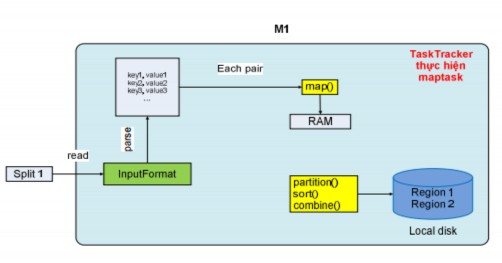
Figure 2.4.3.2.2.4: Map task operation mechanism
When a TaskTracker executes a maptask, it includes the location of the input split on HDFS. It then loads the split data from HDFS into memory, and based on the input data format selected by the client program, it parses the split to generate a set of records, which has two fields: key and value. For example, with the input format text, the tasktracker will generate a set of records with the key being the first offset of the line (global offset), and the value being the characters of a line. With this set of records, the tasktracker will run a loop to take each record as input for the map function to return the output as data including the intermediate key and value. The output data of the map function will be written to main memory, and they will be pre-sorted right inside the main memory.
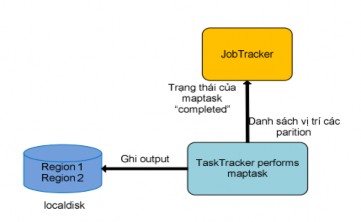
Figure 2.4.3.2.2.5: TaskTracker completes Map task
Before writing to the local disk, the output data will be divided into partitions (regions) based on the partition function, each of which will correspond to the input data of the reduce task later. And right inside each partition, the data will be sorted in ascending order according to the intermediate key, and if the client program uses the combine function, this function will process the data on each sorted partition. After successfully executing the maptask, the output data will be the partitions written on the local disk, at that time TaskTracker will send the completed status of the maptask and the list of locations of the output partitions on its local disk to JobTracker. That is the entire process of TaskTracker executing a maptask.
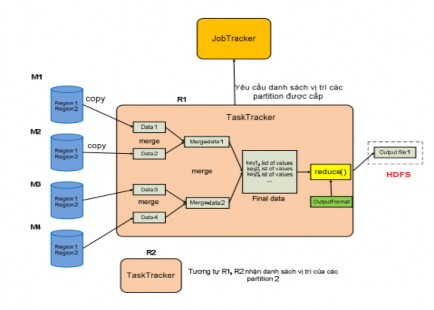
Figure 2.4.3.2.2.6: Reduce task working mechanism
Unlike TaskTracker which performs maptask, TaskTracker performs reduce task in a different way. TaskTracker performs reduce task with input data which is a list of locations of a specific region on the outputs written on the localdisk of maptasks. This means that for a specific region, JobTracker will collect these regions on the outputs of maptasks into a list of locations of these regions.
Knowing the number of map tasks and reduce tasks, the TaskTracker periodically asks the JobTracker about the region locations that will be allocated to it until it has received all the region locations of the output of all map tasks in the system. With this list of locations, the TaskTracker will load (copy) the data in each region as soon as the map task whose output contains this region is completed into memory. And this TaskTracker also provides multiple threads to load data simultaneously to increase parallel processing performance.
After successfully loading all regions, TaskTracker will merge the data of the regions in multiple batches, which are performed simultaneously to increase the performance of the merge operation. After the merge batches are completed, intermediate data files will be sorted. Finally, the intermediate data files
This time will be merged again to create a final file. TaskTracker will run a loop to get each record as input for the reduce function, the reduce function will rely on the format of the output to perform and return the appropriate output result. All of this output data will be saved to a file and this file will then be written to HDFS.
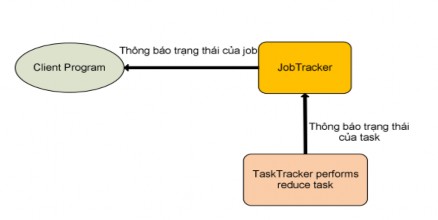
Figure 2.4.3.2.2.7: TaskTracker completes Reduce task
When the TaskTracker successfully performs the reduce task, it will send the “completed” status message of the assigned reduce task to the JobTracker. If this reduce task is the last task of the job, the JobTracker will return to the user program that this job is complete (Figure 2.4.3.2.2.5: TaskTracker completes the Reduce task). At that time, the JobTracker will clean up its data structure used for this job, and notify the TaskTrackers to delete all output data of the map tasks (Because the maptask data is only intermediate data as input for the reduce task, it is not necessary to save it in the system).
2.4.3.2.2.3. MapReduce and HDFS (Optimal features of MapReduce when combined with HDFS): HDFS is just a distributed file system with management mechanisms inside it. Reasons for combining MapReduce and HDFS:
Firstly, MapReduce simply does the task of parallel computing, so in a distributed system, how will the data be controlled so that users can easily access it? Therefore, using HDFS to split the input splits of MapReduce down and have a size close to the block size, this increases the performance of parallel processing and synchronization of TaskTrackers with each split that can be processed separately. In addition, the final output data
The final output of a MapReduce Job is also stored in HDFS, which allows users on any computer in the system to get all of these output results through methods belonging to the HDFS management mechanism (Transparency). In addition, when blocks are not in a balanced state (load-balancer), HDFS has a mechanism to rebalance the blocks effectively, which will increase the performance of data locality (discussed below).
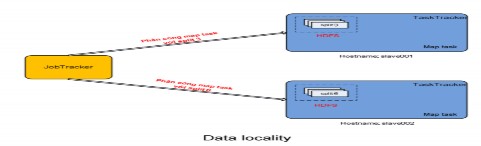
Figure 2.4.3.2.2.8: Data locality
Second, with the input splits distributed across the system, HDFS allows JobTrackers to know whether an input split and its replicas (copies created by HDFS) are stored on a physical machine. This is important because if the JobTracker knows this information, it will allocate the TaskTracker to perform the maptask with a replica that is located right inside the computer that is performing the TaskTracker task. This will save the TaskTracker from having to spend time loading data from other computers, because it does not have to use the system's network bandwidth. With the above mechanism, MapReduce will increase its performance in terms of time, which is a much-needed improvement in distributed systems. This mechanism is defined by Google and Hadoop as data locality. The data locality mechanism will bring different performance to large systems because it does not have to consume network bandwidth for transporting data back and forth between physical computers. In addition, if the replica is not located in a TaskTracker computer, the JobTracker will distribute a replica that is located in a machine that belongs to the same network switch (In large systems, people can group TaskTrackers into a rack, and this rack is connected to each other via a switch, and this switch is also connected to similar switches), which also significantly reduces the cost of reading data remotely and bandwidth consumption.
2.4.3.2.3 Developing applications based on the MapReduce model with Hadoop MapReduce
Here is the entire process of developing an application based on the MapReduce model with HadoopMapReduce (Figure 2-18: Developing a MapReduce application on Hadoop).
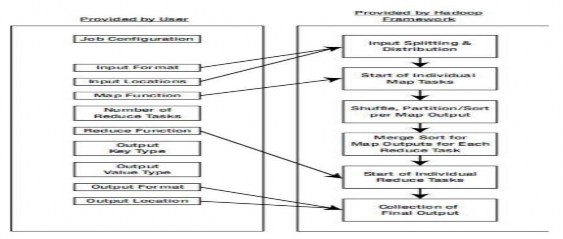
Figure 2.4.3.2.3: Developing MapReduce applications on Hadoop
The development process is clearly divided into which tasks are performed by the user and which tasks are done by the framework itself. For the user, they only intervene in the application development through the following stages:


for how to read the file (like text file, combined file, or database file), then the format of the input data, this really makes sense for using the map function, because with each of these formats, the splits will produce a set of records with different key and value values.
o Then the user must pass in the path of the input data.
o Next, one of the two most important tasks is to define the map function to
from which the desired intermediate output results are obtained. And to have the maptask output data in the correct format for the reduce task to perform, the user must choose which format for the key and which format for the value of each record output of the map function.

The output of maptask is the job of setting up information about the number of reduce tasks. From this information, the partition function has a basis for execution.

that (map function) is the reduce function. In addition, the user chooses the format type for each record (key, value) of the output data of the reduce function.

same (for example: output into multiple files) and the location where the output file will be saved.Here is the order of work that the system (done by the framework) performs during the application development process:

no, to then notify the user that the application can start
,
The system will rely on 2 pieces of information about the format type (data reading format and format of each input record) and the input data path above to calculate and split this input data into input splits.

nput split, then the system distributes the map task across the
TaskTracker does.

The system will divide this record into each partition (the number of partitions is equal to the number of reduce tasks), then the sorting operation by key will be performed in each partition.

The operation to get data from a partition on the maptask's output, then the system will perform the operation of mixing this data, then proceed to arrange to produce a set of records (key, value list) and then run the reduce task function.

ng record with the format type defined by the user. With the format type of the final output data and the path where the file is saved, the reduce task will save the output data according to the above 2 information.
2.4.3.2.4 Applications of MapReduce
MapReduce is not a one-size-fits-all model. In fact, the MapReduce model works well in situations where you need to process a large chunk of data by breaking it into smaller chunks and processing them in parallel.
Some of the following cases are suitable for MapReduce:


calculated in minutes, hours, days, months..

Some cases may not be suitable:

