
Content
Levels | |||
Are not Agree | Manure Cloud | Copper idea | |
1. Using concept maps in teaching and learning will help you have more interested in the subject | |||
2. Recording lesson content using a learning map will Help me record knowledge logically and scientifically . | |||
3. Recording lesson content using a learning map will help me see, understand and remember knowledge easily. | |||
4. When taking notes on lesson content using a concept map, it helps you easily see the overall "picture" of the knowledge content and the relationship between components. knowledge. | |||
5. Using the BĐKN helps me to be more convenient in my work. remember and reproduce knowledge | |||
6. Using the BĐKN helps me to be more convenient in my work. understand deeply; understand the nature, distinguish between the skills and create links between the skills into a system. | |||
7. Design and use of knowledge maps in self-study will help you learn better | |||
8. I hope to practice my skills and Self-study habits using the BĐKN with other contents of the SH subject. | |||
Maybe you are interested!
-

 Designing teaching plans for the lessons Momentum - Law of conservation of momentum, Potential energy in Physics 10 textbooks in the direction of developing students' active cognitive activities in exploring and solving problems - 1
 -
 Designing teaching activities for the lesson Parallel force rule. Equilibrium conditions of solids under the action of three parallel forces and the lesson Caucasus's law. Absolute temperature Advanced Physics 10 textbook to promote students' initiative and autonomy in learning - 9
 -
 Designing a Training and Assessment Tool for Biology Skills in Teaching Grade 11 Students for Biology Majors
 -
 Research Projects on Designing and Organizing Teaching by Topic in History Subject in High School
 -
 Applied microbial genetics - 1
APPENDIX 6. USING CONCEPTS IN INTERNET COLLABORATIVE LEARNING
According to this model, the learning environment is at the center of the learning environment.
Combined with Cmap Toolss software, a new learning model can be created, which is collaborative learning over the Internet. Once you are accepted to cooperate, you can collaborate with many Cmap Toolss users at the same time over the Internet, you can participate in discussions, edit, develop and own the concept maps together.
To participate in cooperation, you need to perform the following 2 steps:
Step 1. Request for cooperation
Cmap Owner
Collaborator | |||
1. From a Cmap open in Places/click left click on the icon at the top right of Cmap to remove the collaboration lock - The Synchronuos Collaboration Enabled” window appears (confirm Cmap for synchronous collaboration)/select Oke
2. “Response to Collaboration” window Request” appears / select Collaborate. | 1. From a Cmap open in Places/ Remove collaboration lock/ “Request Collaboration Session” window opens/select Submit Request Hongtutn (You can select Set this as the default user ID if you want to change the user ID or set a new ID) | ||
tuandtvt | |||
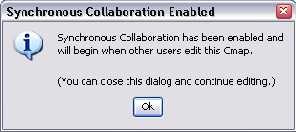
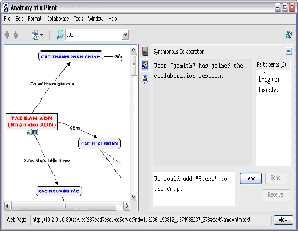
Step 2. Collaboration : After the Cmap owner or administrator accepts the synchronous collaboration request, any participant on the list can edit and add information and resources to that Cmap. Users can also communicate online with oneanother by typing text into the dialog box on the right side of the Cmap and then clicking Send. This way, only an Internet connection is required.
The Internet is everyone everywhere
around the world can collaborate, share and learn with BĐKN. This is one of the outstanding advantages of designing and using BĐKN on Cmap Tools software.