
o In the third byte of the address where the subnet is defined, the wildcard mask checks that the bit in the 16th position of the address must be turned on (value is 1) and the remaining high bits must be turned off (value is 0). Therefore the corresponding bits in the wildcard mask must be 0.
o The remaining four bits of the third byte do not need to be checked so that it can form values from 16 to 31. Therefore the corresponding bits in the corresponding wildcard mask will be 1.
o So the full wildcard mask is:
0000 0000.0000 0000.0000 1111.1111 1111 or 0.0.15.255
For simplicity, some routers, such as CISCO, use some acronyms to refer to some commonly used masks:
Maybe you are interested!
-
 Research on access control model for big data - 12
 -
 Internal control of revenue and expenditure activities at the National Children's Hospital - 2
 -
 Measurement and Remote Control – Electrical Engineering Industry - 8
 -
 The Nature and Role of the Internal Control System
 -
 Competing Competitive Advantages of Convenient Air and Sea Access
o any: used to indicate a mask that allows all addresses (255.255.255.255) or prohibits all (0.0.0.0.).
o host: placed before a computer's IP address to indicate that all bits of the address should be checked. For example: host 172.16.1.1.
7.4.3 Configuring standard access lists for IP protocol
This section introduces some of the commands supported in Cisco routers.
7.4.3.1 Access list command
This command is used to create an entry in the standard filter list. The syntax is as follows:
access-list access-list-No {permit | deny } source {source-mask}
Meaning of the parameters:
o access-list-No: Is the access list identifier, with values from 1 to 99 o permit | deny: Option to allow or deny traffic for the address block described below.
o source: Is an IP address
o source-mask: Is the wildcard mask applied to the source address block
7.4.3.2 ip access-group command
This command is used to bind an existing access list to an interface. The syntax is as follows:
ip access-group access-list-No {in/out} o access-list-no: identifier of the access list associated with the interface
o in/out: determines the traffic direction to be applied and whether in or out.
7.4.3.3 Some examples
7.4.3.4 Create a standard access list
7.4.3.4.1 Example 1
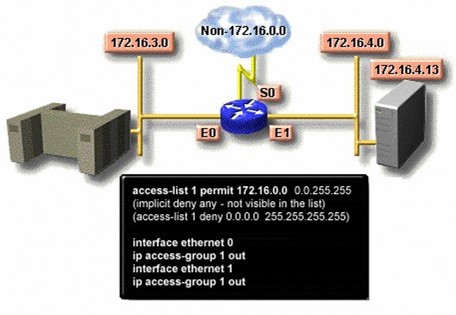
The above access list only allows traffic from the source network.
172.16.0.0 is forwarded through the router. Traffic on other networks is blocked.
7.4.3.4.2 Example 2
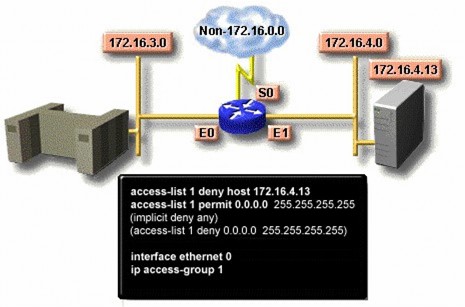
This access list is designed to block traffic from IP address 172.16.1.13 and allow other traffic to be forwarded through the interfaces.
Ethernet (E0 and E1)
7.4.3.4.3 Example 3
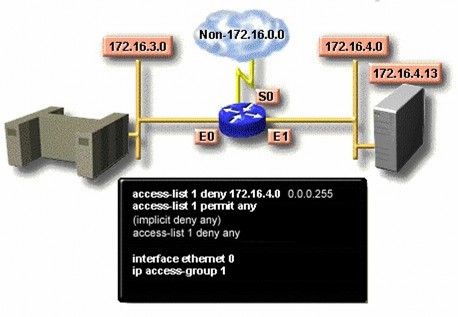
This access list is designed to block traffic from subnets.
172.16.4.0 and allows other traffic to be forwarded.
7.4.4 Configuring extended access lists
To be able to control the filtering of traffic flows more precisely, we use extended access control lists of the IP protocol. The commands in the access list allow checking the source and destination addresses. In addition, the list
Extended access lists also allow the specification of TCP and UDP port numbers. Extended access lists typically use identifiers from 100 to 199. The next section describes the extended access list commands typically supported by routers.
7.4.4.1 Access-list command
This command is used to create an entry to express a complex filter condition. The syntax is as follows:
access-list access-list-no {permit|deny} protocol source source-mask destination destination-mask [operator operating] [established]
o access-list-no: The list identifier, with values from 100 to 199 o permit|deny: specifies whether this list should be used to permit or deny the following address block.
o protocol: can be one of the following values IP, TCP, UDP, ICMP, GRE, IGRP.
o source and destination: Specify the sending and receiving IP addresses
o source-mask and destination-mask: are character masks representing the source address and destination address .
o operator and operand: is one of the following operations lt, gt, eq, neq (less than, greater than, equal to, not equal to), and a port number. o established : Allows the TCP protocol to maintain the connection
7.4.4.2 ip access-group command
Associate an extended link control list with an outgoing network interface.
Allows only one access control list on one port of one protocol. The syntax is as follows:
ip access-group access-list-no {in|out} o access-list-no: is the identifier of the extended access control list o in|out: to specify whether this access control list applies to the incoming or outgoing interface.
7.4.4.3 Some examples of extended access control lists Example 1:
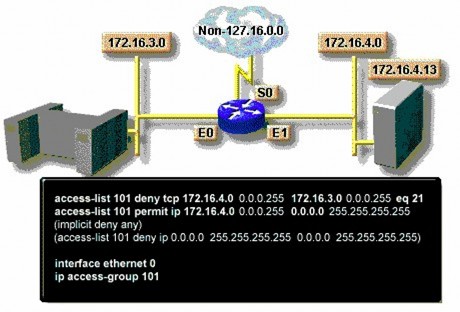
This access control list is designed to allow traffic from subnet 172.16.4.0 to be routed to any other network or subnet through the E0 interface.
Example 2:
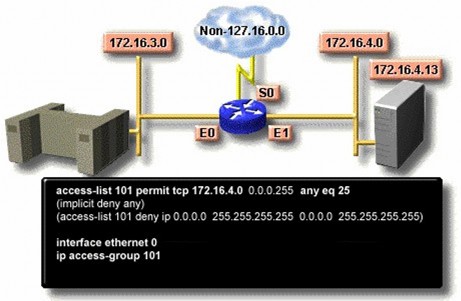
This access control list is designed to allow only email from subnet 172.16.4.0 to be sent over interface E0. Traffic from other networks is denied.
7.4.4.4 Principles for using access control lists
So we have two types of access control lists: standard access control lists and extended access control lists. Standard access control lists filter packets based on the source address. Therefore, in a network with many routers, it should be set up on the router closest to the outside world. In contrast, extended access control lists allow filtering based on the destination.
destination of packets, so they are often placed on routers closest to the source machines to prevent packets from reaching unauthorized destinations early.
Chapter 8
Network Administration Issues Purpose
This chapter aims to introduce the reader to the following issues:
• Network administration issues: Performance management, configuration, accounts, fault management, security
• Model of a network management system
• Network management protocol
• SNMP network management protocol
8.1 Introduction
Network administration is often understood in many different ways. Some people think that it is monitoring network activities, adding new users to the system, deleting users who no longer exist in the organization, or assigning permissions to use network resources such as printers, folders, and Internet access to network users. Others think that it is a more difficult job, having to add new network devices, install new services to the system, make all machines in the network operate properly, monitor network traffic using simulation programs, etc. According to ISO, in terms of concept, network administration can be divided into the following five areas:
o Performance management o Configuration management o Accounting management o Fault management o Security management
8.1.1 Performance management
The purpose of performance management is to measure and ensure the presence of network performance criteria so that the performance of the network is maintained at an acceptable level. Parameters for measuring network performance can be total network throughput, user response time, ...
Network performance management involves three steps. First, performance-related data is collected based on parameters of interest to the network administrator. Next, the data is analyzed to determine baseline levels. Finally, threshold values are determined for each important parameter so that whenever these values exceed the threshold value, the network is considered to have a problem that needs attention. Typically, network management software allows the setting of automatic warning mechanisms when it detects that the threshold of some parameters has been exceeded.
Each of the steps described above is part of the process of setting up a self-reactive system. When performance becomes unacceptable because of exceeding set thresholds, the system reacts by sending an alert message.
8.1.2 Network Configuration Management
The purpose of network configuration management is to monitor network and network system configuration information so that the impact of different versions of hardware and software can be monitored and managed.