
INDEX
TABLE OF CONTENTS 1
ACKNOWLEDGEMENTS ................................................................................
Maybe you are interested!
-
 Wireless Network Technology Network Administration Profession - Vocational College - General Department of Vocational Training - 7
 -
 Network and Security Services
 -
 Strengthening Information Security Measures and Ensuring Network Security
 -
 Learn Wireless LAN Security - Hanoi University of Science and Technology - 1
 -
 Computer Network Security and Firewalls - 2
INTRODUCTION 4
CHAPTER I: OVERVIEW OF WIRELESS LAN 5
1.1. What is wireless lan? 5
1.1.1. Concept 5
1.1.2. History of formation and development. 5
1.1.3. Advantages of WLAN 6
1.1.4. Disadvantages 7
1.2. WLAN Infrastructure 7
1.2.1. Basic structure of WLAN 7
1.2.2. Devices for WLAN 8
1.2.3. WLAN Models 12
1.3. 802.11 Standard 15
1.3.1. Overview 15
1.3.2. IEEE 802.11 Specifications 16
1.3.3. Packets processed in the datalink layer: are to hold and capture packets 16
1.3.4. Processing of packets 16
1.4 Data security in wlan 16
CHAPTER II: AUTHENTICATION PROCESS IN WIRELESS LAN 18
2.1. EAP 18 Concept
2.2. 802.1x-EAP authentication process 18
2.3. WEP and WPA 18
2.3.1. Encryption and decryption in WEP 18
2.3.2. Encryption and decryption in WPA 21
CHAPTER III: WLAN SECURITY USING RADIUS AUTHENTICATION METHOD23 3.1. What is RADIUS 23
3.2. Packet exchange process in RADIUS 23
3.2.1. Authorization and Auditing 23
3.2.2. Security and Extensibility 24
3.2.3. Applying RADIUS to WLAN 25
3.2.4. Additional options 26
CHAPTER VI: INSTALLATION AND DEPLOYMENT PROCESS OF RADIUS SERVER SYSTEM 28
4.1. DHCP installation and configuration 28
4.1.1. DHCP Settings 28
4.1.2. DHCP Configuration 28
4.2. Install Enterprise CA and Request Certificate from CA Enterprise Server 28
4.2.1. Installing Enterprise CA 28
4.2.2. Request Certificate from CA Enterprite Server 29
4.3. Create users, grant Remote Access to users and switch to Native Mode 30
4.3.1. Create an OU named “wifi” 30
4.3.2. Switch to Native Mode 31
4.4. Install and configure RADIUS, create Remote Access Policy 31
4.4.1. RADIUS Setup 31
4.4.2. Configuring RADIUS 32
4.4.3. Create Remove Access Policy 33
4.5. AP 35 Configuration
4.6. Wireless client configuration 36
4.7. Demo 38
CONCLUSION 41
REFERENCES 42
INTRODUCTION
Nowadays, with the remarkable development in all fields of Science and Technology, Information Technology has been and is occupying an extremely important position in Society. Following that, the Industry, Trade, Telecommunications... sectors all develop accordingly and take Information Technology as the foundation.
Among them, the birth and development of computer networks must be mentioned. The birth of WLAN is truly a breakthrough in network technology, this is a method of transferring from one point to another using radio waves. And now it is popular all over the world, bringing many benefits to users, especially its mobility. In some countries with developed information technology, wireless networks really come into life. With just a laptop, PDA or any wireless access device, we can access the wireless network anywhere, at work, at home, on the plane, at a coffee shop... anywhere within the coverage of WLAN.
Due to the characteristics of information exchange in the transmission space, the possibility of information leakage is understandable. If we do not overcome this weakness, the wireless network environment will become the target of hackers, causing loss of information, money, etc. Therefore, information security is a very hot issue today. Along with the development of wireless networks, it is necessary to develop security capabilities to provide effective and reliable information to users. That is also the reason why the Group chose the project "Research on wireless network security solutions based on RDIUS".
CHAPTER I: OVERVIEW OF WIRELESS LAN
1.1. What is wireless lan?
1.1.1. Concept
Wireless LAN, abbreviated as WLAN (Wireless Local Area Network) or WIFI (Wireless Fidelity), is a network used to connect two or more computers together without using wires. WLAN uses spread spectrum technology, using radio waves to allow communication between devices in a certain area called Basic Service Set.
This is a solution that has many advantages over traditional wireline connections. Users still maintain connection to the network when moving within coverage areas.
1.1.2. History of formation and development.
In 1990, WLAN technology first appeared, when manufacturers introduced products that operated in the 900 Mhz band. These solutions (without a unified manufacturer) provided data transmission speeds of 1 Mbs, much lower than the 10 Mbs speeds of most cable networks at the time.
In 1992, manufacturers began selling WLAN products that used the 2.4GHz band. Although these products offered higher transmission speeds, they were still proprietary solutions and were not widely available. The need for uniformity among devices operating on different frequency bands led several organizations to develop wireless networking standards.
In 1997, the IEEE (Institute of Electrical and Electronics Engineers) adopted the 802.11 standard, known as WIFI (Wireless Fidelity) for WLAN networks.
In 1999, the IEEE adopted the 802.11a and 802.11b additions to the 802.11 standard (which defined the transmission methods). And WLAN devices based on the 802.11b standard quickly became the dominant wireless technology.
In 2003, IEEE announced an improvement called 802.11g, which attempts to integrate the best of 802.11a, 802.11b, and 802.11g. It uses the 2.4Ghz band for greater coverage.
In 2009, IEEE finally approved the new generation WIFI standard 802.11n after 6 years of testing. The 802.11n standard is capable of transmitting data at speeds of 300Mbps or even higher.
1.1.3. Advantages of WLAN
Convenience : Wireless networks provide a solution that allows users to access network resources anywhere in the area where the WLAN is deployed (hotels, schools, libraries, etc.). With the explosion of laptops and mobile devices that support wifi today, this is really convenient.
Mobility: With the extremely strong development of mobile telecommunications, users can access the internet anywhere. Such as: coffee shops, libraries, schools and even in parks or sidewalks. Users can access the internet for free.
Efficiency: Users can maintain network connectivity as they move from place to place.
Deployment: It is very easy to deploy a wireless network, we only need an ADSL line and an AP to have a simple WLAN network. Using cables will be very expensive and difficult to deploy in many places in the building.
Scalability: Easy to scale and can respond instantly to large increases in the number of visitors.
1.1.4. Disadvantages
Besides the advantages that wireless networks bring to us, it also has disadvantages. This is the limitation of technology in general.
Security: This can be said to be the biggest disadvantage of WLAN, because the signal transmission medium is wave and the signal transmission environment is air, so the possibility of a wireless network being attacked is very high.
Range: As we know, the latest IEEE 802.11n standard can only operate at a maximum range of 150m, so wireless networks are only suitable for a narrow space.
Reliability: Because the signal transmission medium is radio waves, interference, degradation, etc. are inevitable. This affects the efficiency of the network.
Speed: The current highest speed of WLAN can be up to 600Mbps but is still much slower than conventional cable networks (can be up to Gbps)
1.2. WLAN infrastructure
1.2.1. Basic structure of WLAN
Distribution System: This is a logical component used to coordinate information to destination stations. The 802.11 standard does not specify the exact technology for DS.
Access Point: the main function of AP is to extend the network. It has the ability to convert data frames in 802.11 into common frames that can be used in other networks.
Wireless Medium (radio communication layer): The 802.11 standard uses radio communication frequencies to convert data frames between stations.
Station: These are peripheral devices that support wireless connections such as: laptops, PDAs, Palms...
1. Access Point (AP)
2. Wireless Medium
3. Station
1.2.2. Devices for WLAN
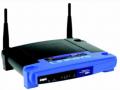
Wireless Accesspoint (AP): Is a device that provides clients with an access point to the network.
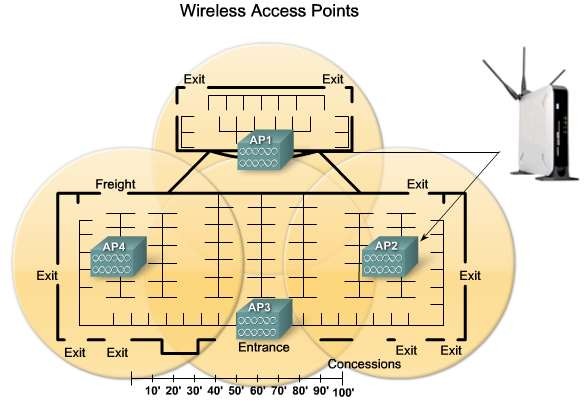
AP operating modes: AP has three main operating modes.